
Install Signal's official APK: every verified method
Published: October 7, 2026 · Updated: October 8, 2026
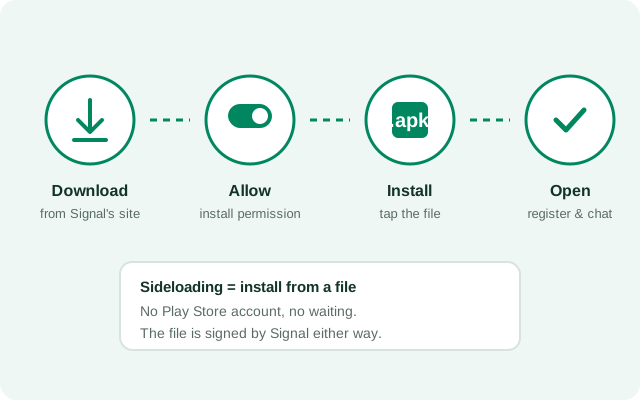
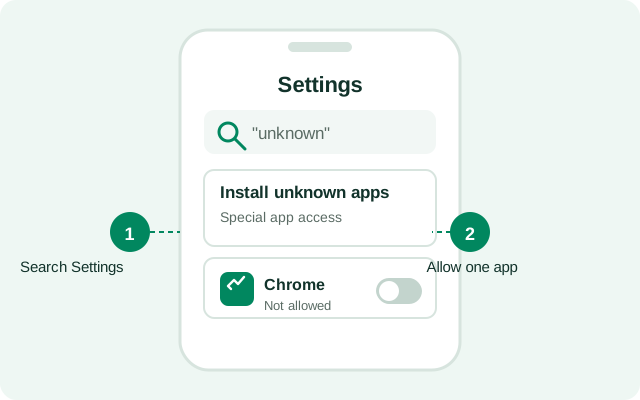
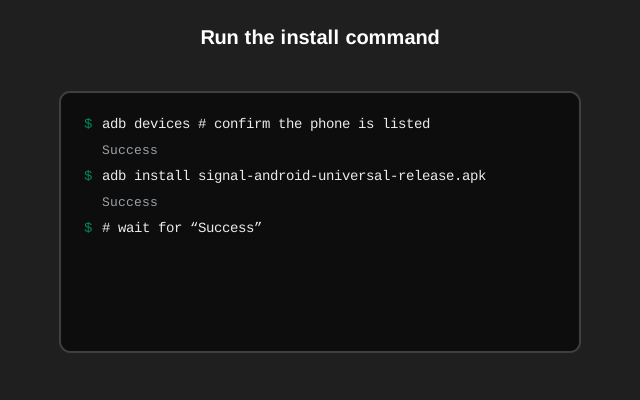
You can install Signal's official APK from your browser, a file manager, a computer over USB, or even another phone; the right method depends on your situation. Every guide below installs the same genuine file from signal.org/android/apk (website build 8.29.3, package org.thoughtcrime.securesms). Pick your method, follow the steps, and verify the file before you tap install.
Choose your install method
Install by phone brand
Some phones hide the install permission in brand-specific menus. Pick your brand for the exact taps.
Install by Android version
On Android 8 and newer the install steps are nearly the same, so each version guide focuses on the settings that release changed.
No Play Store? Start here
Other devices
Switching builds & reinstalling
Switching between the Play Store build and the website build always requires an uninstall in between. The two are signed with different keys, so Android treats them as different identities. Here is the full explanation.
File, version & download issues
After installing
Once Signal is on the phone:
- First-run setup - Registration, backup restore, and the settings worth checking in your first ten minutes.
- Post-install security checklist - Lock down your install step by step.
- Verify the install - The post-install checklist: version, chats, linked devices, test message.
- Permissions explained - What each permission is for, and which you can safely deny.
- Fix denied permissions - Re-grant the ones you tapped "deny" on.
- Auto-updates - How the website build keeps itself current without the Play Store.
- Verify the SHA-256 fingerprint - Prove the file is genuinely from Signal.
- Signal dropped SMS support - What changed and what to use instead.
- Find your contacts on Signal - Sync your address book and invite missing contacts.
- Invite friends to Signal - Every method that works.
- Use Signal without a SIM card - What is actually possible.
- Use Signal on two phones - How linked devices work.
- Link a second Android phone - Companion mode for Android.
- Signal on dual-SIM phones - Which number does what.
- Two Signal accounts on one phone - Dual apps and app clones, explained.
- Can Signal move to an SD card? - The honest answer.
Sources & official references
This is an independent guide. We host no files and we're not affiliated with Signal. Everything we describe traces back to Signal's own published sources:
- Official APK download page: signal.org/android/apk, the only source we recommend for the APK file, and the page that prints the SHA-256 fingerprint.
- Official support site: support.signal.org, Signal's own help articles for Android, including backup and registration topics.
- Signal blog: signal.org/blog, release announcements and security notes from the Signal team.
- Android app source & releases: github.com/signalapp/Signal-Android/releases, the open-source client (AGPLv3) and its release history.
Version and package facts on this site (website build 8.29.3, package org.thoughtcrime.securesms) are checked against these sources. If anything here ever disagrees with signal.org, signal.org wins.
Frequently asked questions
Where should I download the Signal APK from?
Only from Signal's official page: signal.org/android/apk. We don't host APK files, and we don't recommend any third-party APK site.
Do I need the Play Store at all?
No. The website build installs by sideloading and updates itself afterward. The Play Store is only relevant if you prefer the Play build.
Which install method should I choose?
Browser download for the common case; file manager if the download notification vanished; ADB if the phone can't download or installs keep failing; phone-to-phone if you have no data.
Will I lose my chats reinstalling or switching builds?
Only if you skip the backup. Make an encrypted chat backup and save the recovery key first, and your history restores onto the fresh install.
How do I know the APK is genuine?
Compare the file's SHA-256 fingerprint against the one printed on signal.org/android/apk. Matching fingerprints mean the file came from Signal unmodified.
How do I install Signal on a Huawei phone without Google Play?
Open the Huawei Browser, go to signal.org/android/apk, and download the file. When your phone asks, allow app installs from the browser, then tap the downloaded file and install. Signal works fine without Google services.
Do I need a phone number to register Signal?
Yes. Registration needs a mobile number — Signal sends a verification code by SMS or call to confirm it is yours. The number stays your account identifier even after you install the APK build.
Can I use Signal on an Android tablet?
There is no tablet-only app, but the same APK runs on Android tablets. Register it with your phone number — the SMS verification code goes to that number, so keep your phone nearby. Many people use Signal Desktop on a laptop instead.
from Signal's official site. File hosted by Signal, not by us.