
How to install the Signal APK on a Vivo phone
Published: October 7, 2026
Signal Foundationfrom Signal's official site — file hosted by Signal, not by us. signal.org/android/apk
Vivo phones running FuntouchOS (and the newer OriginOS on some models) are hugely popular across Asia. They are also among the most aggressive Android phones at killing background apps. That makes this guide two guides in one: the install itself, which is standard, and the notification survival kit, which is the part Vivo owners actually need.
The APK is the same official file for every brand: signal.org/android/apk, currently website build 8.29.3, package org.thoughtcrime.securesms. Before anything else, the standing rule: never download Signal from a third-party site. Vivo-focused blogs and file hosts circulate repackaged APKs; only signal.org is Signal's channel. The mirror warning guide explains the risks.
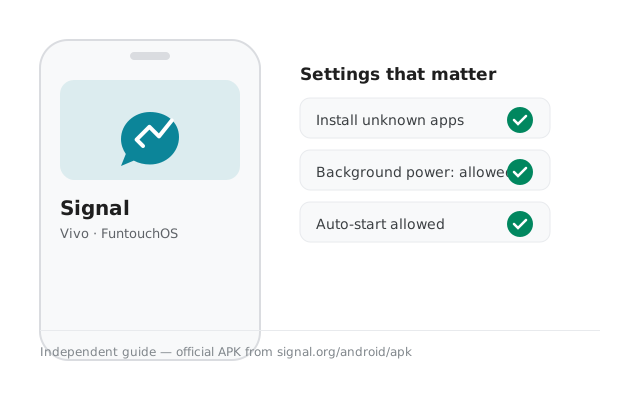
Why sideload on a Vivo?
Most Vivo phones outside China ship with the Play Store, so sideloading is a choice, not a necessity. The legitimate reasons: a broken or missing Play Store after a reset, a phone on a work profile that blocks it, data-cost concerns, or a deliberate de-Googled setup. Vivo phones sold in mainland China run OriginOS without Google services entirely. For those, the APK isn't an alternative, it's the only route.
One thing the APK does not do is make Signal lighter or faster. The website build is the same app, same size, and it keeps its own update mechanism. Sideload because the Play route is unavailable or unwanted, not because you expect a performance difference.
A Vivo-specific note: some Vivo models ship with the Play Store version of Signal preinstalled by the carrier or seller. If Signal is already on the phone from the Play Store, you cannot install the APK over it. Different signing keys. Decide which build you want using our build comparison, back up if needed, then proceed.
Install steps
Download from Signal's page
Open signal.org/android/apk in your browser and tap the download link. Confirm the download. The file name ends in
8.29.3.apk.Open the file
Tap the download notification or find the file in the Files app under Downloads. Vivo's iManager may run a security scan first. Let it finish.
Allow the unknown-apps permission
Android redirects you to the setting. Enable it for the app that opened the file (your browser, or the Files app). The exact FuntouchOS path is in the next section.
Install and open
Return to the file, tap Install, wait for it to finish, then tap Open.
Register
Enter your phone number, enter the SMS code (or request a voice call), set your Signal PIN, and restore a backup if you have one.
Finding "install unknown apps" on FuntouchOS (honest route)
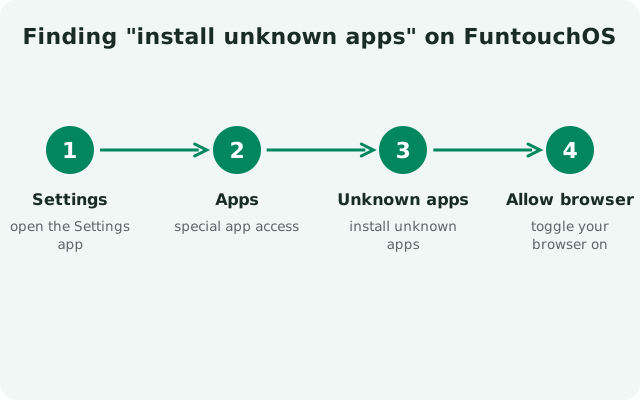
Here is the honest version: FuntouchOS moves this setting between versions, and Vivo's own documentation doesn't always keep up. On most current FuntouchOS versions the path is Settings > Security > Install unknown apps (sometimes under "More security settings"). Tap the app that will perform the install (your browser) and allow it. On some versions it's under Settings > Apps > Special app access > Install unknown apps, the stock Android location.
If neither path exists on your phone, use the Settings search bar at the top of the Settings app and type "unknown". FuntouchOS search finds the setting even when the menus hide it. This is genuinely the fastest method on Vivo phones and we recommend starting here rather than digging through menus.
Grant it only for the one app that needs it. After Signal is installed, you can turn the permission back off. It only governs future installs, not the app you already installed.
The install screen and what to expect
Vivo layers two checks on top of Android's installer. First, iManager's virus scan may inspect the APK before or during install. This is Vivo's bundled security app doing its job; it will pass a genuine Signal APK. Second, Play Protect (if Google services are present) shows its standard "unknown app" warning. Both are expected. Neither can tell a genuine file from a malicious one. Only your own SHA-256 fingerprint check against Signal's page does that.
Read the permission list on the installer screen. Signal asks for the standard messenger permissions: contacts, notifications, camera, microphone, storage. Nothing on that list is unusual, and our permissions guide explains each one. If an installer ever asks for something bizarre like device-admin rights, stop: that is not the real Signal.
One more Vivo-specific behavior: after a system update, FuntouchOS sometimes resets per-app battery exemptions back to their defaults. If notifications were working and suddenly stop after an update, don't assume Signal broke. Re-check the battery settings from the survival kit section before anything else. It takes thirty seconds and it's the cause more often than not.
Notification survival kit for Vivo
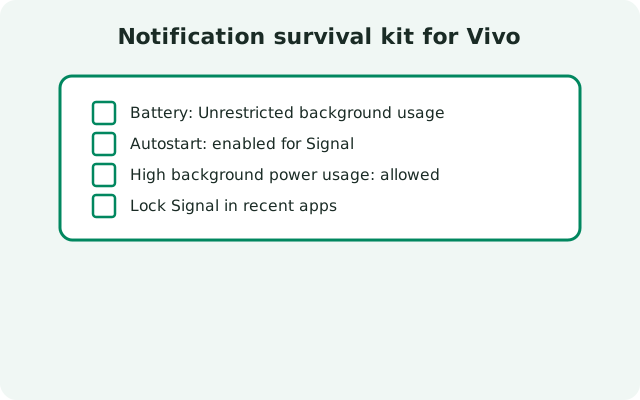
This is the section that matters. Vivo's background management is among the most aggressive in Android, and Signal's website build (which keeps its own connection instead of using Google push) is exactly the kind of app FuntouchOS likes to kill. Without the fixes below, messages arrive late or only when you open the app.
- Settings > Battery > Background power consumption management (name varies): find Signal and set it to allow background power use. Do not leave it on "intelligent" or restricted.
- Settings > Apps > Signal > Battery: allow background activity / set to unrestricted.
- Autostart: in Settings > Apps, find the autostart / auto-launch manager and enable it for Signal, so the app restarts its connection after a reboot.
- Lock it in recents: open the recent-apps view, find Signal, and lock it (usually a lock icon or a downward swipe on the card). This stops aggressive task killers and the "clear all" button from closing it.
- iManager: check iManager's app-management or power-saving sections for any separate kill list and exempt Signal there too.
Then run the real test: phone untouched, screen off, 20 minutes, have someone message you. Seconds = fixed. Minutes or "only when opened" = something is still killing it; walk the list again. Delayed notifications on Vivo are a settings problem, not a Signal problem, and they are fixable.
If the Play Store version is already installed
You cannot install the APK over the Play version. Android will refuse with an install error because the signing keys differ. The switch requires an uninstall, and an uninstall wipes local data, so the order matters:
- Make sure your chats are backed up. Signal's backup lives under Settings > Chats > Backups. Our Android backup guide covers the current system.
- Uninstall the Play Store version.
- Install the APK from signal.org and verify the fingerprint.
- Register with the same number and restore the backup at first launch.
Your contacts, groups, and account all survive this. They're tied to your number and your backup, not to which build you installed. What doesn't survive is anything you didn't back up, which is why step one comes first.
Updates, verification and registration
The website build updates itself: Signal checks for new versions and prompts you to install them, no Play Store involved. This depends on the background exemptions above. A frozen app can't check for updates either. Keep the battery settings intact and updates arrive on their own; if one stalls, the update guide has the fix order. Confirm the current build on the latest version page (8.29.3 at writing).
Registration is the standard flow: number, SMS code (voice call fallback), PIN, restore. On dual-SIM Vivo phones, make sure the right SIM can receive the SMS. See the dual-SIM guide. Set a real PIN and store it safely; registration lock is what stops someone who steals your number from hijacking your Signal.
Frequently asked questions
Where is 'install unknown apps' on Vivo FuntouchOS?
Usually Settings > Security > Install unknown apps, or Settings > Apps > Special app access > Install unknown apps. The fastest method is typing 'unknown' in the Settings search bar. FuntouchOS finds it even when menus hide it.
Why doesn't Signal notify me on my Vivo phone?
Vivo aggressively kills background apps. Allow Signal in Settings > Battery > Background power consumption management, enable autostart, and lock it in the recent-apps view. Then test with the phone idle for 20 minutes.
Can I install the APK over the Play Store version on Vivo?
No. Different signing keys mean Android refuses. Back up your chats, uninstall the Play version, then install the APK and restore.
Is iManager's warning about the APK something to worry about?
The scan itself is normal. What matters is your own verification: the SHA-256 fingerprint of the signing certificate must match the one on signal.org/android/apk, character for character.
from Signal's official site — file hosted by Signal, not by us. signal.org/android/apk