
Share the Signal APK from phone to phone
Published: October 7, 2026 Updated: October 8, 2026
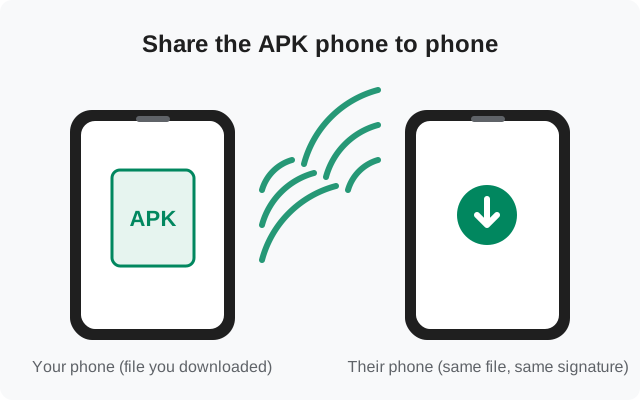
No mobile data, no Wi-Fi, but a friend next to you has the Signal APK file? Phone-to-phone sharing gets the file across without the internet. Handy in dead zones, during travel, or when data is expensive. The methods are simple, but there's one rule that matters more here than anywhere else: only install a shared APK you can trace back to signal.org.
The ground rules: what makes sharing safe
An APK received from another phone is only as trustworthy as its history. Before you install a shared file:
- Know where the sender got it. "I downloaded it from signal.org/android/apk myself" is good. "I got it from a friend of a friend" / "some Telegram channel" is not.
- Verify the fingerprint. The SHA-256 check (how to verify) works on any file regardless of how it reached you. On the receiving phone this step is more important, not less.
- Never install a file that arrived with a changed name or odd size. Tampering sometimes shows up as a renamed or resized file.
- Prefer sharing from the original downloader. Every extra hop between signal.org and your phone is another chance for substitution.
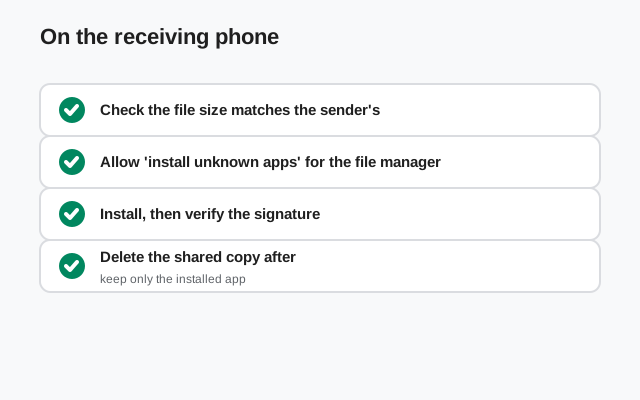
A quick extra check that costs nothing: compare the file size on both phones. The sender's file and your received copy should be identical in size. A mismatch means the transfer corrupted or truncated the file, and you should re-send rather than install. Size equality doesn't prove authenticity (that's the fingerprint's job), but inequality proves something went wrong.
The honest options, compared
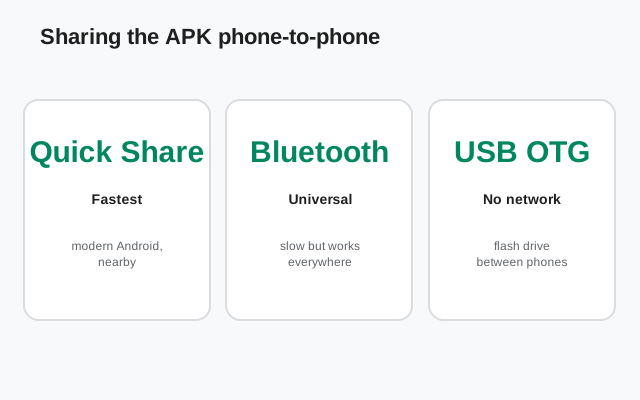
| Method | Speed | Needs | Best for |
|---|---|---|---|
| Quick Share | Fast (Wi-Fi Direct) | Both phones modern Android, nearby | Quickest phone-to-phone transfer |
| Bluetooth | Slow | Nothing special. Works everywhere | Old phones, maximum compatibility |
| Wi-Fi sharing apps | Fast | A file-sharing app on both phones | Large files, no cable |
| USB OTG flash drive | Fast | OTG adapter + USB drive | Multiple phones, one file |
All four move the identical file. Pick by what's available, not by what's fastest. A slow transfer that completes beats a fast method neither phone supports.
Option 1: Quick Share (fastest on modern phones)
On the sender: find the APK
Open the file manager, go to Downloads, long-press the Signal APK.
Share → Quick Share
Tap Share, choose Quick Share (formerly Nearby Share), and pick the receiving phone from the nearby devices list.
On the receiver: accept
Accept the incoming file. It lands in the receiver's Downloads.
Install from the file
Open it with the file manager as described in installing on the receiving phone below.
Both phones need Bluetooth and location/Wi-Fi on for discovery, and Quick Share visibility set to allow the transfer. If the phones can't see each other, Bluetooth (next option) almost always can.
Option 2: Bluetooth (works on everything)
Pair the phones
Settings → Bluetooth on both, make both discoverable, pair them.
Send the file
On the sender: file manager → long-press the APK → Share → Bluetooth → choose the paired phone.
Accept on the receiver
Accept the incoming transfer. Bluetooth is slow. A tens-of-megabytes APK takes a few minutes. Keep the phones close and don't wander off.
Bluetooth-received files usually land in a Bluetooth folder rather than Downloads. Check there if the file seems missing. If the transfer keeps failing halfway, move the phones closer together and make sure neither screen locks mid-transfer.
On Samsung phones the received file may appear in the Bluetooth share history inside the My Files app rather than as a browsable folder. Tap the completed-transfer notification to open it directly. If even that fails, any file manager's search for "signal" across all storage will find it wherever it landed.
Option 3: direct Wi-Fi sharing apps
Apps like Files by Google (its built-in Nearby/Quick Share), SHAREit-style tools, or manufacturer sharing apps (Samsung Quick Share, Xiaomi Mi Share) create a direct Wi-Fi connection between the phones and move the file in seconds.
- Both phones need the same sharing app or compatible protocols.
- Decline any "bonus" the app offers. Some sharing apps bundle ads or request contacts access they don't need for a file transfer.
- After the transfer, you can uninstall the sharing app if you only installed it for this.
Honest note: for a single APK, Quick Share (option 1) is usually simpler than installing a whole sharing app. This option earns its keep when you're moving many files or the phones' built-in sharing won't cooperate.
Files by Google deserves a specific mention: its built-in share feature (formerly Nearby Share, now folded into Quick Share) works without installing anything extra on most Android phones, since Files by Google is preinstalled on many of them. Open Files → Nearby/Quick Share, and both phones see each other the same way as the system Quick Share. It's the same protocol with a different door.
Option 4: USB flash drive with OTG
If one phone has the APK and a USB-OTG adapter (or USB-C flash drive):
Copy the APK to the drive
Plug the drive into the sender via OTG, copy the APK onto it with the file manager.
Move the drive to the receiver
Plug it into the receiving phone, open the file manager, find the drive under storage devices.
Copy to the phone, then install
Copy the APK to the phone's Downloads (installing straight off some drives works, but copying first avoids mid-install disconnects), then tap it to install.
This is the best option for setting up several phones: one drive, one verified file, many installs. Verify the fingerprint once on the drive's copy and you're covered for all of them.
On the receiving phone: install it right
Find the received file
Downloads for Quick Share; the Bluetooth folder for Bluetooth; wherever you put it for the other methods.
Verify it
Check the name matches Signal's website-build pattern and the size looks right (tens of MB). Then the fingerprint check against signal.org's published value (full instructions). Yes, even from a friend. Especially from a friend.
Allow install for the file manager
The receiving phone needs "Install unknown apps" allowed for whichever app opens the file (per-brand paths).
Install and register
Tap Install, open Signal, and register your number. Each phone registers its own number. Sharing the APK doesn't share the account.
If the receiving phone already has Signal from the Play Store, stop. You'll hit the signature conflict, not a sharing problem. The transfer worked fine; it's the install that can't proceed. Back up the receiver's chats, uninstall the Play version, then install the shared APK.
After a successful phone-to-phone install, the receiver should still run the fingerprint check. The file came from a person, not a download, so the check matters most here. And the sender should keep their copy: if the receiver's install fails for any reason, re-sending the same verified file beats re-downloading over a slow connection.
Once the receiver's install is confirmed working, both phones can delete the shared APK file. Keeping stale copies around is how someone accidentally installs an outdated build months later and wonders why it immediately demands an update. The official page always has the current file when you need it again.
Frequently asked questions
Is it safe to install an APK someone sent me?
Only if you can trace it to signal.org and you verify the SHA-256 fingerprint. A shared file skips the 'downloaded it myself' trust, so the fingerprint check is mandatory, not optional.
Does sharing the APK share my Signal account?
No. The APK is just the app installer. Every phone registers its own number and its own account after installing.
Quick Share cant find the other phone. What now?
Check Bluetooth and Wi-Fi/location are on, Quick Share visibility is set to Everyone or Contacts, and the phones are within a few meters. Fall back to Bluetooth pairing, which is more forgiving.
The received file wont install: App not installed.
If Signal is already on the receiving phone from the Play Store, that's the signature conflict. Back up, uninstall, then install. See why the APK won't install over the Play version.
Can I share the APK over WhatsApp or email instead?
You can, but some messengers rename or recompress attachments. Phone-to-phone methods keep the file byte-identical, which is what you want for fingerprint verification.
from Signal's official site — file hosted by Signal, not by us.