
How Much Storage Does Signal Actually Need?
Published: October 7, 2026 · Updated: October 8, 2026
The official Signal APK file is about 109 MiB (114,758,484 bytes, measured from Signal's own download server on 7 October 2026). But that is only the first of three numbers that matter. Once installed, Signal takes more room than the file alone, because Android unpacks and optimizes it. Then your chats, photos, and videos add weight over time. On a modern phone with 128 GB or more, none of this is worth thinking about. On an 8 GB or 16 GB phone, it is worth doing the math before you download. This guide gives you the verified file size, the honest storage math for small phones, what to clear when space runs out, and how to stop Signal's media from quietly eating your storage.
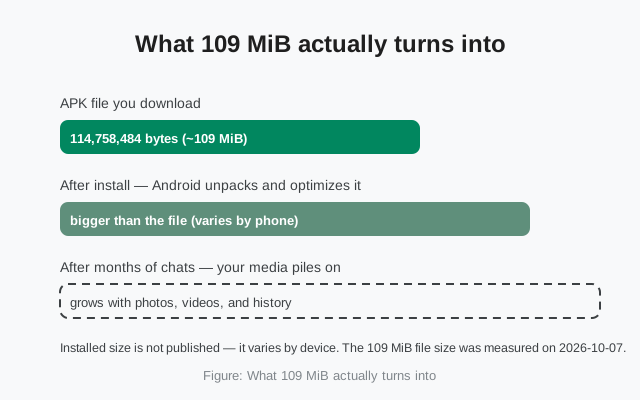
The verified number: 114,758,484 bytes
Let us start with the one number nobody has to guess at. The current website build of Signal (version 8.29.3) downloads as a single universal APK file. Its exact size, measured with an HTTP HEAD request against Signal's own servers on 2026-10-07, is 114,758,484 bytes. Divide by 1,048,576 and you get about 109.4 MiB, which is why you will see “~109 MiB” quoted as the size.
A word on MiB vs MB, because phone storage screens mix them up: your phone probably reports sizes in MB or GB using decimal math (1 GB = 1,000 MB), while the 109 MiB figure uses binary math (1 MiB = 1,024 KiB). In your phone's decimal terms, the file is about 115 MB. Same file, two labels. When this page says the file is “about 1.3% of an 8 GB phone,” that is 109.4 MiB against 8,192 MiB of binary storage. The math is honest either way. The percentages just shift a hair.
Two practical consequences of that number. First, budget about 115 MB of mobile data for the download itself, plus a little overhead for the connection and the update check. Call it 120 MB to be safe. If you are on a tight data plan, do this on Wi-Fi. Our mobile-data download guide has the full playbook for metered connections. Second, the number changes with every release. Each version adds or removes code, resources, and bundled libraries, so do not be surprised if next month's build is 108 or 112 MiB. The figure on this page is tied to v8.29.3 and the date it was measured.
Why is it 109 MiB and not smaller? Because this is a universal APK: one file that carries native code for every CPU architecture Android phones use (ARM64, ARMv7, x86_64). A per-architecture build would be smaller, but then you would need to know your phone's architecture before downloading. Most people do not. The universal file trades size for simplicity: one download that works everywhere. That trade is the main reason Signal's APK is chunkier than some rivals'.
Why the installed app is bigger than the file
Here is the part that surprises people: the 109 MiB file is the smallest number in the story. The installed app always takes more room than the file you downloaded. That is not Signal being wasteful. It is how Android works, and it is true of every app.
When you tap the APK, Android does three things that all cost space. First, it unpacks the file: an APK is really a zip archive, and its contents get extracted onto your storage. Second, it optimizes the app's code for your specific phone, compiling it ahead of time so it launches fast, which trades storage for speed. Third, the app immediately starts creating data: databases for your messages, caches for thumbnails and link previews, and files for every photo and video you send or receive.
How much bigger? We are not going to invent a number. Signal does not publish an installed-size figure, and it genuinely varies: by Android version, by phone brand's optimization settings, and by how much you use the app. What we can say honestly is: expect the installed footprint to exceed the 109 MiB file by a comfortable margin, and then expect it to keep growing from there as your chats accumulate. Anyone quoting you a precise installed size down to the megabyte is guessing. Treat such numbers accordingly.
The takeaway for planning purposes: the download needs ~115 MB free to land on the phone, and the install needs meaningfully more than that to finish. If your phone is gasping with 150 MB free, the download may succeed and the install may still fail. That is the single most common storage-related install failure, and the next section tells you exactly how much headroom each phone size needs.
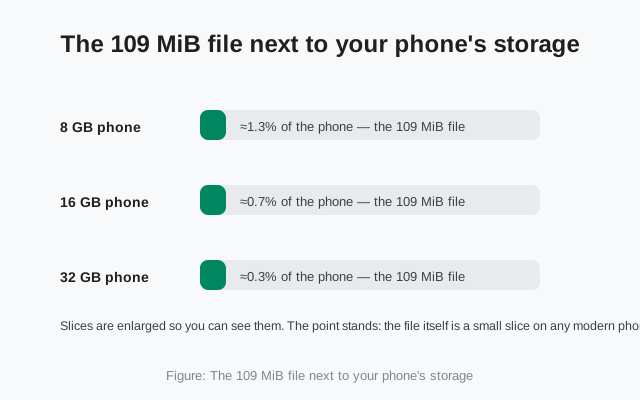
Storage math for 8, 16, and 32 GB phones
Percentages make this concrete. The 109 MiB file is about 1.3% of an 8 GB phone, 0.7% of a 16 GB phone, and 0.3% of a 32 GB phone. Those are just the file. The honest planning number (file plus install overhead plus breathing room) is roughly double the file size. Here is what that means in practice:
| Phone storage | Room for the 109 MiB file | After install + overhead | Verdict |
|---|---|---|---|
| 32 GB and up | Yes, the file is about 0.3% of the phone | Comfortable: install overhead and months of media still fit easily | No math needed. Just install it. |
| 16 GB | Yes, about 0.7% of the phone | Fine, but media will matter over time; the app's data grows with your chats | Install, then set media auto-download to Wi-Fi only (see below). |
| 8 GB | Yes, if roughly 250 MB is free (the file is about 1.3% of the phone) | Tight: the install needs headroom beyond the file itself | Doable. Run the cleanup steps below first, then install. |
| Under 8 GB / Android Go | Risky: the download itself may fail midway | Not recommended without serious cleanup | Free at least 300–400 MB first (a safe rule of thumb: ~3x the file size), or skip it. |
A note on “8 GB” phones: you never actually get 8 GB. The system software eats a large chunk before you install anything, so a phone sold as 8 GB might offer you 4–5 GB of usable space. That space is shared with every photo you have ever taken. The percentages above are against the advertised size; your usable slice is smaller, which is exactly why the 8 GB row says “run the cleanup first.”
And one more thing the table does not show: SD cards do not solve this the way people hope. Signal installs to internal storage. Android decides install location from the app's manifest, and most messengers (Signal included) live on internal storage. You can move your photos, videos, and downloads to the SD card to free internal space for Signal, but you cannot move Signal itself to the card. Freeing internal space is the game; the SD card is just one tool for it.
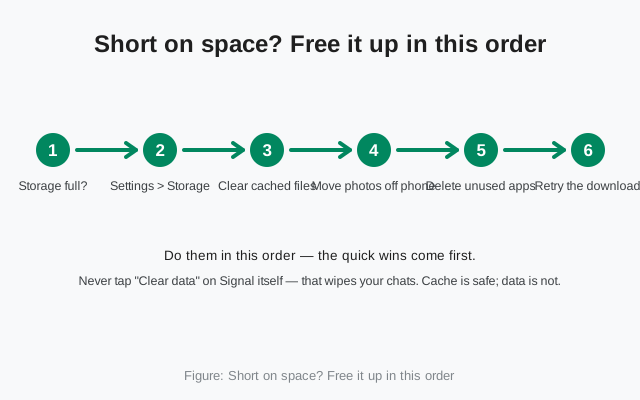
Short on space? Free it up in the right order
If your phone says there is not enough room, do not start deleting things at random. Work through this order: quick, safe wins first, destructive options never:
- Check what is actually full. Go to Settings → Storage and look at the breakdown. You need to know whether the hog is cached data, your photos, or other apps. The fix is different for each.
- Clear cached files. In the Storage screen, cached data can often be cleared in one tap and typically frees hundreds of megabytes. Cache is temporary: thumbnails, half-loaded files, app leftovers. Clearing it deletes nothing you care about.
- Move photos and videos to the SD card or cloud. On most full phones, the camera roll is the biggest single consumer. Move it, do not delete it.
- Delete apps you do not use. Be honest about the games you opened twice. Each one is hundreds of megabytes of internal storage you get back instantly.
- Retry the download and install. With 300+ MB free, the 109 MiB file lands comfortably and the install has its headroom.
Two things to never do in this process. First, never tap “Clear data” on Signal itself (or any messenger) to free space. That wipes the app's databases, which means your chats. “Clear cache” is safe; “clear data” is destruction with a friendly label. Our cache-clearing guide shows the safe path with the exact screens. Second, do not install “phone cleaner” apps from outside the Play Store to do this job. Half of them are adware, and the good ones do nothing Settings cannot do.
If you cleared everything reasonable and the phone is still too full, that is information, not failure: the phone is telling you it has outgrown its storage, and no messenger will fix that. But for most 8 GB and 16 GB phones, steps 1–4 free enough room several times over.
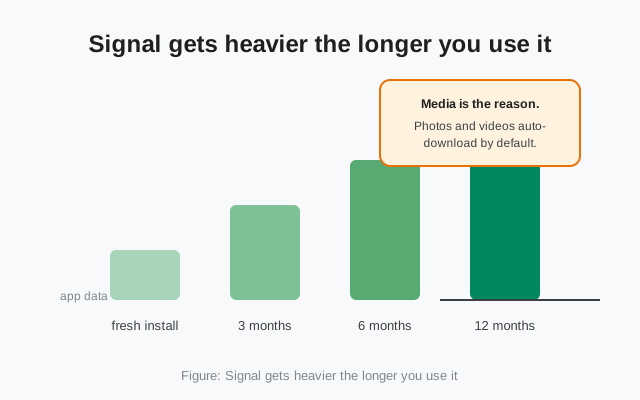
Signal gets heavier over time: media is why
The file is a one-time cost. The slow, quiet cost is media. Every photo you receive, every video someone forwards, every voice note: Signal stores it on your phone, because that is where your chats live. A fresh install might sit at a modest size; a year of active group chats with photo-happy friends can multiply the app's data several times over. This is not a Signal flaw. It is true of every messenger. But Signal's privacy design means there is no cloud copy to lean on, so the phone carries all of it.
The lever that matters most is auto-download. By default, Signal downloads incoming media automatically so chats feel instant. That is lovely on Wi-Fi and expensive on a small phone. Change it: Signal → Settings → Data and storage, and set photos, videos, and files to download on Wi-Fi only, or to never auto-download if your storage is truly tight. You can still tap any individual photo to fetch it; you just stop paying storage for every meme in every group.
The second lever is old chats. Group chats you left six months ago are still sitting there with all their media. Deleting a dead chat deletes its stored media with it. It feels wrong (what if I need it?), but an honest audit once or twice a year keeps the app's footprint flat instead of ever-growing. If the chat truly matters, that is what chat backups are for: back it up, then delete it from the phone.
Think of Signal's storage in three layers: the file (109 MiB, one time), the install (bigger than the file, one time), and the data (grows with your life, and the only layer you control). Most “Signal is taking so much space” complaints are about the third layer, and the third layer is the one with levers.
The honest take: Signal is not the lightest messenger
Let us say the quiet part out loud: Signal is heavier than some of its competitors. The universal APK (one file carrying native code for every CPU architecture) is the main reason. A messenger that ships per-architecture files, or leans on the Play Store's app bundles to download only what your phone needs, can post a smaller download number. Signal chose the universal file because it has to work for people installing by hand on de-Googled phones, Huawei devices, and in regions where the Play Store is absent: the exact audience this guide serves. One file, no architecture quiz, works everywhere. That simplicity costs megabytes.
Does it matter? On any phone sold in the last five years with 64 GB or more, no. The difference between a 60 MB download and a 109 MB download is background noise. On an 8 GB phone from 2019 that is already full of photos, yes, it is one more thing competing for scarce space. That is the honest framing: Signal trades a bigger file for a simpler, more universal install, and for most people that trade is invisible.
What Signal does not do is bloat you with the other kind of weight: there is no ad SDK phoning home, no bundled mini-games, no “pro” upsell modules, no analytics frameworks inflating the install. The megabytes are the app itself (encryption, calling, media handling), not a parasite payload. And unlike the “lite” editions floating around shady download sites, there is exactly one Signal, from exactly one source: signal.org/android/apk/. Any site offering a smaller “Signal Lite APK” is not offering you a diet version. It is offering you malware with good marketing.
from Signal's official site — file hosted by Signal, not by us
Frequently asked questions
Can I install Signal on the SD card?
No. Android decides install location from the app's manifest, and Signal installs to internal storage like most messengers. What you can do is move your photos, videos, and downloads to the SD card to free internal space for Signal itself.
Will clearing Signal's cache delete my chats?
No. Cache holds temporary files like thumbnails; your chats live in the app's data, which cache-clearing does not touch. The dangerous button is 'Clear data' (sometimes labeled 'Clear storage'). Never tap that without a working chat backup.
Why does the APK size change with every version?
Each release adds or removes code, resources, and bundled native libraries, and the universal APK carries code for every CPU architecture in one file. Small size shifts between versions are normal. The 114,758,484-byte figure on this page is for v8.29.3, measured 2026-10-07.
Is there an official Signal Lite with a smaller download?
No. There is no lite, mini, pro, or plus edition of Signal. Just the one app. Any site offering a 'Signal Lite APK' is lying, and fake lite editions are a classic malware trick. If size is the concern, use the storage steps on this page instead.
Does Signal's installed size keep growing forever?
It grows with your message history and media, but it is not unstoppable. Turning off media auto-download and deleting dead group chats keeps the footprint roughly flat. The file and the install are one-time costs; only your data grows, and that layer has levers.
Keep reading
- the APK download page: current version, size, and fingerprint in one place
- downloading over mobile data: how to grab the file on a metered connection
- storage-full errors: what to do when Android says there is no room
- clearing Signal's cache: free space without touching your chats