
How to install the Signal APK on Nokia and HMD phones
Published: October 7, 2026 · Updated: October 8, 2026
Nokia and HMD phones run clean, near-stock Android, which makes them some of the simplest phones to sideload Signal onto. No renamed menus, no heavy battery killers, no store politics. Download the official Signal APK from signal.org/android/apk (current website build 8.29.3), allow the install, register, done. This guide covers the exact permission path, the small battery check, and clears up the Nokia/HMD/Android One naming confusion.
from Signal's official site — file hosted by Signal, not by us. signal.org/android/apk
Which phone do you have?
The branding on the box matters less than you think, but here is the quick map:
- Nokia-branded phones (2017–2023 era). Made by HMD Global under the Nokia name. Most ran Android One: Google's clean-Android program with no skin and fast updates. Sideloading works exactly like stock Android.
- HMD's own phones (HMD Skyline, HMD Crest, and later). HMD now sells phones under its own name too. Same story: near-stock Android, same install steps.
- Very old Nokia Lumia / Symbian phones. Signal does not run on Windows Phone or Symbian. This guide (and the APK) is Android-only.
If your phone runs Android 8 or newer, you are fine. Signal's current builds need a reasonably modern Android; truly ancient devices should check our old-Android support notes.
Which browser should you download with? Any mainstream one works: Chrome, Firefox, or Brave all handle APK downloads the same way. What matters is that you type the address yourself: signal.org/android/apk. Do not search for "signal apk download" and click the first ad or mirror result; the top results for that query are frequently copycat sites. Typing the official address directly removes the entire class of fake-download problems. After downloading, your file manager (Files by Google on most Nokia/HMD phones) shows the APK in Downloads. Tap it there if the browser's "open" prompt does not appear.
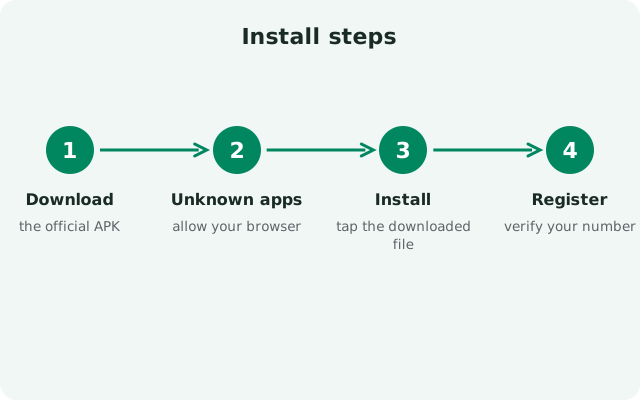
Install steps
-
Download the official APK
Open signal.org/android/apk in your browser and download the file. Current website build: 8.29.3, package
org.thoughtcrime.securesms. -
Allow installs from your browser
Open the file; Android asks for the "Install unknown apps" permission. Exact path below. It is the stock-Android one.
-
Verify the fingerprint
Compare Signal's published SHA-256 fingerprint with your downloaded file before installing. How to verify.
-
Install and open
Tap Install, then Open. On errors, see "App not installed" fixes.
-
Register your number
Enter your number, confirm the SMS code, set your profile and PIN (details below).
The unknown-app permission
Stock Android, stock path: nothing renamed.
Settings → Apps → Special app access → Install unknown apps → select your browser → Allow from this source.
Opening the APK file first usually jumps you straight to this screen. The grant is per-app and reversible: allow your browser, install Signal, then revoke it if you like. Signal keeps working.
A bit of history worth knowing: some Nokia phones from the Android 8/9 era shipped with an aggressive background-task manager (from a vendor called Evenwell) that killed apps like Signal and caused exactly the delayed notifications people complained about. That software is gone from current Nokia/HMD phones. Modern Android One and HMD builds do not include it. So if you find an old forum thread warning that "Nokia kills Signal in background," check the date: advice from 2018 does not apply to your 2024+ phone, and following it will send you changing settings that no longer exist.
Notifications and battery settings
Android One and HMD's clean Android do not include the aggressive background killers some skins add, so notifications normally work immediately. Two quick checks cover the exceptions:
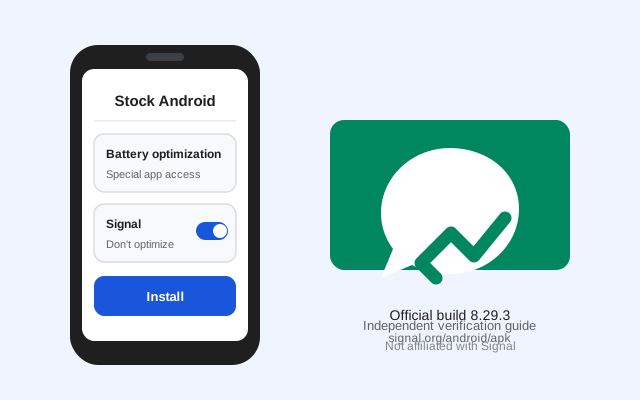
- Battery optimization: Settings → Battery → Battery optimization → Signal → Don't optimize. This keeps Android from pausing Signal's background connection.
- Notifications allowed: Settings → Apps → Signal → Notifications: confirm they are on.
If your phone runs Android's Adaptive Battery, leaving it on is fine. It learns Signal is important once you use it daily. Persistent delays are rare here; if you hit them, our notification troubleshooting guide has the full checklist.
The HMD Skyline deserves a specific mention since it is HMD's current hero phone: it runs clean Android 14+ with the same settings layout described on this page, and its much-advertised repairability changes nothing about software. Sideloading works identically. HMD has also committed to straightforward software support on its own-brand phones, which means the permission paths here should stay valid for years. Whether the logo on the back says Nokia or HMD, the inside is the same near-stock Android, and Signal neither knows nor cares about the branding.
Before anything else, confirm your Android version: Settings → About phone → Android version. Current Signal builds need Android 8 or newer. Most Nokia/HMD phones from the last several years run Android 12–15 and are fully supported; if yours is stuck on something older, check our old-Android support notes before downloading. An unsupported OS version produces confusing install failures that look like file problems but are not.
HMD, Nokia, Android One: the naming explained
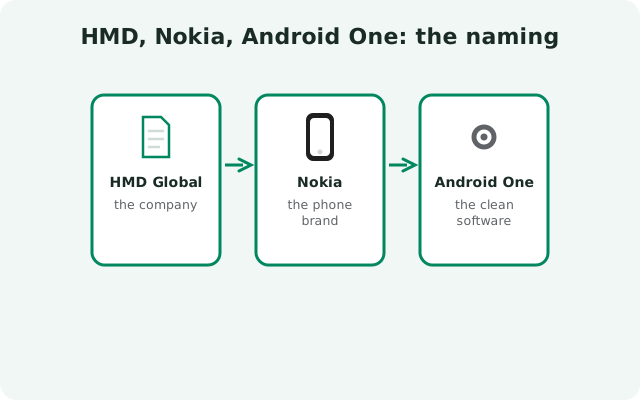
People get confused by the branding, so here is the thirty-second version:
- HMD Global is the Finnish company that has made Nokia-branded phones since 2016.
- Nokia is the brand on the phone: licensed from the original Nokia company, which itself no longer makes phones.
- Android One was Google's program for clean, unmodified Android with guaranteed updates. Most Nokia smartphones from 2018–2021 were Android One devices.
- HMD (no Nokia) is the brand HMD now also uses for its own phones, like the HMD Skyline.
For Signal, all of this changes nothing: every one of these runs standard Android, and the steps on this page apply to all of them.
Dual-SIM owners: many Nokia and HMD phones have two SIM slots, and Signal registers exactly one number. Pick which SIM receives the verification SMS before you begin, keep that SIM active, and set it as the default for SMS under Settings → Network & internet → SIMs if codes go missing. Registration needs only the SMS to reach the number you typed. Mobile data can come from either SIM. If the code never arrives on the right SIM, SMS troubleshooting covers the fixes in order.
Updates, registration, and extras
- Updates: the website build updates itself. Our APK update guide explains the process.
- Registration: number → SMS code (or voice call) → profile → PIN. Problems? SMS code troubleshooting.
- First run: first-run guide and security checklist.
- Permissions: what each one means in our permissions guide.
- Moving phones: transfer walkthrough: back up before you wipe the old device.
Frequently asked questions
Will the Signal APK work on my old Nokia Android One phone?
Yes, as long as it runs a supported Android version (Android 8+ for current builds). Android One phones are ideal for sideloading because the software is clean stock Android with no interfering skins.
My phone says ‘HMD’, not ‘Nokia’. Does this guide still apply?
Yes. HMD's own phones run the same near-stock Android as its Nokia-branded phones, and the install steps are identical.
Can I install Signal on a Nokia feature phone (like the 3310 remake)?
No. Those run Series 30+ or KaiOS, not Android. The APK cannot install there. This guide is for Nokia/HMD Android smartphones only.
Do I still need the Play Store after installing the APK?
No. The website build checks for and installs its own updates. Many Nokia owners sideload precisely to reduce dependence on Google services.
Will Signal keep working after HMD stops updating my phone?
Yes. Signal updates itself independently of system updates, so the website build does not depend on your phone's update policy. You only run into trouble if the Android version itself becomes too old for new Signal releases, which takes many years.
Can I install the APK on a Nokia T21 tablet?
Yes. The same APK installs on Nokia/HMD Android tablets. Tablets cannot receive SMS directly, so register with your phone number using the linked-device route instead. See our tablet install guide for the two setup options.
The install button is greyed out. What now?
That usually means the ‘Install unknown apps’ permission was not granted to the app opening the file, or the download is incomplete. Re-check the permission path above and re-download if needed, or see the install-error guide.
Next steps: get the file from the official Signal APK download page, verify it with our install verification guide, and read why the fingerprint check is the step that matters.