
Why the Signal APK can't install over the Play version
Published: October 7, 2026
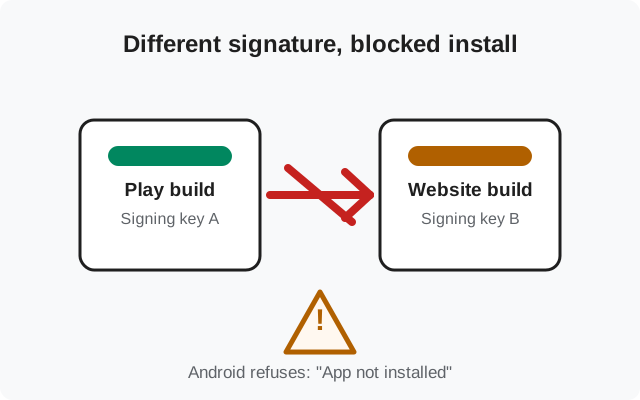
You downloaded Signal's official APK, tapped it, and instead of an install screen you got a flat refusal: App not installed. The file is fine. Your phone is fine. The problem is that Signal is already on your phone, installed from the Play Store. Android will not let one build of an app install on top of another build signed with a different key. This page explains exactly why that happens, and the one safe way to switch builds without losing your chats.
The exact error you'll see
The message varies a little by phone, but the meaning is always the same. On Samsung phones it usually reads "App not installed." On Pixels and phones running stock-ish Android, the installer says the package conflicts with an existing package by the same name. Some brands show a shorter variant: "App not installed as package appears to be invalid" or simply "Installation failed."
Three things about this error are worth noticing. First, it appears instantly. The installer doesn't get partway and then fail, because the check happens before anything is written. Second, it names no missing permission and no corrupt file; that is your clue the file itself is fine. Third, it happens even when the APK is the exact official build from signal.org/android/apk. Official and genuine does not help here. The block is about which signature is on the file, not whether the file is trustworthy.
If instead your error says the file can't be opened at all, that's a different problem. See our guide on what to do when the APK file won't open.
Why Android refuses: signatures are identity
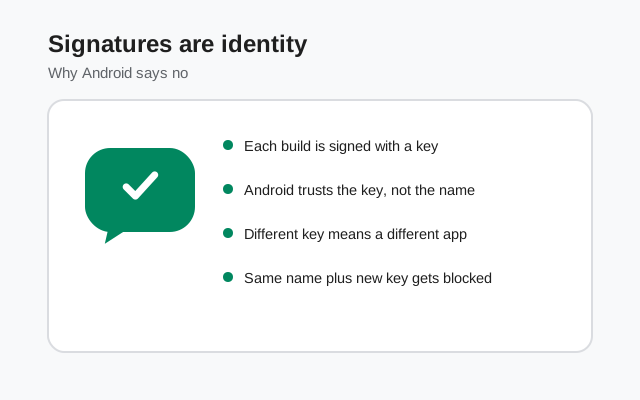
To Android, an app's identity is not its name or its icon. It's the signing key baked into the package. When you install Signal from the Play Store, Android records "this app, package org.thoughtcrime.securesms, belongs to whoever holds Play's signing key." When you then offer it an APK of the same package signed with Signal's website key, Android sees a stranger claiming to be the same app, and refuses.
This is not a bug or an oversight. It is the mechanism that stops a malicious app from silently replacing your banking app, your authenticator, or your messenger with a lookalike. The rule is absolute and has no toggle: a package can only be updated by a file signed with the same key. No setting, no permission, and no third-party installer app can override it. Any tool that claims to bypass signature checks is either lying or asking you to root your phone and disable a core security feature, which you should not do for a messenger.
So why does Signal have two different keys at all? Because the two builds travel through two different distribution systems. The Play Store build is signed through Google Play's signing infrastructure; the website build is signed by Signal directly and published on Signal's own page. Both contain the same Signal code. They are, in every way that matters to you, the same app. They just can't be the same installation.
The two Signal builds, side by side
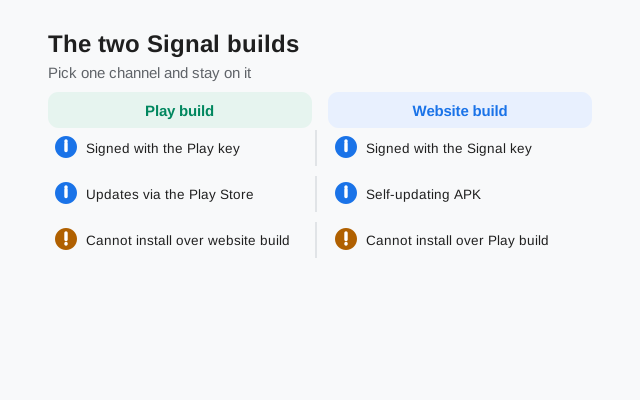
| Play Store build | Website build (APK) | |
|---|---|---|
| Where you get it | Google Play Store listing | signal.org/android/apk |
| Signing key | Play signing infrastructure | Signal's own website key |
| Package name | org.thoughtcrime.securesms | org.thoughtcrime.securesms |
| Can install over the other | No. Different keys block over-installation in both directions | |
| Updates | Through the Play Store | The app checks for and installs its own updates |
| The app itself | Same Signal code, same features | |
People usually pick the website build for one of three reasons: their phone has no Play Store (Huawei, de-Googled phones), they prefer not to route updates through Google, or they need the APK file itself (for example to install on several devices). If none of those apply to you and the Play version is already working, there is no practical reason to switch. The apps are identical.
How do you tell which build you have? Open Signal's Settings → About (or see where to find your version number). The two builds look nearly identical there. The reliable tell is where you installed it from. Play Store install means Play build; sideloaded APK means website build. When the two channels' version numbers briefly differ after a release, that's normal: releases don't always land on both channels the same day, and neither build is "behind" in any meaningful sense.
The only fix: uninstall one first (backup first)
There is exactly one supported path: back up, uninstall the build you have, install the build you want, restore. Uninstalling wipes the app's local data, so the backup is not optional. Without it, your message history is gone.
Back up with the recovery key
In Signal, go to Settings → Chats → Chat backups and create an encrypted backup. Signal gives you a long recovery key. Write it down somewhere safe. Our backup-before-reinstall checklist walks through this in detail.
Uninstall the current build
Long-press the Signal icon and uninstall, or remove it from Settings → Apps. Don't worry: your account on Signal's servers keeps your registration; the backup file keeps your history.
Install the other build
For the website build, download the APK from signal.org/android/apk and follow our beginner sideloading walkthrough. For the Play build, just install from the Play Store.
Restore on first launch
Open the fresh install, register the same phone number, and choose to restore from the backup when prompted, entering your recovery key.
If you are moving specifically from the Play build to the website build, the full procedure is written out step by step in our Play-to-website migration guide.
A note on linked devices: your desktop or tablet linked to Signal usually survives the switch, because the account itself never changes. But check Settings → Linked devices afterward and re-link anything missing. And don't delete the backup file the moment the restore finishes; keep it for a week. If you discover later that one old conversation didn't come across, that file is your only way back.
Prevention: pick one channel and stay on it
The conflict only ever bites people who mix channels. Two habits prevent it entirely:
- Decide once. If your phone has the Play Store and you installed Signal from it, keep updating from it. If you sideloaded the website build, keep sideloading its updates (the app prompts you itself). Switching back and forth means an uninstall every time.
- Back up before any switch. The moment you decide to change builds, the backup comes first: before the download, before the uninstall. Make it a reflex.
One more scenario: if you are setting up a second phone, don't move the app at all. Install fresh from whichever channel you use and register normally. The conflict only involves two builds of the same app on the same phone.
Edge case worth knowing: Android's work profiles and secondary users each have their own app space. Signal in your personal profile and a copy in the work profile are separate installations. The signature rule applies within each profile independently. If the conflict error appears even though you "uninstalled Signal," check the work profile: a disabled or half-removed copy there is the usual culprit.
Myths about this error
- "The APK is corrupted." No. A corrupted APK fails differently (parse errors, won't open). An instant "conflicts with an existing package" message means the file parsed fine and Android recognized it, then rejected the signature.
- "Renaming the file will fix it." The file name is irrelevant. Android reads the package name and signature inside the file, not what you called it.
- "Clearing the package installer's cache helps." It doesn't. The signature check is deterministic, not a caching glitch.
- "Disabling Play Protect will let it install." Play Protect has nothing to do with this check, and turning off your malware scanner to install a messenger is a bad trade in every scenario.
- "I need to root my phone." Absolutely not. Rooting to dodge a signature check trades your phone's whole security model for convenience. Back up and reinstall instead. It takes ten minutes.
Frequently asked questions
Can I keep both builds installed at the same time?
No. They share the package name org.thoughtcrime.securesms, so Android treats them as the same app. One phone, one build. Your choice.
Will I lose my chats when I switch builds?
Only if you skip the backup. With an encrypted chat backup and your recovery key, you restore everything onto the new build during first launch. Without it, uninstalling wipes local history.
Does the website build get updates as fast as the Play build?
Yes, the website build checks for and installs its own updates directly from Signal. No Play Store needed. Version numbers can briefly differ between channels around release days, but both ship the same code.
Is one build safer than the other?
Both are official Signal builds with the same code. The safety question is where you download from: only signal.org/android/apk for the APK, only the real Play Store listing for the Play build.
I uninstalled but it still says the package conflicts. Why?
The uninstall probably didn't complete. Some phones keep a disabled copy in a work profile or second user space. Check Settings → Apps for any remaining Signal entry (including work profile apps) and remove it, then try again.
from Signal's official site — file hosted by Signal, not by us.