
Installing the Signal APK on a Tecno phone
Published: October 7, 2026 · Updated: October 8, 2026
Signal Foundationfrom Signal's official site — file hosted by Signal, not by us. signal.org/android/apk
Tecno phones (the Spark, Camon, and Pop lines especially) are everywhere across Africa, South Asia, and the Middle East, often as affordable first smartphones. HiOS, Tecno's Android skin, renames and buries a few settings that stock Android keeps in plain sight, so installing Signal from the official APK takes a little more navigation than on a Pixel. This guide covers the exact path on HiOS, plus the battery settings that decide whether your messages actually arrive.
The file itself is brand-independent: the official APK from signal.org/android/apk, currently website build 8.29.3, package org.thoughtcrime.securesms. Many Tecno phones are entry-level hardware, so also confirm your phone meets Signal's minimum Android version. Very old Spark models can fall below it.
Why use the APK on a Tecno?
Most Tecno phones ship with the Play Store, so the honest question is why you'd sideload at all. The common reasons: the Play Store app is broken or missing after a reset, mobile data is too expensive to let the Play Store's background processes chew through it, or the phone runs a regional software build where Google services misbehave. Some Tecno owners also simply prefer downloading the file once and installing it directly.
There is one reason that doesn't hold up: "the APK is lighter." It isn't. The website build is the same app, roughly the same size, and it updates itself in the background just like the Play version does. Choose the APK for a concrete reason (a broken store, no Google services, data constraints), not for imagined performance gains.
And the standing rule applies double on budget-phone forums: never download the APK from a third-party site. Tecno-focused blogs and file hosts are full of repackaged installers. Only signal.org/android/apk is Signal's channel, and the mirror warning guide explains what a repackaged APK can do to your messages.
Step-by-step install
Download from Signal's page
Open signal.org/android/apk in your browser and tap the download link. Confirm when the browser asks to keep the file. On slower connections this can take a few minutes. Let it finish.
Open the downloaded file
Tap the download notification, or open Files and find the APK in Downloads. HiOS may show its own security scan first; let it run.
Grant the unknown-apps permission
Android will redirect you to the permission screen. Enable Allow from this source for your browser (or file manager, if that's what opened the file). The exact HiOS path is in the next section.
Install
Go back to the file, tap Install, and wait. Budget Tecno hardware takes a little longer. Give it a full minute before assuming anything failed.
Register and set up
Open Signal, enter your number, enter the SMS code, set your PIN, and restore a backup if you have one.
If you see "App not installed," you almost certainly have the Play version of Signal on the phone already. The two builds cannot be installed side by side. Back up, uninstall the Play version, then install the APK.
Allow unknown-app installs on HiOS
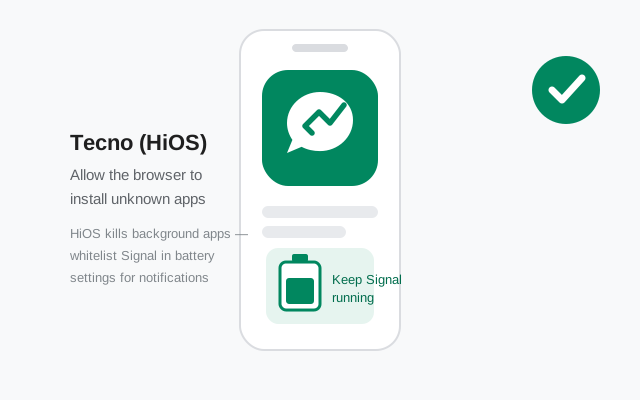
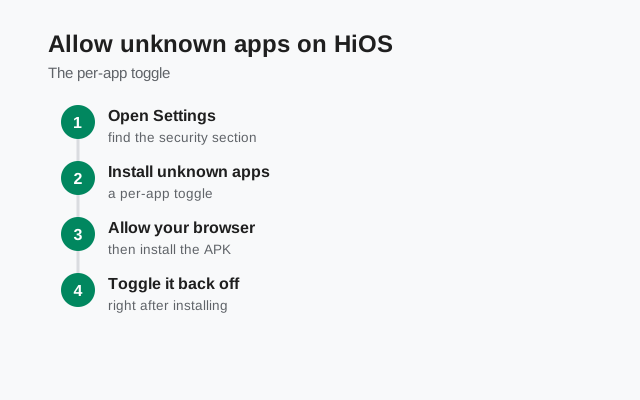
On HiOS the setting lives at Settings > Apps > Special app access > Install unknown apps. Tap the app that will handle the install (usually your browser) and switch it on. On some HiOS versions the path reads Settings > Security > Install unknown apps; if the first path doesn't exist on your phone, try the second. HiOS renames things between versions without apology.
HiOS also runs its own install-time security scan and may show a warning about the APK being from an unknown source. This is HiOS doing its job, and like Play Protect it cannot tell a genuine Signal APK from a malicious one. Only you can, by verifying the SHA-256 fingerprint against Signal's own page before installing.
Grant the permission only to the one app that needs it, and feel free to switch it back off after Signal is installed. The installed app keeps working; the permission only governs future installs from that source.
Verify the APK fingerprint
Verification matters more on the budget-phone web, where repackaged APKs circulate freely. The procedure: Signal publishes the SHA-256 fingerprint of its signing certificate on signal.org/android/apk. After downloading, check the signing certificate of your APK file and compare the two fingerprints character by character.
On a computer, Android's apksigner tool prints the certificate fingerprint; our verification guide covers the exact commands and the on-phone alternatives. If even one character differs from Signal's page, delete the file. It did not come from Signal. Never trust a fingerprint printed on any third-party site, including this one. The only fingerprint that proves anything is the one on signal.org, because Signal controls that page.
HiOS battery settings: the notification fix
This section decides whether Signal is actually usable on your Tecno. HiOS is aggressive about killing background apps to stretch battery life on small batteries, and Signal's website build depends on a persistent background connection for notifications. Out of the box, HiOS will put Signal to sleep and your messages will arrive late or only when you open the app.
Fix it in two places. First, Settings > Battery: look for battery saver / Power Marathon options and make sure they're not set to kill background apps aggressively; add Signal to any allowlist or "unrestricted" list offered. Second, Settings > Apps > Signal > Battery (wording varies): set it to allow background activity. Also check HiOS's app freezer or "recent tasks" lock. Locking Signal in the recent-apps view on some HiOS versions keeps it alive.
Then test for real: have someone message you after the phone has sat untouched, screen off, for 20 minutes. Messages should arrive within seconds. If they don't, something is still freezing the app. Re-check both settings and any "phone manager" or "optimizer" app that came with the phone.
Post-install checklist for Tecno
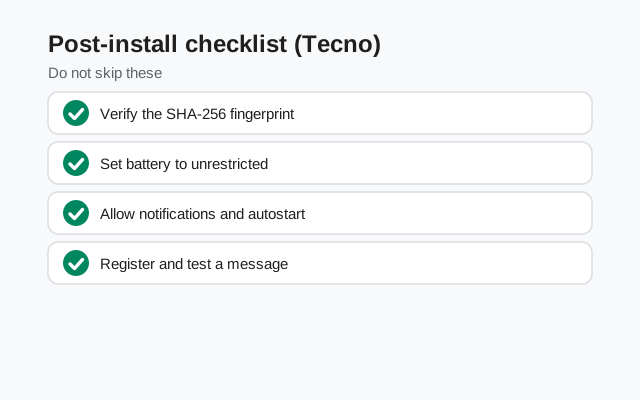
| Item | What to confirm |
|---|---|
| Source | APK downloaded from signal.org/android/apk; build 8.29.3 |
| Fingerprint | SHA-256 matches Signal's page exactly |
| Permission | Install-unknown-apps granted to the browser only; can be switched off now |
| Conflicts | No Play Store Signal installed alongside |
| Battery | Signal exempted from HiOS battery saver and app freezer |
| Notifications | Test message arrives with screen off after 20 idle minutes |
| Storage | A few hundred MB free so updates can download and install |
Budget phones also tend to run out of storage, and a full phone blocks both installs and updates. If Signal's self-updater ever stalls, the update guide walks through the causes, but "storage full" is the first thing to check on a Tecno.
Register and first-run setup
Registration works the same on every Android phone: enter your number, get the code by SMS (or voice call if SMS fails), enter it. On Tecno phones with dual SIMs, make sure the SIM that holds your number is the one able to receive the SMS. Our dual-SIM guide covers the details if both slots are filled.
Set a Signal PIN when asked. This isn't a screen lock. It protects your account with registration lock, so someone who steals your number can't re-register your Signal. Write it down somewhere safe. Then restore from a backup if you have one; doing it at first launch is far cleaner than migrating later.
Allow the permissions Signal requests: contacts, notifications, camera and microphone. Each can be reviewed later under Settings > Apps > Signal > Permissions, and our permissions guide explains what each one actually does.
Keeping the website build updated
The website build updates itself without the Play Store. Signal checks for new versions and prompts you to install them. On a Tecno, two things can break this: the battery settings above (the updater needs background activity) and full storage. Keep a few hundred megabytes free and keep Signal exempted, and updates arrive on their own.
When prompted, install the update the same way you installed the app. Same signing key, so it installs over the old version without touching your chats. You can always confirm what the current build is on the latest version page (8.29.3 at the time of writing).
Can I install Signal on a Tecno phone without the Play Store?
Yes. Download the official APK from signal.org/android/apk, allow unknown-app installs for your browser (Settings > Apps > Special app access > Install unknown apps on HiOS), verify the SHA-256 fingerprint, and install.
Why do Signal messages arrive late on my Tecno?
HiOS aggressively freezes background apps. Exempt Signal in Settings > Battery and set its battery use to allow background activity, then test with the phone idle for 20 minutes.
Is the APK from a Tecno blog or file host safe?
No, not verifiably. Only signal.org/android/apk is Signal's channel. Verify the SHA-256 fingerprint against Signal's own page before installing anything.
My Tecno is very old. Will the APK still install?
Only if the phone runs a supported Android version (currently Android 5.0+). Check the minimum-version guide; the APK cannot bypass the OS requirement.
from Signal's official site — file hosted by Signal, not by us. signal.org/android/apk