
Why Signal dropped SMS support, and what to do about it
Published: October 7, 2026
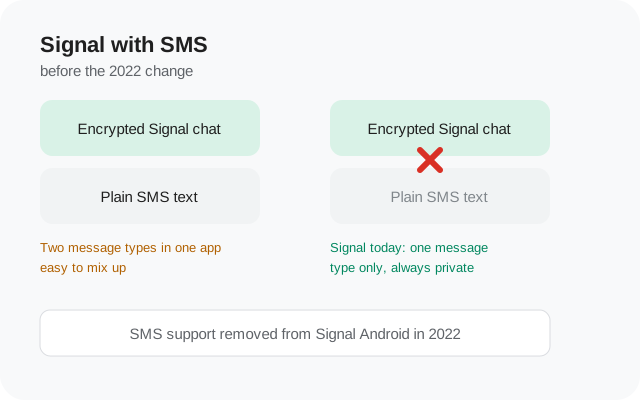
Signal removed SMS support in 2022. The Android app can no longer send or receive plain text messages, and it can no longer be set as your default SMS app. Today Signal handles only its own encrypted messages between Signal users. The change was deliberate: SMS is not encrypted, and mixing secure chats with insecure texts in one app kept confusing people about which messages were actually private.
If you installed Signal expecting it to handle all of your texting, here is the honest answer: keep a separate SMS app for contacts who do not use Signal, and invite the people you actually talk to so your real conversations move to encrypted Signal chats. This page covers what changed, the real reasons behind it, and exactly what to do now.
What changed when Signal dropped SMS?
Before the change, Signal for Android could do two jobs at once. It sent its own encrypted messages to other Signal users, and it could also act as your phone's SMS app, sending ordinary carrier text messages to anyone. Android let you set Signal as the default SMS app, so both kinds of messages lived in one inbox.
When SMS support was removed in 2022, the second job disappeared completely:
- Signal can no longer send SMS. Every message you send goes as an encrypted Signal message to another Signal user.
- Signal can no longer receive SMS. Verification codes and texts from non-Signal contacts will not arrive in Signal.
- Signal cannot be the default SMS app. Android's default-apps list no longer offers Signal as an option.
The SMS threads you already had stayed on your phone. Nothing was deleted from your device. But any new text message needed a different app to send or read it, which is where a lot of confusion came from. People kept texting inside Signal and wondered why their messages never arrived.
The real reason Signal removed SMS support
Signal's own explanation came down to two honest problems that had been growing for years.
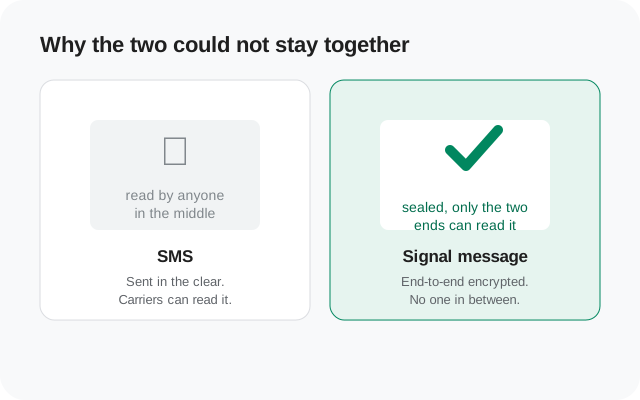
Problem one: privacy. SMS travels in the clear. Your carrier can read it, anyone along the path can store it, and it can be intercepted in ways an encrypted message cannot. Signal is a privacy tool. Shipping an app that happily sends unencrypted messages through carriers, while wearing the branding of a secure messenger, worked against everything the app stood for. Worse, the app made it easy to forget which was which.
Problem two: confusion. Signal tried to make the two message types look different, but in practice people mixed them up. Users assumed that because a message was sent from inside Signal, it had Signal's protection. Some sent sensitive information over SMS without realizing it was traveling unencrypted. For an app whose whole promise is "your messages are private," that mix-up was not a small bug. It was the core promise leaking.
There was a third, quieter reason: the SMS feature cost users real money on some plans while feeling like a free Signal message. Charging people carrier texting rates from inside a "free and secure" app was a bad fit, and Signal decided the honest move was to stop doing the job entirely rather than keep doing it badly.
So the removal was not an accident or a missing feature. It was a deliberate trade: give up the convenience of a two-in-one app so that everything inside Signal is genuinely private, with no exceptions.
The default-SMS-app era, explained
To understand why the change felt so big, it helps to know what the old setup actually was. On Android, unlike on iPhones, where Apple never lets third-party apps touch SMS, any app can ask to become the default SMS handler. Signal offered this for years as a way to win people over slowly: install Signal, let it handle your regular texts, and over time move your contacts into encrypted Signal chats.
It worked, in a sense. A lot of people installed Signal specifically because it was a nicer texting app, then discovered the encrypted chats later. For those users, Signal was never just the blue lock icon. It was where every conversation lived.
The plan had a flaw, though. Keeping people inside the app for their plain texts meant keeping them comfortable sending unencrypted messages through an app they trusted for privacy. Signal eventually decided the on-ramp was not worth the trust cost, and in 2022 it cut the feature rather than keep a half-measure. If you came to Signal through that route, you are exactly the person this page is for.
What SMS users had to do during the switch
If you were using Signal as your SMS app when support was removed, texts simply stopped flowing through it. The fix was a one-time setup:
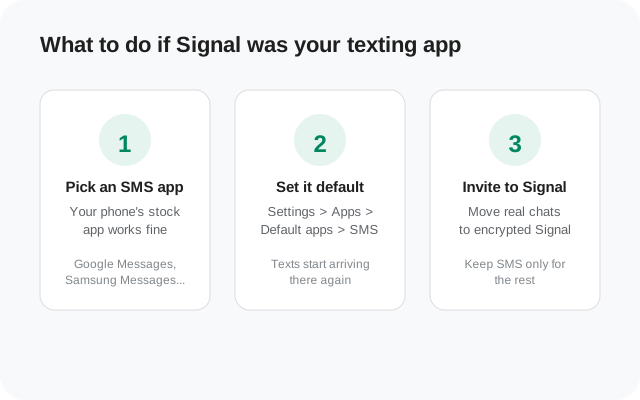
- Pick another SMS app. Most phones already had one. Google Messages is the usual choice and comes preinstalled on many phones; Samsung phones ship with Samsung Messages.
- Set it as the default. Go to Android Settings > Apps > Default apps > SMS app, and choose your replacement. From that moment, texts arrive there instead of Signal.
- Keep texting normally. The new app shows your old message history, your threads stayed on the phone the whole time, and new messages work exactly as before.
The part that tripped people up was timing. If you did not notice the change, you might have kept sending texts from Signal to contacts who were never going to receive them. Anyone who missed replies for a while in 2022 probably found their answer here.
Nothing about your Signal account, your encrypted chats, or your backups was affected. The switch only concerned plain carrier texts.
What to do now if you text non-Signal contacts
If you are installing Signal today and wondering how to reach people who are not on it, the answer has two halves: one practical, one longer-term.
Half one: use a separate SMS app for texting. This is not a workaround; it is the intended setup now. Signal is your encrypted messenger. Your phone's SMS app is for texts to everyone else. Two apps, two jobs, no confusion about which message is protected.
Half two: invite the people who matter. Most of us text the same handful of people over and over. Getting your family, your partner, and your closest friends onto Signal moves your real conversations into encrypted chats and shrinks the SMS side of your life down to delivery codes and the occasional holdout.
Some practical notes worth knowing:
- SMS apps are free and already on your phone. There is nothing to buy or sign up for.
- Your SMS plan stays the same. Texts you send from Google Messages or Samsung Messages cost exactly what they cost before.
- Keep both apps' notifications on so you do not miss messages on either side.
- You do not need to uninstall Signal to fix anything. It was never broken; it just stopped being a texting app.
Signal then vs. Signal now
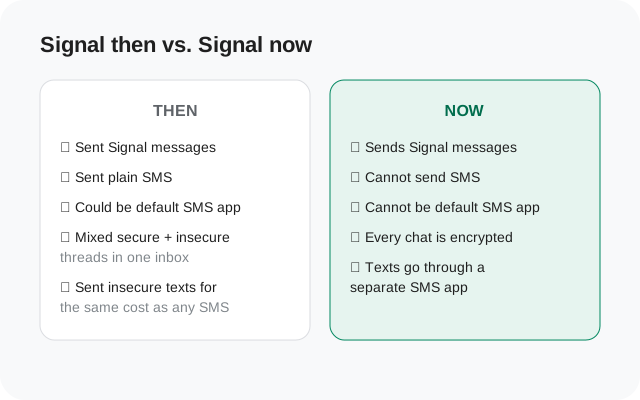
| What you could do | Signal before 2022 | Signal now |
|---|---|---|
| Send encrypted Signal messages | Yes | Yes |
| Send plain SMS texts | Yes | No |
| Set as default SMS app | Yes (Android) | No |
| Receive verification codes by SMS | Yes | No: codes go to your SMS app |
| Mix secure and insecure threads in one inbox | Yes (and confusing) | Not possible |
| Guarantee: everything in the app is encrypted | No | Yes |
The last row is the one Signal cared about. The trade was real, users lost a convenience, but the payoff was that "inside Signal" finally means what people always assumed it meant.
Can I still text people who don't have Signal?
From inside Signal: no. Signal only talks to Signal users now. There is no hidden toggle, no setting, and no official plugin that brings SMS back, and any "Signal SMS" feature you see advertised elsewhere is either fake or something else entirely.
What you can do:
- Text them from your SMS app. This is the normal answer. Open Google Messages or whatever your phone uses and text away.
- Invite them to Signal. Signal has an invite option that sends them a link. If they join, your chats move to encrypted messages automatically.
- Meet them where they are. If a whole group lives on another app, there is no rule that says Signal has to be your only messenger.
The honest setup for most people is a split: Signal for the people you care about keeping private, and plain texting for everything else. It is less elegant than one app doing everything, but it is also the setup where you never have to wonder which messages are protected.
from Signal's official site — file hosted by Signal, not by us
Frequently asked questions
When did Signal remove SMS support?
In 2022. The Android app lost the ability to send and receive SMS, and could no longer be set as the default SMS app.
Why did Signal remove SMS support?
Two main reasons: SMS is not encrypted and carriers can read it, and mixing secure chats with plain texts in one app confused users about which messages were private.
Can I still set Signal as my default SMS app?
No. Signal no longer appears as an option in Android's default SMS app list.
Where did my old text messages go?
They stayed on your phone. A different SMS app can show your existing threads; only new messages needed the new app.
Will Signal ever bring back SMS support?
Signal removed it deliberately and has not announced any plan to bring it back. Treat Signal as a messages-only app going forward.
What SMS app should I use instead?
Whatever your phone already has, Google Messages on most phones, Samsung Messages on Samsung phones, works fine. There is nothing special to install.
Keep reading
- first-run setup after installing the APK: every screen in order, from permissions to PIN
- what each Signal permission does: contacts, camera, microphone and the rest, explained plainly
- is the Signal APK safe: how to check you have the real file before installing
- download the official Signal APK: the current website build, version 8.29.3, from Signal's own page