
How to install the Signal APK on Xiaomi phones
Published: October 7, 2026 · Updated: October 8, 2026
Signal Foundationfrom Signal's official site — file hosted by Signal, not by us. signal.org/android/apk
Xiaomi's own phones (the Mi and Xiaomi lines) run either MIUI or the newer HyperOS, and the two put the sideload permission in different places. Xiaomi also adds its own security-scan popup on every APK install and ships some of the most aggressive background-app killing in Android. This guide covers both operating systems, the scan popup, and the notification fixes that Xiaomi owners need most. On a Redmi or Poco phone? Those are Xiaomi sub-brands with the same software, and their guides are merged into one: see our Redmi & Poco install guide.
The APK itself is identical across brands: the official file from signal.org/android/apk, currently website build 8.29.3, package org.thoughtcrime.securesms. And the non-negotiable rule: never download Signal from a third-party site. Xiaomi forums and file hosts are full of repackaged APKs; only signal.org is Signal's channel. See the mirror warning guide for why.
MIUI or HyperOS: which do you have?
Xiaomi is mid-transition from MIUI to HyperOS, and the setting paths differ. Check yours first: open Settings > About phone and look at the OS version at the top. If it says MIUI 14 (or 13, 12), you're on MIUI. If it says Xiaomi HyperOS, you're on HyperOS. Redmi and Poco phones follow the same split.
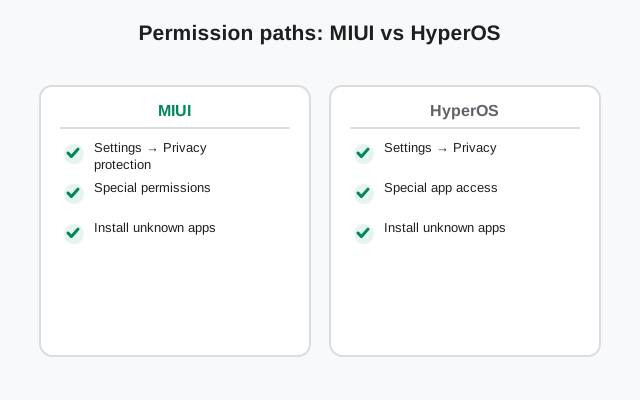
The practical differences for this guide: the unknown-apps permission lives under Privacy protection on MIUI and under Privacy & security on HyperOS, and HyperOS renames a few battery menus. The install flow itself (download, allow, verify, install, register) is identical. The sections below give both paths where they diverge.
One more Xiaomi-specific wrinkle: some Redmi/Poco phones sold in certain regions ship with a locked-down software build where sideloading prompts look scarier than stock Android's. The permission is the same; only the wording around it is more dramatic. Don't let the tone of the warning substitute for actual verification. The SHA-256 check is what proves the file.
Install steps
Download from Signal's page
Open signal.org/android/apk in your browser and tap the download link. Confirm the download. The file name ends in
8.29.3.apk.Open the downloaded file
Tap the download notification. Xiaomi's security scan will run first. This is expected (next section).
Allow the unknown-apps permission
When prompted, enable Install unknown apps for your browser. Exact paths for MIUI and HyperOS are in the next section.
Install
Return to the file and tap Install. Wait for it to complete, then tap Open.
Register
Enter your phone number, enter the SMS verification code, set your Signal PIN, and restore a backup if you have one.
If the install fails with a conflict error, a Play Store version of Signal is already on the phone. The two builds can't coexist. Back up, uninstall the Play version, then install the APK. Our build comparison helps you pick the right one first.
Unknown-app permission: MIUI vs HyperOS
On MIUI: Settings > Privacy protection > Special app access > Install unknown apps. Tap your browser and allow it. On older MIUI the path may be Settings > Passwords & security > Special app access. Same destination.
On HyperOS: Settings > Privacy & security > Special app access > Install unknown apps. Same idea, renamed hallway.
In both cases, grant the permission only to the app that handles the file: your browser if you downloaded there. You can switch it back off after Signal is installed; it only controls future installs. If you can't find the setting, use the search bar at the top of Settings and type "unknown apps". Both MIUI and HyperOS search land you on it directly.
The security-scan popup (expected)
Every APK install on MIUI/HyperOS triggers Xiaomi's own security scan, showing a full-screen "scanning" interstitial before the install button appears. On a genuine Signal APK it passes in seconds. Treat it as what it is: Xiaomi checking the file against its own lists. It is not a verdict on whether the file truly came from Signal.
The real check remains yours: the SHA-256 fingerprint of the APK's signing certificate must match the fingerprint printed on signal.org/android/apk, character for character. Our verification guide shows how. If the scan ever fails or flags the file, stop. Don't override it. Delete the file and re-download from the official page.
You'll also see Play Protect's standard sideload warning if Google services are present. Same story: expected, not a diagnosis. Verify the fingerprint yourself.
A note on where Xiaomi's scan gets its verdict: it checks the file against Xiaomi's own cloud lists, which means a brand-new Signal release can occasionally trigger a longer scan or a "rare app" notice simply because Xiaomi hasn't seen that exact build before. That's a reputation lag, not a safety signal. The fingerprint comparison against signal.org is the check that actually answers "did Signal publish this file," and no cloud reputation list can answer it for you.
The notification survival kit
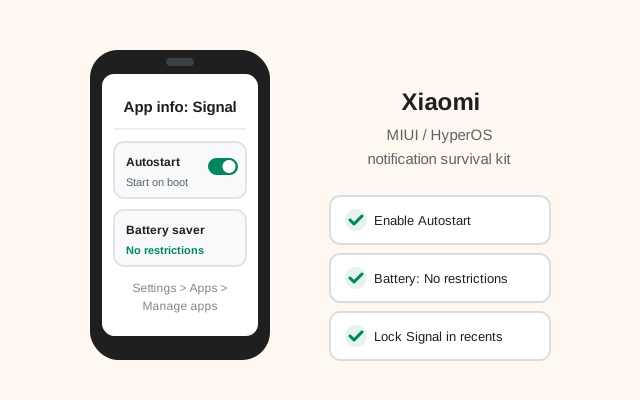
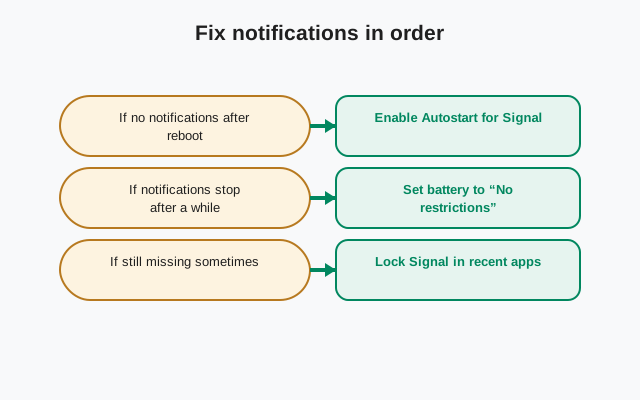
Xiaomi's background management is the main event for Signal's website build, which keeps its own persistent connection for notifications instead of using Google push. Out of the box, MIUI/HyperOS will put Signal to sleep and messages will arrive late.
- Autostart: Settings > Apps > Manage apps > Signal (or via the Security app > Manage apps): enable Autostart so Signal launches its connection at boot.
- Battery saver per app: in the app's info screen, set Battery saver to No restrictions. This is the single most important toggle.
- Lock in recents: open recent apps, long-press or swipe on the Signal card, and lock it so "clear all" doesn't kill it.
- MIUI/HyperOS battery saver: if the system-wide battery saver is on, it can still throttle background data. Either keep it off or confirm Signal is exempted.
- Data: make sure Signal isn't restricted from background data (App info > Data usage or Restrict data usage).
Test honestly: screen off, phone untouched for 20 minutes, have someone send a message. Seconds = done. Late = walk the list again. This pattern (messages only arriving when the app is opened) is a Xiaomi settings issue in nearly every case, not a Signal bug.
A word on "MIUI optimization"
Deep in Developer options sits a toggle called "MIUI optimization" (on HyperOS, similar options exist under different names). It changes a bundle of system behaviors, and some guides tell you to turn it off to fix app problems. Our advice: leave it alone.
Disabling MIUI optimization resets a pile of app permissions and system settings, can break theming and multi-window behavior, and its effects on background apps are unpredictable. It sometimes helps one app while quietly breaking others. Every notification problem Signal has on Xiaomi is fixable with the per-app settings in the previous section. The nuclear toggle is never required for Signal, and flipping system-wide behavior to fix one app is a bad trade.
If you already turned it off following someone else's advice and things got weird, turning it back on and rebooting restores the defaults. Then apply the notification survival kit above instead.
Updates and registration notes
The website build updates itself without the Play Store. Signal checks for new versions and prompts you to install them. The background exemptions above keep the updater working too. Confirm the current build on the latest version page (8.29.3 at writing); if an update stalls, the update guide covers causes in order.
Registration is standard: number, SMS code (voice-call fallback), PIN, restore. On dual-SIM Redmi phones, check the dual-SIM guide so the code goes to the right SIM. Set a real PIN (registration lock is what protects your number from SIM-swap hijack) and store it somewhere safe.
Frequently asked questions
Where is 'install unknown apps' on Xiaomi?
MIUI: Settings > Privacy protection > Special app access > Install unknown apps. HyperOS: Settings > Privacy & security > Special app access > Install unknown apps. Or search 'unknown apps' in Settings.
Is Xiaomi's security scan popup a problem for the Signal APK?
No, it runs on every APK install and passes on a genuine file. The real safety check is still yours: match the SHA-256 fingerprint against signal.org/android/apk.
Why are my Signal notifications delayed on Xiaomi?
MIUI/HyperOS kills background apps. Set Signal's battery saver to 'No restrictions', enable autostart, and lock it in recent apps. Then test with the phone idle for 20 minutes.
Should I turn off MIUI optimization to fix Signal?
No. Leave it on. Every Signal notification issue on Xiaomi is fixable with per-app battery and autostart settings; the system-wide toggle causes more problems than it solves.
Can I install the APK alongside the Play Store version?
No. The builds use different signing keys and Android refuses the second install. Back up, uninstall one, then install the other.
from Signal's official site — file hosted by Signal, not by us. signal.org/android/apk