
What Are Signal's APK Build Flavors, and Which Should You Use?
Published: October 7, 2026 · Updated: October 8, 2026
What does "build flavor" actually mean?
It is not a product line. There is no Signal Lite, no Signal Pro, no Signal Plus. The word "flavor" comes from Android development, where one code base can be compiled into slightly different variants. For Signal's Android app, the variants are distribution pipes: same source code, packaged and signed for different delivery routes.
The flavor is even written into the filename. The official file is named Signal-Android-website-prod-universal-release-8.29.3.apk: website channel, production (stable) build, one universal file for all devices, release build, version 8.29.3. The filename guide decodes every part. Anything calling itself Signal Pro or Signal Plus in a filename is fake.
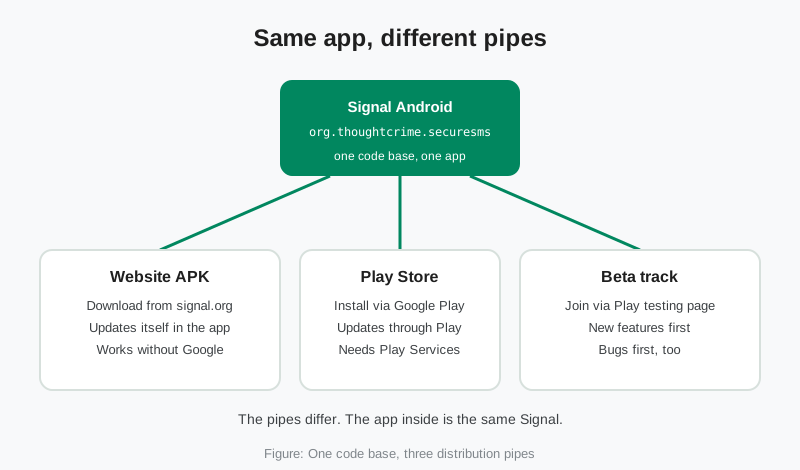
Why do the pipes matter at all? Because Android ties updates to the signing key, and each pipe signs with its own key. That single fact explains the most common confusion in this whole topic: why the website APK cannot be installed over the Play Store app, and vice versa. More on that below.
Website build vs Play build, side by side
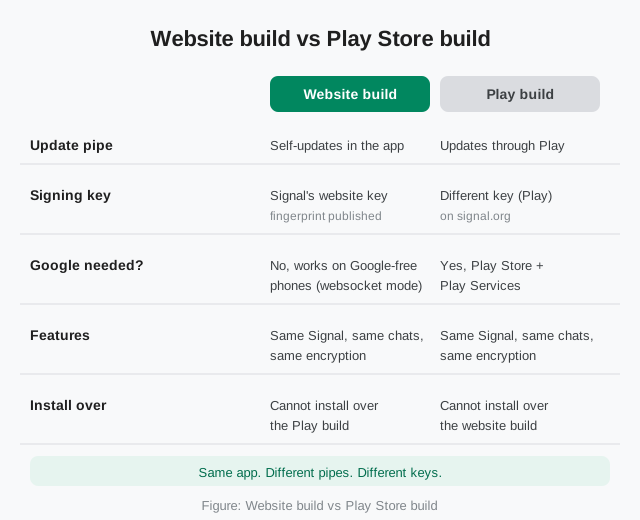
The website build is the APK you download from Signal's download page. It checks Signal's own servers for new versions and offers updates inside the app, no Google account, no Play Store involved. It is signed with Signal's website key, whose SHA-256 fingerprint is published on that same page.
The Play build is the app from the Google Play Store. Updates arrive through Play's normal update mechanism, signed with a different key. It needs the Play Store and Play Services on the phone to work the way most people expect, including push notifications through Google's infrastructure.
Features, chats, contacts, encryption, media, settings: identical. A message sent from the website build is indistinguishable from one sent from the Play build. The version numbers can differ slightly between the two channels because they are released separately, but the feature sets track each other. The guide on why the versions differ explains the numbering.
Signal's own framing is worth hearing. The download page says the APK is for "advanced users with special needs" and that most users should not do this under normal circumstances. That is not a quality warning. It is Signal telling you that if the Play Store is right there on your phone, using it is simpler. The website APK exists for the people the Play Store does not serve.
The signing keys: why one cannot install over the other
Android's rule is simple and strict: an update must be signed with the same key as the installed app. The website build and the Play build are signed with different keys. So Android refuses to install one over the other, every time, with an error about conflicting signatures.
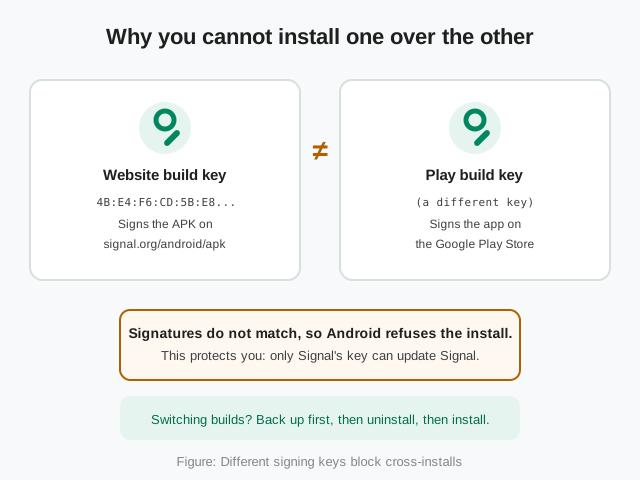
This is protective, not annoying. The signature check is what stops a tampered APK from silently replacing your app. If any file could install over Signal, so could a malicious one. The refusal is the system working.
It does mean switching builds is a small project, not a tap. The order is fixed: back up first, uninstall the old build, install the new one, restore. Skip the backup and your chats are gone, because the uninstall wipes the app's data. Both directions are covered step by step: moving from Play to the website build and moving from the website build to Play.
The website key is not a secret. Signal publishes its SHA-256 fingerprint on the download page, and you can verify any file against it with apksigner verify -v --print-certs --min-sdk-version 24. That is the same verification described in the security updates guide.
The beta track: how pre-release builds work
The beta is the one flavor that is genuinely different software: newer code, less testing. Every Signal release passes through a beta phase first, and anyone can join it.
What you get: features first. Signal Login, the option to register without a phone number, was beta-tested in the 8.28 line before most users ever saw it. What you also get: bugs first. Crashes, battery drain, broken features, that is the deal, and it is the point. A few thousand testers running rough builds surface problems no lab can reproduce, so the stable release is calmer for everyone else.
Two honest boundaries. First, beta builds are labeled "Pre-release" on the GitHub releases page, above the stable builds. Second, Signal's public download page serves the stable production build only: beta builds come through the Play Store testing program or as pre-release APKs on GitHub, never from that page. Any other site offering a "Signal beta APK" direct download is not an official channel, whatever the filename says. The full walkthrough, including how to enroll and the risks checklist, is in the Android beta guide.
Which flavor should you pick?
Short version: pick by your phone and your patience. Long version:
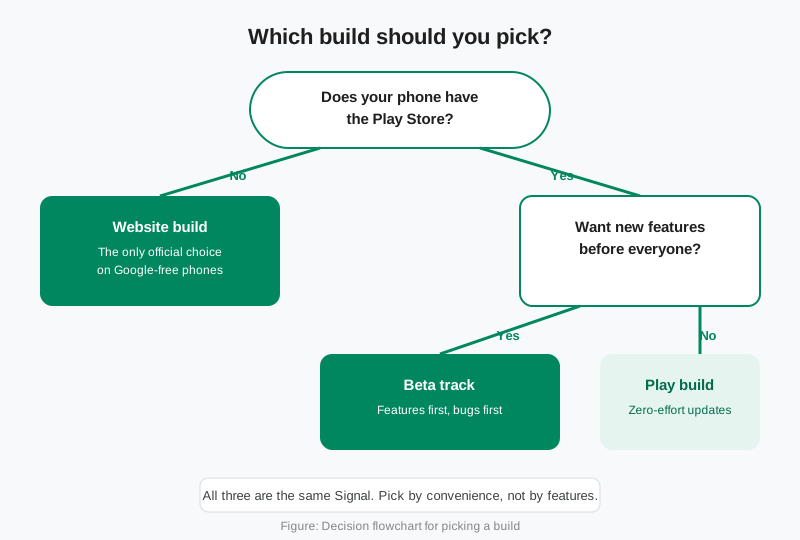
| Your situation | Pick this |
|---|---|
| Your phone has no Play Store (Huawei, de-Googled, GrapheneOS) | Website build. It is the only official path that needs nothing from Google. Install from Signal's download page; the app updates itself. The no-Play-Store install guide covers the setup. |
| You want updates with zero effort | Play build. It updates alongside your other apps through the Play Store. Set auto-updates and forget it. |
| You want new features before everyone else | Beta track. Enroll on the Play testing page. Accept the bugs as the price of early access, and report what you find. |
| You want to verify the binary yourself | Website build. The signing-key fingerprint is published on Signal's page, and reproducible builds let you compare the APK against the public source. |
| Play is blocked or unreliable where you live | Website build. Same app, no Google dependency, self-updating. This is exactly the "special need" the download page is for. |
What you should not do: pick a flavor for features. There are no extra features hiding in any pipe. And do not mix pipes on the same install. If you are on the Play build and sideload the website APK "to get the newer version faster," Android will refuse, and you will have wasted an afternoon.
Does the website build work without Google?
Yes, and this is its reason to exist. When no Play Services are on the phone, Signal falls back to a persistent websocket connection to deliver notifications instead of Google's push infrastructure. A Signal maintainer confirmed this behavior on the project's GitHub issue tracker: the app works without Play Services, falling back to the websocket when Play Services are not installed at all.
The tradeoff is battery. A persistent connection keeps the radio busier than push notifications do, so expect higher drain than on a phone with Play Services. That was the known cost from the start, and it has not changed. It is the price of independence from Google's infrastructure, and for many people it is worth paying.
One practical rule: keep your setup consistent from registration onward. Install and register in the same Google or no-Google state you plan to keep. Switching the environment later can confuse the notification path, and the fix is usually reinstalling in the final state. Huawei phones deserve a special mention: some report partial Google services that are not fully functional, which can confuse the app's detection. If notifications misbehave on such a phone, the website build with its websocket fallback is the cleaner setup.
How do you tell which flavor you have?
Three quick checks:
Where did you install it from?
Play Store listing means Play build (or beta, if you enrolled in testing). A downloaded APK file means website build.
How do updates arrive?
Through the Play Store means Play build or beta. Through a prompt inside the app means website build.
What was the file called?
If you still have the APK, a genuine website file is named Signal-Android-website-prod-universal-release-X.Y.Z.apk. The word "website" in the name is the flavor telling on itself.
If you cannot remember and it matters, for example before switching builds, assume nothing and back up first. The backup is what makes the answer safe either way.
from Signal's official site, file hosted by Signal, not by us
Related guides: all version guides · join the Android beta · decoding the official filename · how version numbers work · Play to website build · website build to Play · install without the Play Store
Frequently asked questions
Is the website APK the "full version" of Signal?
Yes. It is the complete app with every feature, not a trial or a cut-down edition. The only differences from the Play build are the signing key and the update pipe.
Which flavor is more secure?
Neither. Same code, same encryption, same account protections. The website build has one verification edge: its signing-key fingerprint is published for independent checking. Both are equally safe when obtained from their official sources.
Can I switch flavors without losing my chats?
Yes, with a backup. Back up in the app, uninstall the old build, install the new one, restore. Android will not let you skip the uninstall because the signing keys differ. Both migration guides walk through it.
Does joining the beta replace my stable app?
It updates your installed app to the beta build. Your chats stay. Leaving the testing program and reinstalling the stable release takes you back. Expect rough edges while you are on it.
Why is the website version number different from the Play version?
The two channels are released and versioned separately, so the exact build number can differ while the feature set stays the same. Do not chase matching numbers across channels. The version-difference guide explains the full system.
Are "Signal Pro" or "Signal Plus" APKs a flavor?
No. They do not exist. Those names appear only on scam and malware files. Signal ships one app under one package name, org.thoughtcrime.securesms, through the three pipes on this page.