
Signal Android Beta Program: How to Join and What to Expect
Published: October 7, 2026 · Updated: October 8, 2026
What is the Signal Android beta?
Every Signal release passes through a beta phase. Beta builds are pre-release versions: the new code is in, the testing is not finished. You can see them on the official GitHub releases page, where they are labeled "Pre-release" above the stable builds.
The beta exists for one reason: to find bugs before they reach everyone. A few thousand testers running a rough build will surface crashes, battery drain, and broken features that no lab can reproduce. By the time a version graduates to stable, the worst problems have been found and fixed. Beta testers do real, useful work, they just do it with a rougher app.
Features often live in beta for a while before going stable. Signal Login, the option to register without a phone number, was beta-tested in 8.28 before most users ever saw it. The beta is where Signal's future arrives first.
How to join the official beta
Signal documents beta enrollment in its official GitHub wiki. The wiki points to the Play Store beta testing page for the app:
Official enrollment page: play.google.com/apps/testing/org.thoughtcrime.securesms
The steps:
Open the beta testing page
Use the link above, signed in to the Google account on your phone. This is the page Signal's own wiki links to, not a third-party "beta APK" site.
Become a tester
Tap the option to join the beta program. Your account is now enrolled for Signal's app (package org.thoughtcrime.securesms).
Update Signal through the Play Store
After enrolling, the Play Store will offer you the beta build as an update. Install it like any other update.
Use the app normally
That is the whole job. If something breaks, report it, the wiki points bug reports to the official GitHub issue tracker.
The wiki's own summary of the deal is worth quoting: "If you're interested in a life of peace and tranquility, stick with the standard releases." The beta is opt-in roughness. Nobody is enrolled by accident.
What beta testers actually get
Early access to features, and early access to the bugs in those features. Two concrete examples from the official record:
- Signal Login (8.28 beta). Beta testers were the first to register for Signal without a phone number. The official 8.28 notes describe the deal: a small one-time fee to prevent spam, an in-app purchase that is never directly linked to the new account, and an Account ID plus recovery key that must be stored safely because there is no other recovery path. The notes thank testers for helping beta test the feature, beta feedback is what turns a rough feature into a stable one.
- New emoji, sticker, and GIF keyboard (current pre-releases). The pre-release builds on GitHub are currently testing a new and improved keyboard for emojis, stickers, and animated GIFs. If you join the beta now, this is the kind of unfinished work you will be trying first.
Beta features change. Buttons move, behavior gets revised, and some experiments never ship. If you need a feature to work exactly as documented, wait for stable.
Beta vs stable, in brief
Stable is the build Signal recommends for everyone: reliable, polished, new features after testing finishes. Beta is for people who enjoy testing and can tolerate breakage: new features first, unfinished and subject to change, deliberately rougher.
| Stable | Beta | |
|---|---|---|
| Who it is for | Everyone | People who enjoy testing and can tolerate breakage |
| New features | Arrive after testing finishes | Arrive first, unfinished and subject to change |
| Roughness | Reliable, polished | Deliberately rougher |
If Signal is how you talk to your family, your clients, or anyone who depends on you, stay on stable. The full comparison, with the decision table for every situation, is in the beta vs stable guide.
The honest risks
The beta's risks are not mysterious. They are the ordinary costs of unfinished software:
- Crashes. Beta builds crash more than stable builds. Usually it is just the app closing; your account and messages survive.
- Battery and performance. Unfinished code can be inefficient. If your phone runs hot or the battery drops faster on a beta build, that is expected, and worth reporting.
- Features that change or vanish. A beta feature is a draft. It can be redesigned, delayed, or dropped before stable.
- Beta-only account features. Things like the Signal Login beta involve real money and unrecoverable credentials. Read the beta notes for that specific feature before opting in, and store any Account ID and recovery key in a password manager.
None of this is a reason to fear the beta. It is a reason to join it with your eyes open, and with a backup.
Before you join: the checklist
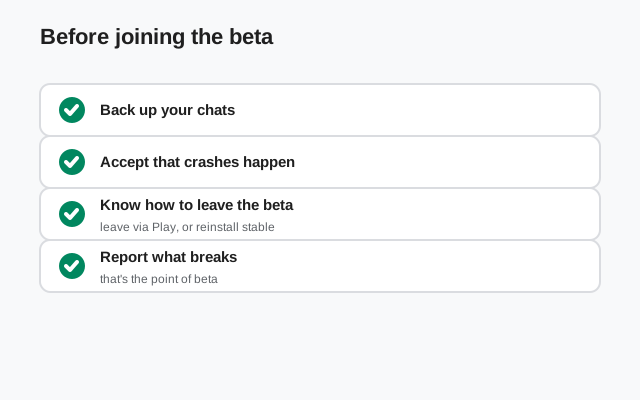
Run through this list before you tap "become a tester":
- Back up first. Make a current backup before switching channels. The Android backup guide covers the options.
- Decide if this phone can be rough. If this is your only phone and you depend on Signal daily, consider testing on a secondary device instead.
- Know how to report bugs. The official channel is the GitHub issue tracker. Search first, your bug may already be reported.
- Know how to leave. You can leave the beta through the same Play Store testing page, then reinstall the stable build. Back up before you switch back, too.
- Do not download "beta APKs" from anywhere else. The official beta paths are the enrollment page above and Signal's GitHub pre-release APKs. Third-party beta files are a classic malware vector.
How beta feedback shapes the stable release
The beta is not a preview program. It is a testing program, and the difference matters. A preview exists to build excitement. A beta exists to find problems, and Signal treats it that way: beta builds ship with unfinished work, and the notes often thank testers directly for helping test a feature, as the 8.28 Signal Login notes do.
Here is what your testing actually changes. Crash reports from beta builds show the developers exactly where the new code breaks on real phones, not in a lab, but on the thousands of device models and Android versions people actually use. Battery complaints reveal inefficient code before it reaches everyone. And usability confusion in a beta feature ("I could not find the setting", "the flow lost my place") gets fixed while the design is still flexible, instead of after millions of people have learned the rough version.
That is also why beta features change between beta and stable. If testers consistently misunderstand a screen, the screen gets redesigned. If a beta experiment causes more problems than it solves, it can be delayed or dropped. Joining the beta means accepting that the feature you test today may look different, or never arrive, when the stable release ships. What you get in return is a genuine influence on the app's direction, which is more than most "early access" programs offer.
A note for website-APK users
The beta enrollment Signal documents is the Play Store path. If you run the website APK from Signal's download page, you are on the stable channel by definition, the file on that page is the stable release. Do not try to mix the two. Beta builds come through the Play Store after enrollment. Switching from the website build to a Play build (beta or stable) means backing up, uninstalling, and reinstalling, because the two channels use different signing keys.
If you want to follow beta development without installing it, the GitHub releases page shows every pre-release and its notes. Reading along is free and risk-free.
from Signal's official site, file hosted by Signal, not by us
Frequently asked questions
How do I join the Signal Android beta?
Enroll on the official Play Store beta testing page linked in Signal's GitHub wiki (play.google.com/apps/testing/org.thoughtcrime.securesms), then update Signal through the Play Store.
Is the Signal beta free?
Yes. Joining the beta costs nothing. (The Signal Login beta separately asks a small one-time fee when registering without a phone number, that is the anti-spam measure for that feature, not a beta charge.)
Can I leave the beta?
Yes. Leave through the same Play Store testing page, then reinstall the stable build. Back up before switching.
Will the beta delete my chats?
Installing a beta build over your current app keeps your data. But beta software is beta software: keep a current backup, because the unexpected is the point of testing.
Where do I report beta bugs?
On the official GitHub issue tracker. Search for your bug first to avoid duplicates.
Related guides: all version guides · beta vs stable: which should you install · Android version history · the current stable build · stable download guide · beta APK download and install guide