
Why the APK Version Differs from the Play Version
Published: October 7, 2026 · Updated: October 8, 2026
Two tracks, one app
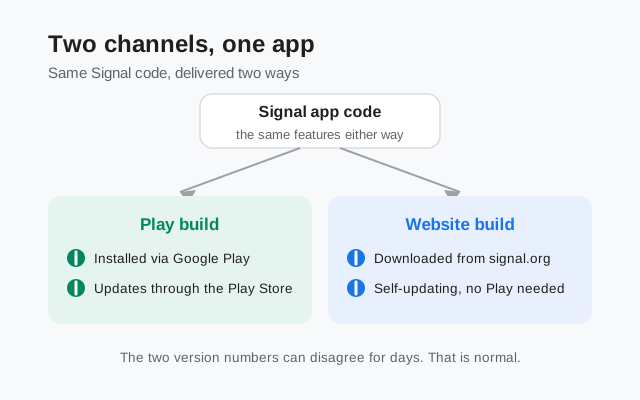
Signal ships its Android app through two channels. The first is the Google Play Store, the app most people install. The second is the direct APK download from Signal's own download page, built for phones that have no Play Store and for people who prefer getting the app straight from the publisher. Both downloads are the same Signal: the same code, the same features, the same encryption, the same account system. Your chats, calls, and contacts work identically on either one.
Why two channels exist
So why do two channels exist at all? Because not every phone can use the Play Store. Some phones ship without Google services, some regions restrict the Play Store, and some people simply do not want a store in the middle. The website build serves all of them: it is a full Signal that downloads, installs, and even updates itself without Google's store. If you installed Signal from the Play Store, you are on the Play track. If you downloaded the APK from Signal's site, you are on the website track.
Two release pipelines
The confusion starts because the two tracks are released separately. The website build is pushed to Signal's download page directly. The Play build goes through Google Play's release machinery, which has its own review steps and its own rollout pacing. Each release gets a version number when its channel ships it, so the website can show one number while the Play Store shows a slightly different one. Neither is wrong. They are just two snapshots of the same app taken at slightly different moments.
What "the latest version" means on your channel
This is also why advice like "update to the latest version" can sound contradictory. The latest website build (8.29.3 at the time of writing) and the latest Play build are both "the latest" for their own channel. If someone tells you Signal 8.29 is out and your Play Store still shows an older number, the Play rollout may simply not have reached you yet. Give it a few days before assuming something is broken. This page explains the numbering system and when a gap matters; if you are still deciding which channel to use, the build-flavors guide compares the three pipes side by side.
The signing-key difference, and what it means for you
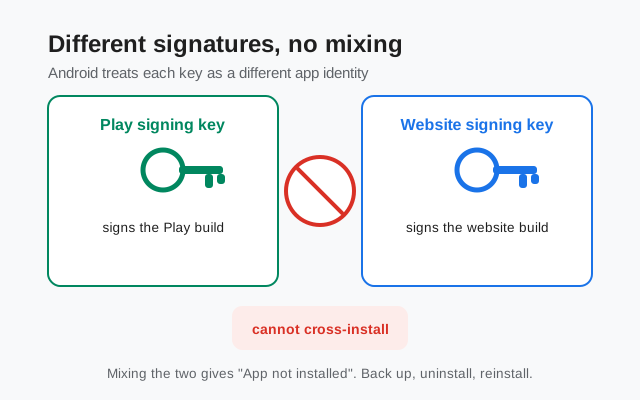
Here is the technical fact behind most of the confusion, explained plainly. Every Android app is stamped with a digital signature when it is built, like a wax seal on a letter. Android checks that seal every time the app updates. The rule is strict: an update must carry the same signature as the app already installed. A different signature means Android says no.
Signal's website build is signed with Signal's own signing key. The Play build is signed with a different key. That is verified and documented: the two builds cannot be installed over each other, and the signature fingerprint of the website build is published on Signal's download page so you can check your file against it. To Android, the two builds look like two different apps that happen to share the package name org.thoughtcrime.securesms.
What does this mean in practice? Three things.
First: the "App not installed" error
If you download the website APK while the Play version of Signal is on your phone, the install fails with "App not installed" or a similar message. The file is not corrupted and the download is not broken. Android is refusing on purpose because the signatures do not match. The same thing happens in reverse: the Play Store will not update a website-build install. If you hit this error, stop re-downloading the file. It will never install over the other build.
Second: switching channels is a small project, not a tap
To move from the Play build to the website build (or back), you must back up your chats, uninstall the current app, install the other build fresh, and restore the backup. There is no shortcut. The uninstall step wipes the app's data from the phone, which is why the backup comes first. The full walkthrough is in the guide on what happens when you mix the two builds, and the Android backup guide covers the backup step.
Third: the signature is your verification tool
Because the website build's fingerprint is published on Signal's download page, you can confirm that the file on your phone is genuinely Signal's and untampered. Download only from that page, check the signature if you want to be thorough, and treat any "new Signal version" offered anywhere else with suspicion. A repackaged APK can wear any version number it likes; the signature is what it cannot fake.
Why the numbers disagree
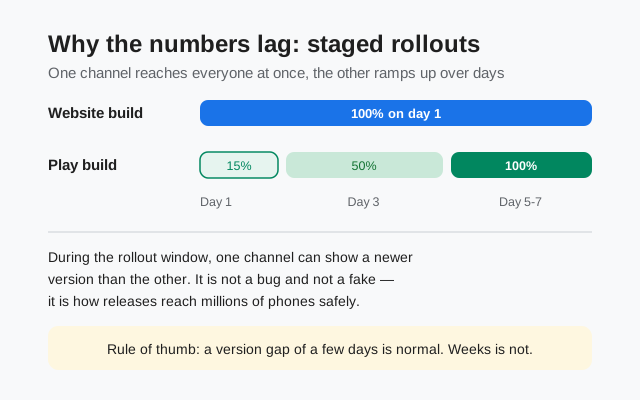
With the two channels and two keys understood, the version gap itself is easy to explain. Each channel gets a version number when that channel ships a release. The website build goes to Signal's download page in one push: everyone who downloads that day gets the same file. The Play build goes through staged rollout, where the new version reaches a small percentage of users first, then more over the following days. Staged rollouts are deliberate. If a release has a serious bug, catching it at 10 percent of users is far better than catching it at 100 percent.
Rollout weeks look messy by design
So during a rollout week, it is completely normal for the website to show a newer number than your Play Store, or for the Play Store to show a newer number than a friend's website download. The numbers are assigned per channel and the channels move at different speeds. A patch release like 8.29.3 might appear on the website first and reach Play days later, or the reverse. Either direction is fine.
The practical rule: watch time, not numbers
The practical rule is about time, not numbers. A version gap of a few days is normal and needs no action. A gap of weeks is a sign that something is stuck: your Play Store may not be checking for updates, or the website build's self-updater may have missed a release. If your app has not updated in weeks while new versions are clearly out, the stuck-on-an-old-version guide walks through the fixes, starting with the same first step as everything else: back up. For the general logic of how Signal numbers its releases, see how Signal version numbers work.
How to check which build you have
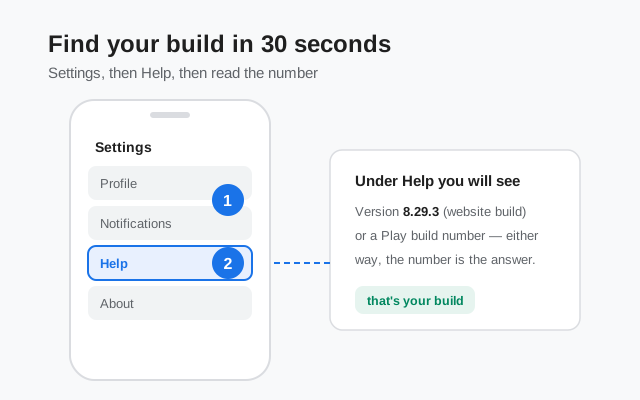
Thirty seconds settles it. Open Signal, go to Settings, then Help, and read the version number shown there. That number is your build, and it tells you which channel you are on. If you downloaded the APK yourself, the filename is a second clue: the official website file is named like Signal-Android-website-prod-universal-release-8.29.3.apk, and the word "website" in the name means the website build. The filename guide decodes every part of that long name.
Why does it matter which build you have? Because updates, reinstalls, and troubleshooting all depend on the channel. A Play user updates through the Play Store. A website-build user gets update offers inside the app itself. And if you ever need to reinstall, you must install the same channel again, or go through the backup-uninstall-reinstall dance to switch. Knowing your build takes the guesswork out of every fix on this site.
When a version difference matters, and when it does not
Most version gaps are noise. A few are signals. This table sorts them:
| Scenario | What it means and what to do |
|---|---|
| Website shows a newer number than your Play Store | Normal rollout lag. The Play release ramps up over days. Check the Play Store for updates, and wait a few days before worrying. |
| Play Store shows a newer number than the website page | Also normal. The Play rollout finished first, or the website page has not posted the patch yet. Same features, the numbers catch up on their own. |
| "App not installed" when installing the APK | Signature mismatch, not a broken file. You have the Play build installed. Either keep the Play build, or back up, uninstall, install the APK build, and restore. |
| Numbers differ by weeks, not days | Your channel's update may be stuck. Work through the stuck-on-an-old-version guide instead of hunting for APKs elsewhere. |
| Some other site offers a "newer" Signal APK | Treat it as hostile until proven otherwise. Repackaged APKs borrow real version numbers. Delete it and download only from Signal's own page. |
The short version of the whole page: same app, two channels, two signatures, separately numbered releases. Once you see the system, the "wrong" version number stops looking wrong. And when you do need the newest file, the path is always the same: Signal's official download page, the current build check to confirm the number, and the update walkthrough if you are installing manually.
from Signal's official site, file hosted by Signal, not by us
Frequently asked questions
Is the website APK the same app as the Play Store app?
Yes. Same Signal, same features, same encryption, same account system. The difference is the delivery channel and the signing key, not the app itself.
Can I install the website APK over my Play Store Signal?
No. The two builds use different signing keys, so Android refuses with an 'App not installed' error. To switch, back up your chats, uninstall the current build, install the other one, and restore. The install-conflict guide covers the steps.
Which channel gets updates first?
It varies from release to release. Either channel can show a newer number for a few days while the other catches up. A gap of days is normal; a gap of weeks means your update is stuck.
Do both builds update automatically?
The Play build updates through the Play Store like any other app. The website build checks for updates itself and offers them inside the app. Both keep you current without manual downloads in normal use.
Will switching builds lose my chats?
Only if you skip the backup. Uninstalling wipes the app's data from the phone, so a fresh backup taken right before the switch is what carries your chats across. See the Android backup guide.
How do I know my APK is really from Signal?
Download only from Signal's official download page. The signature fingerprint of the website build is published there, so you can verify the file you downloaded matches. Any 'new version' offered anywhere else should be treated as untrusted.
Related guides: all version guides · which build to pick: build flavors · check the current build · how version numbers work · read the APK filename · mixing the two builds · how updates work