
How Signal Handles Security Updates: The Honest Story
Published: October 7, 2026 · Updated: October 8, 2026
How do Signal security updates reach your phone?
Through the same pipe as every other update. There is no separate "security patch" channel on Android. When Signal fixes a security issue, the fix goes into a new build, and the new build reaches you through whichever channel you installed from:
- Website build: the app checks Signal's own servers for new versions and shows an update prompt inside the app. You tap update, the new APK downloads, and it installs over your current build. Your chats, settings, and media stay untouched because the new file carries the same signing key.
- Play Store build: the update arrives like any other app update. If you have auto-updates on, it can land without you noticing.
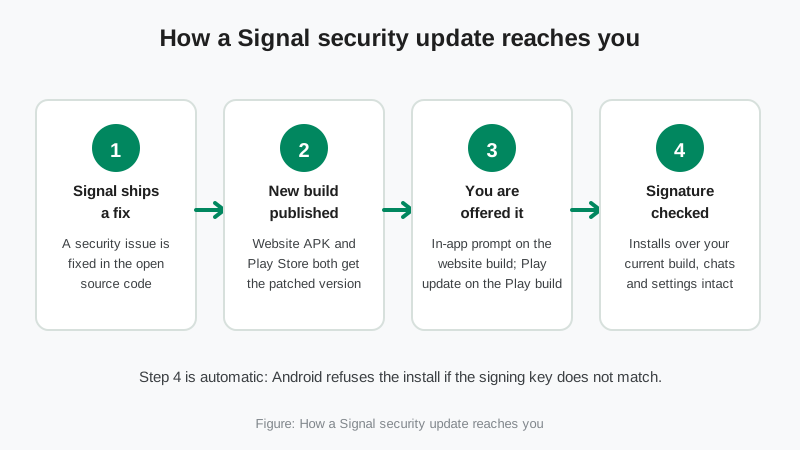
Both channels carry the same fixes. The build numbers can differ slightly between the website and Play releases because the two channels are released separately, but a security fix is never exclusive to one of them. That is worth knowing the next time someone on a forum claims the "real" fix is only on some mirror site. It is not. Mirror sites and "security patch APK" downloads are a known scam pattern, and the mirror warning guide explains how those fakes work.
One honest note from Signal itself: the download page describes the APK as meant for "advanced users with special needs" and says most people should not use it under normal circumstances. If your phone has the Play Store, the Play build is the path of least resistance, and it gets the same security updates.
What counts as a "security update" in Signal's world?
With most apps, a security update means a bug got patched. With Signal, the visible patches are only one third of the story. The other two thirds ship quietly, and they matter more:
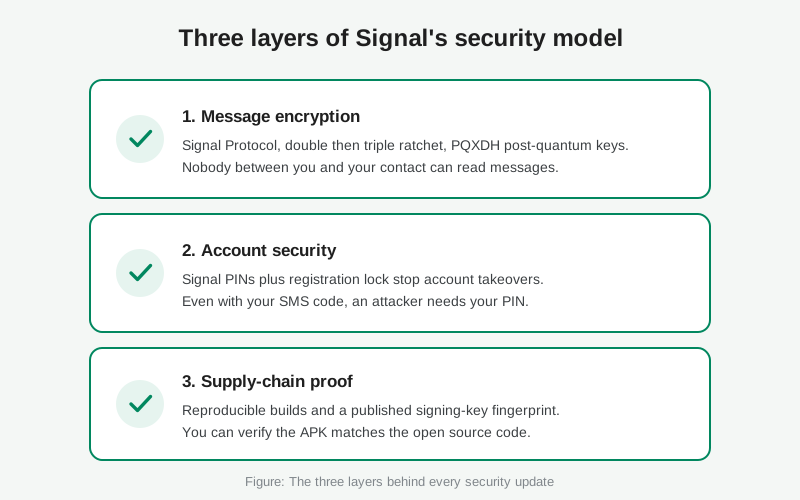
Layer 1: the encryption under your chats. The Signal Protocol gets upgraded over time, and those upgrades arrive as app updates. You tap "update," nothing looks different, but the mathematics protecting your conversations changed. The post-quantum upgrades of 2023 and 2025 are the big examples, and they are covered in the timeline below.
Layer 2: your account. Features like Signal PINs and registration lock protect you against account takeover. They are security features, not patches, and they arrive the same way, as updates you install.
Layer 3: the supply chain. Reproducible builds and a published signing-key fingerprint let you verify that the app on your phone is exactly what Signal's published source code produces. That is security infrastructure, and it is why you can trust the update pipe itself.
The Android client is open source under the AGPLv3 license, published in the signalapp/Signal-Android repository. Anyone can read the code behind every release. That transparency is also why this page can be strict about sourcing: if it is not in the blog or the repo, it is not on this page.
Which security milestones are officially documented?
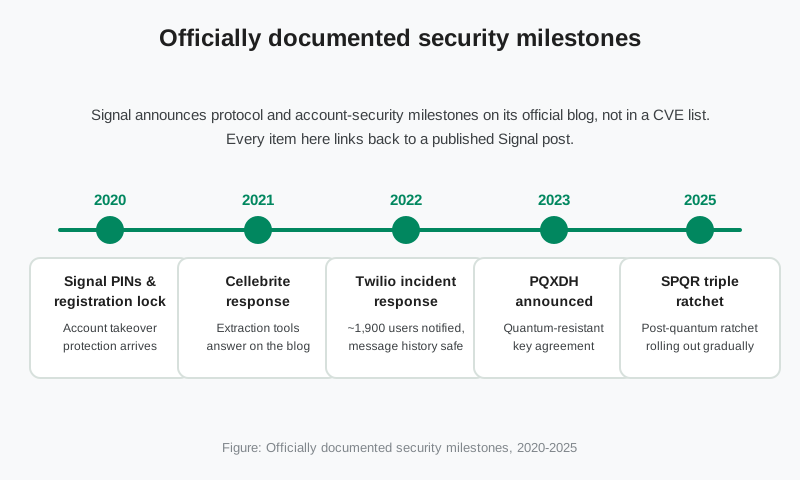
Here is the public record, each item traceable to a published Signal post. This is not a CVE history. Signal does not maintain one. It is the set of security milestones Signal chose to announce, which tells you what the team considers important enough to talk about.
| Year | Milestone |
|---|---|
| 2020 | Signal PINs and registration lock. Announced on the official blog (Introducing Signal PINs and Improving Registration Lock), these protect your account rather than your messages. Your PIN encrypts your profile, settings, and contacts, and registration lock requires the PIN before your number can be registered on a new device. Even with your SMS code, an attacker cannot take over your account without the PIN. The lock expires after seven days of inactivity so a forgotten PIN cannot lock you out forever. |
| 2021 | The Cellebrite response. In an April 2021 blog post, Signal described getting hold of Cellebrite's device-extraction hardware, the kind sold to law enforcement to pull data off seized phones, and examining it. The post found that very little care had gone into the security of Cellebrite's own software, and that a specially crafted file on a phone could derail its extraction tools. It also flagged snippets of Apple code inside Cellebrite's software as a potential legal risk. The message was pointed: the threat is not breaking Signal's encryption, it is physical access to your unlocked phone. |
| 2022 | The Twilio incident response. In August 2022, Twilio, the company that handles Signal's SMS verification, suffered a phishing attack. Signal disclosed that about 1,900 users had phone numbers or SMS verification codes exposed. Message history, contact lists, profiles, and blocked lists were not affected, because Signal does not hold that data in the first place. Signal notified the affected users directly, unregistered their devices as a precaution, and recommended registration lock. The full account is on Signal's support page. |
| 2023 | PQXDH, the post-quantum key agreement. Announced on the blog (Quantum Resistance and the Signal Protocol), Signal upgraded the protocol's key agreement from X3DH to PQXDH, combining the classic X25519 elliptic-curve exchange with the post-quantum CRYSTALS-Kyber-1024 mechanism. An attacker must break both to compute conversation keys. The target is the "harvest now, decrypt later" threat: encrypted messages recorded today staying unreadable even if quantum computers arrive later. |
| 2025 | SPQR, the triple ratchet. Announced on the blog (Signal Protocol and Post-Quantum Ratchets), Signal added the Sparse Post-Quantum Ratchet alongside the existing double ratchet, creating a triple ratchet. Keys keep evolving forward with quantum-safe material mixed in, and the code was formally verified. It rolls out gradually in the background. You do nothing; keeping the app updated is the whole job. |
Notice what is missing: there is no drumbeat of emergency patches, no "update now or else" advisories. That is not because Signal is perfect. It is because the product's security model puts the heavy lifting into the protocol and the account design, where fixes benefit everyone at once, instead of into a stream of app-level fire drills. When a real incident touched users, the Twilio case, Signal disclosed it within days, named the scope, and said exactly what to do.
What did the Twilio incident actually change?
The Twilio incident is the clearest window into how Signal thinks about security, because it is the one time a real attack reached real users. The lesson Signal drew was not "SMS is broken," everyone already knew that. It was that the registration step is the account's weakest link, and registration lock is the fix.
Here is why the incident played out the way it did. Your messages are end-to-end encrypted and Signal's servers never hold them, so there was nothing to steal there. Contact lists and profiles are protected by your Signal PIN. What the attacker could reach, phone numbers and SMS codes, lived at Twilio, outside Signal's control. The blast radius was limited by architecture, not by luck.
The practical takeaway is one setting: registration lock. With it on, re-registering your number on a new device requires your Signal PIN in addition to the SMS code. A SIM-swap attacker or anyone with a stolen verification code hits a wall. Signal's own support page recommends it, and it costs nothing to enable. Find it in the app's account settings, and make sure you know your PIN before you need it.
How does Signal prove the update you install is genuine?
The update pipe is only trustworthy if you can check what comes through it. Signal gives you two independent ways to do that.
The signing-key fingerprint. Signal publishes the SHA-256 fingerprint of the certificate that signs the website APK, right on the official download page. We verified the current 4096-bit fingerprint against that page on October 7, 2026:
5A:54:7F:EC:C2:6A:BA:7F:F1:F5:20:3A:45:51:8C:D8
Compare this against the certificate on any APK file before you install it. The page also documents the apksigner command for the check: apksigner verify -v --print-certs --min-sdk-version 24.
Reproducible builds. Since version 3.15.0, Signal's Android builds are reproducible (announced on the blog). That means anyone can compile the published GitHub source in a controlled environment and get the same APK that Signal ships. If the file you downloaded matches a build from the public source, nobody slipped anything into it between the repo and your phone. The repository's own instructions walk through the verification.
Together these two close the loop. The fingerprint proves the file came from Signal's key. Reproducible builds prove the file came from Signal's published code. Neither requires trusting a third party, which is the entire point. The guide on reading the official filename adds one more quick check: the genuine file's name follows a fixed pattern, and fakes usually fail it.
Why does updating fast matter?
Because most security fixes are invisible. Signal's release notes are short by design: feature releases get a paragraph, patch builds get nothing at all. When 8.29.1 or 8.29.2 ships with no published notes, it is fixing bugs and closing small issues, and you will never be told which ones. The only safe assumption is that some of them matter.
There is a second reason, quieter but just as real. Security in Signal compounds through the protocol. PQXDH and SPQR only protect conversations between updated clients. Every person running an old build is a conversation partner stuck on the older security model. Updating fast does not just protect you; it upgrades the security of everyone you talk to.
And there is a third reason for the long term. Signal drops support for the oldest Android versions over time. An old phone that stops receiving updates stops receiving security fixes entirely, with no warning banner. The Android support timeline shows where the floor is today. If your phone is near it, the security decision is really a hardware decision.
How do you stay current?
The whole system in four habits:
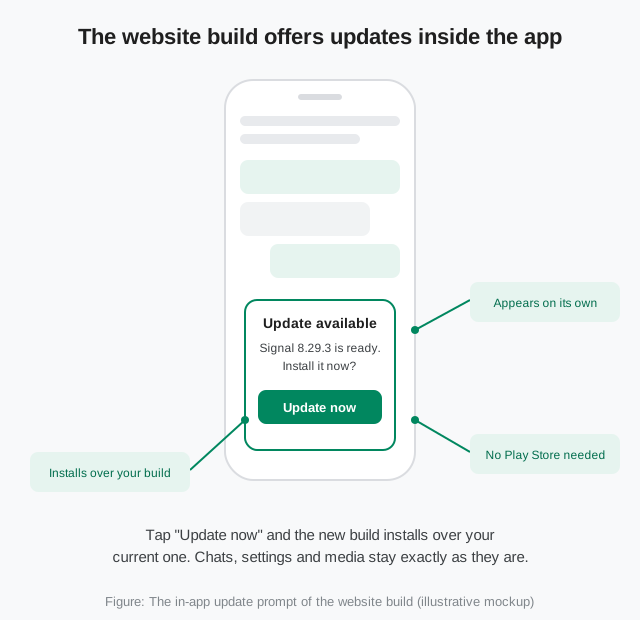
Answer the prompt the day it appears
Website build: accept the in-app update offer immediately. Play build: turn on auto-update for Signal in the Play Store so you never have to think about it.
Turn on registration lock
It is the single highest-value security setting in the app, and the Twilio incident is the proof. You need your Signal PIN for it, so set and remember the PIN first.
Glance at your version number sometimes
Find it in the app's settings. Compare it with the current build guide. If you are several releases behind, something in your update pipe is broken.
Never fetch "new versions" from anywhere else
When a new release is announced, fake download pages appear within hours dressed in the new version number. The update walkthrough covers the safe manual path, and it starts and ends at Signal's own pages.
If an update ever misbehaves, do not go hunting for old APKs on mirror sites. A current backup plus the update-failed fix solves the problem without trading your security for your convenience.
from Signal's official site, file hosted by Signal, not by us
Related guides: all version guides · Android version history · check the current build · is the Signal APK safe? · hoked questions
Where does Signal publish security information?
On the official blog at signal.org/blog and in the release tags of the GitHub repositories. There is no separate security-advisory feed or CVE list. If a security milestone matters, it appears in one of those two places.
Does Signal have CVEs?
Signal does not maintain a public CVE feed. App-level issues are fixed in releases, and the releases are tagged on GitHub. The honest answer is that absence of a CVE list is not absence of bugs; it is a different disclosure culture. The reproducible builds and open source code are how the work stays checkable.
Will a security update delete my chats?
No. Updates install over your current build with the same signing key, so your messages, media, and settings stay in place. A backup before updating is still cheap insurance, and the backup guide covers it.
How do I know an update offer is real?
If it appears inside the app you already have, or in the Play Store, it is real. Both paths are signed and verified automatically. If it arrives as a link on a website, a forwarded message, or a "new version" download page, treat it as hostile until proven otherwise.
What happens if I just never update?
You keep running known bugs, you miss protocol upgrades like the post-quantum ratchets, and eventually your Android version falls out of support and updates stop entirely. Nothing forces you, but every skipped update is a choice to stay on older security.
Is the website build less secure than the Play Store build?
No. It is the same code, signed with a different key, updating through its own pipe. The website build even has one verification advantage: the signing-key fingerprint is published on Signal's download page for independent checking. Pick whichever channel suits your phone.