
What "Universal APK" Means
Published: October 7, 2026 Updated: October 8, 2026
Universal in one paragraph
You have already seen the word. The official file is named Signal-Android-website-prod-universal-release-8.29.3.apk, and "universal" sits right in the middle of it. It is the packaging label: this one APK contains the app compiled for every processor type Android runs on. Download it on a brand-new flagship or a five-year-old budget phone and the same file installs. The filename guide decodes every part of that long name if you want the full tour.
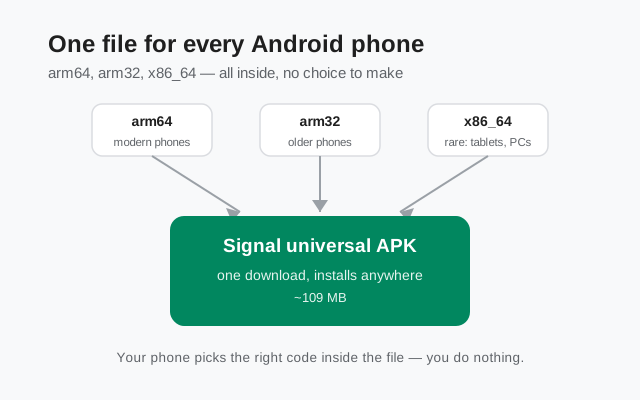
A useful way to picture it: think of a multilingual instruction manual. One booklet, printed in twelve languages. You read your language and skip the rest. The booklet is thicker than a single-language one, but nobody has to pick the right edition at the shop. The universal APK works the same way. It is thicker than it needs to be for your phone alone, and in exchange nobody, on any supported phone, ever downloads the wrong file.
Installation works exactly like any other APK. Your phone opens the file, finds the code written for its own processor, and ignores the other two. There is no extra step, no setting to change, no compatibility mode. If you can install an APK at all, you can install the universal one.
The CPU part, in plain English
The CPU is the chip that runs your phone. Different chip families speak different low-level "machine languages," and app makers compile their code separately for each one they want to support. These variants are called architectures. Android phones use three of them, and the universal APK carries all three:
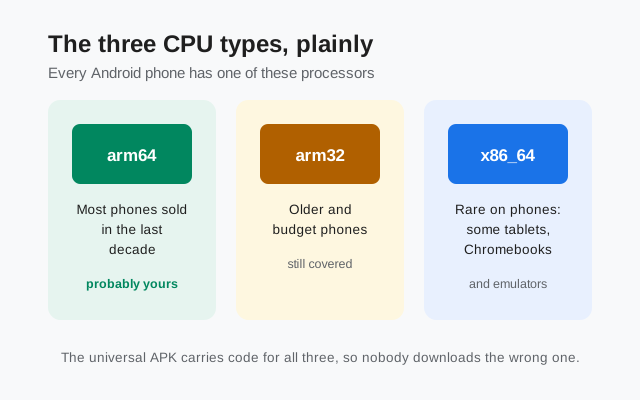
arm64: the modern standard
Nearly every phone sold in the last decade uses it, so this is almost certainly what your phone has. If you have bought a phone recently, or even not so recently, you are on arm64.
arm32: older and cheaper phones
It is the previous generation, still in use on devices that have been around a while. Signal keeps supporting these phones, so their code ships in the same file.
x86_64: rare on phones
You meet it on some tablets, Chromebooks that run Android apps, and emulators on PCs. Almost nobody downloading Signal on a phone needs it, but it costs Signal little to include and it keeps the file truly universal.
Why does this matter at all? Because an APK that contained only arm64 code would refuse to run properly on an arm32 phone. In the early days of Android sideloading, some apps solved this by offering separate downloads: "get the arm64 version" or "get the x86 version," and users had to figure out which chip they owned. Most people had no idea, and the support forums filled up with wrong-download complaints. Signal's answer is to never ask the question. One file, all architectures, zero chip knowledge required.
Why Signal ships one file
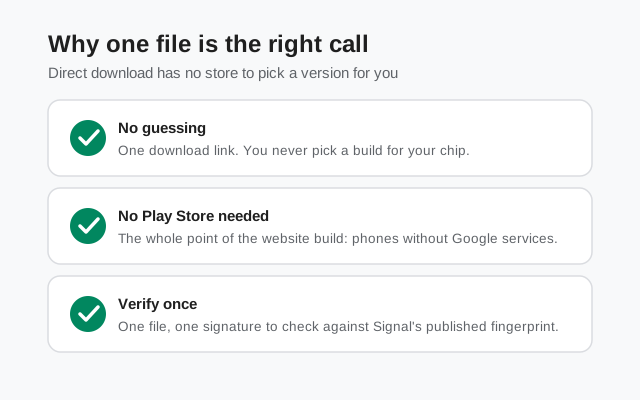
The reason is structural. The Google Play Store knows your device: when you tap install, Play looks at your phone's processor, screen, and language, then serves a build tailored to exactly that device. A download page cannot do any of that. It is just a file link. It has no idea what phone is on the other end, so the only safe choice is a file that works on all of them.
One link, one signature
One file also keeps everything else simple. Support pages, help articles, and QR codes all point to a single link. There is no "which download is mine" step to get wrong and no menu of variants to maintain. For verification, it is one file with one signature: download it, check it against the fingerprint published on Signal's download page, and you are done. Three variants would mean three files to verify and three chances to grab the wrong one.
The tradeoff: size
There is a real tradeoff, and Signal does not hide it: size. The universal APK is about 109 MB (114,758,484 bytes), because it carries three sets of processor code plus everything else the app needs. A tailored download would be smaller. On Wi-Fi that hardly matters. On a metered mobile plan it does, so the sensible move is to download the file on Wi-Fi and keep it. The size buys you certainty: whatever phone you, your family, or your friends use, this file installs.
The right tool for the website build's job
The universal approach also fits the website build's whole reason for existing. The website build is for phones without Google services, odd devices, and situations where the Play Store is not an option. Those are exactly the situations where a tailored download pipeline cannot help you. One complete file, downloadable anywhere and verifiable by hand, is the right tool for that job.
How the Play Store does it differently
The Play Store solves the same problem from the opposite direction. Instead of shipping one complete file, the developer uploads a single app bundle and Google Play slices it per device. Your phone gets only its own architecture's code, only the screen resources its display needs, and only its language. These per-device packages are called split APKs, and they are why a Play Store download of Signal is smaller than the 109 MB universal file.
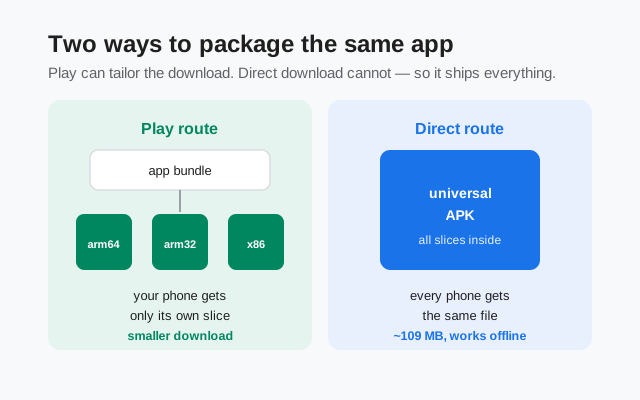
Neither approach changes the app itself. The splits are a packaging optimization, not a different Signal. The features, the encryption, the account system, and the version numbering logic are identical. If your friend installs from the Play Store and you install the universal APK, you are running the same app, and your chats work together without either of you thinking about it.
This is also why you cannot mix and match the two channels' files, a separate issue from packaging. The website build and the Play build are signed with different keys, so Android treats them as different app identities. The version-difference guide explains that system in full: same code, two signatures, separately numbered releases.
Universal vs split APKs: what changes for you
In daily use, almost nothing. But the differences are worth knowing once, so here they are side by side:
| Question | Universal APK (website build) |
|---|---|
| What do I download? | One file, about 109 MB, the same for every phone. |
| Do I pick a version for my chip? | Never. The phone selects its own code inside the file. |
| Works without the Play Store? | Yes. That is the point of the website build. |
| How do I verify it? | One file, one signature: compare against the fingerprint on Signal's download page. |
| How do updates arrive? | The app checks for updates itself and offers them in the app. |
And the Play side of the same table:
| Question | Split APKs (Play build) |
|---|---|
| What do I download? | A smaller package tailored to your device, assembled by Play. |
| Do I pick a version for my chip? | Never. Play picks for you automatically. |
| Works without the Play Store? | No. It needs Play to install and update. |
| How do I verify it? | Play handles integrity checking for you. |
| How do updates arrive? | Through the Play Store, on its staged rollout schedule. |
Two packaging strategies, one app. If you are on the website build, "universal" is the reason your single download works on every phone you own. Grab it from Signal's official download page, check the current build number while you are there, and the download guide walks through the install itself.
from Signal's official site, file hosted by Signal, not by us
Frequently asked questions
Do I need to know my phone's processor type to download Signal?
No. That is the entire point of the universal APK. One file covers arm64, arm32, and x86_64, and your phone picks the right code inside it automatically.
Is the universal APK bigger than the Play Store download?
Yes. The universal file is about 109 MB because it carries code for all three processor types. The Play Store serves your phone only its own slice, so its download is smaller. The installed app runs the same either way.
Does the bigger file make the app slower?
No. Your phone loads only the code written for its own processor; the other two sit unused in the file. Performance is identical to the Play build.
Can I install the universal APK on any Android phone?
On any phone Signal supports, yes. 'Universal' answers the processor question. Whether your Android version is still supported is a separate question, covered in the Android support timeline.
Why does the official filename say 'universal'?
It is the packaging label in the filename: Signal-Android-website-prod-universal-release-8.29.3.apk. Each part of that name is decoded in the filename guide.
Should I download the 109 MB file over mobile data?
It works, but on a metered plan it is a heavy download. Wi-Fi is the sensible choice. Once downloaded, the file installs offline like any APK.
Related guides: all version guides read the APK filename why the versions differ check the current build download walkthrough Android support timeline