
Molly: the independent FOSS Signal fork, explained
Published: October 7, 2026 Updated: October 8, 2026
Molly is not Signal. It is an independent free and open-source fork of the Signal Android app, built and maintained by a third party at molly.im. It is not made by, endorsed by, or affiliated with Signal Foundation, and this guide site is not affiliated with either. That distinction matters for everything below: Molly talks to the same Signal network (you can message any Signal user), but it is a separate app, with its own releases, its own update channel, and its own trust considerations. If you want the official app, download Signal's own APK instead.
So why does Molly exist? The official Signal Android app depends on Google services in a few places, most visibly for push notifications through Firebase Cloud Messaging (FCM) and for some contact-discovery pieces. On phones without Google services (Huawei phones, GrapheneOS, other de-Googled setups), that dependency is a real problem. Molly was built to remove it. It replaces Google push with UnifiedPush (an open push standard) or a built-in background connection, so notifications work on Google-free phones without microG or workarounds. It also adds options Signal does not ship, most notably encrypted database storage at rest: your local message database can be locked with a passphrase, so a stolen unlocked-ish phone does not hand over your history as easily.
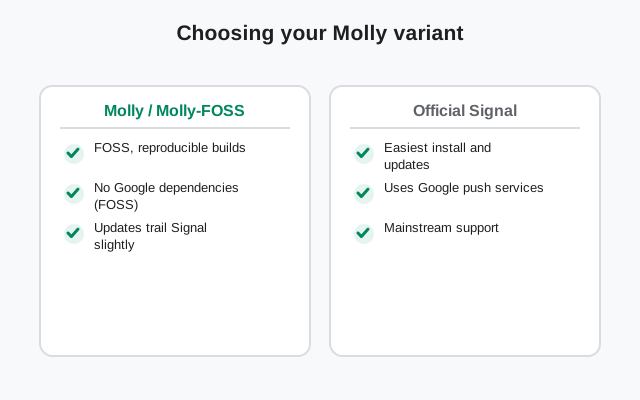
There are two Molly variants, and choosing is the first decision. Standard Molly keeps Google FCM for notifications (like official Signal) but adds the extra features and removes some Google dependencies elsewhere. Molly-FOSS removes all proprietary Google code and uses UnifiedPush instead. It is the pick for de-Googled phones. Both install as separate apps from molly.im, both follow Signal's releases with a short delay, and both are published with reproducible builds (you can verify the published APK was built from the published source code). The which-Molly decision guide and the Molly vs Molly-FOSS comparison walk through the choice in detail.
Because it speaks the Signal protocol, Molly interoperates fully with official Signal: your contacts cannot tell which app you use, group chats work, calls work, disappearing messages work. What differs is the wrapper around that protocol: notification plumbing, database encryption, backup behavior, and a handful of extra settings. The Molly vs Signal comparison lists the concrete differences so you can decide whether the extras are worth switching for. For many people on normal phones with Google services, the honest answer is that official Signal is the simpler choice; Molly's case is strongest on Google-free phones.
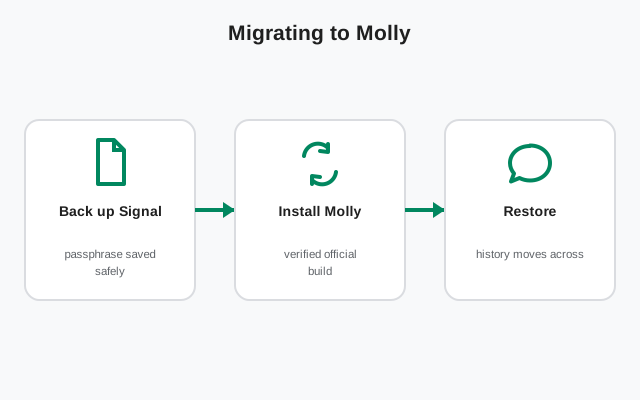
Migration is possible in both directions. Moving from Signal to Molly (or back) uses Signal's own encrypted backup files. You back up in one app and restore in the other, since they share the backup format. But plan it: back up first, confirm the backup passphrase works, and know that linked devices complicate things. The migration guides cover the exact order of operations so you do not strand your chats.
A fork also means a different trust model, and you should think about it before installing. Molly is developed in the open and its builds are reproducible, which is the right foundation. But it is a small independent project, not a funded nonprofit with a security team. Updates follow Signal's releases with some lag, which means security fixes can arrive later than on official Signal. You also give up the official support channel: if something breaks, the community and molly.im documentation are your help desk. The is-Molly-safe guide weighs this honestly instead of cheerleading.
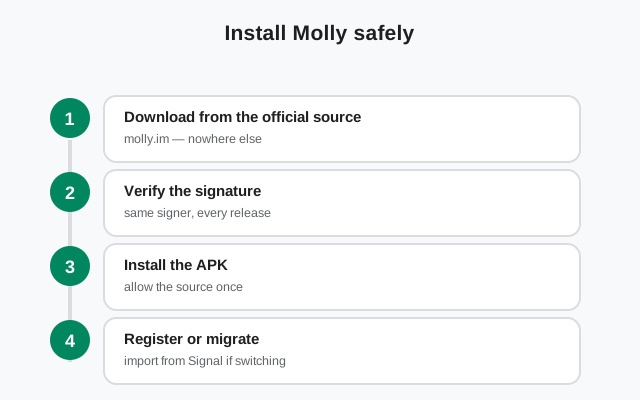
Two warnings that save people real trouble. First: install Molly only from molly.im. The same fake-APK ecosystem that targets Signal targets forks too, and a trojaned "Molly Pro" is a classic lure (our fork-landscape guide lists the fakes to avoid). Second: there are other "Signal forks" and "Signal mods" floating around that are not forks at all: repackaged malware with a familiar icon. Real forks are open source with published code; if there is no source repository, it is not a fork, it is a trap.
How to use this hub: deciding whether you want a fork at all? Read what Molly is, why use a fork, and Molly vs Signal. On a Huawei or GrapheneOS phone? Molly on Huawei and Molly on GrapheneOS are your starting points. Ready to install? The install guide points only to the official molly.im releases. And if you just want official Signal with no forks involved, the download page is where you want to be.
Start with the most-used guides
The basics
What Molly is, why it exists, and whether to trust it.
| Guide | What it covers |
|---|---|
| What is Molly | The independent FOSS Signal fork explained |
| Why use a fork at all | De-Googling and feature motivations |
| Is Molly safe & trustworthy | Trust assessment of the independent fork |
| Molly source code & reproducibility | Code transparency of the fork |
| Other Signal forks (and fakes to avoid) | Fork landscape with fake-fork warnings |
Choosing your variant
Molly vs official Signal, and Molly vs Molly-FOSS.
| Guide | What it covers |
|---|---|
| Molly vs Signal | Feature and design differences |
| Molly vs Molly-FOSS | UnifiedPush vs FCM variants compared |
Install & update
Get it from the official source and keep it current.
| Guide | What it covers |
|---|---|
| Install Molly APK (official) | Official install from molly.im |
| Update Molly APK | Keeping Molly updated |
| Molly on Huawei / no-GMS phones | Why Molly fits Google-free phones |
| Molly on GrapheneOS | Molly as the de-Googled pick |
Migration & backups
Move between Signal and Molly without losing chats.
| Guide | What it covers |
|---|---|
| Migrate Signal → Molly | Backup-restore migration walkthrough |
| Migrate Molly → Signal | Reverse migration walkthrough |
| Molly backup & restore | Backup specifics for the fork |
Technical deep-dives
Notifications, encryption, and release mechanics.
| Guide | What it covers |
|---|---|
| Molly notifications without Google | UnifiedPush setup for Google-free phones |
| Molly database encryption | At-rest database encryption feature |
| Molly contact discovery without Google | Google-free contact discovery |
| Molly release cycle & updates | How Molly tracks Signal releases |
| Molly troubleshooting | Common Molly failure modes |
How to choose the right guide
| Your situation | Start here | Why it fits |
|---|---|---|
| Normal phone with Google services | /download/signal-apk-download/ | Official Signal is simpler: no fork needed |
| Huawei / de-Googled phone | /molly/molly-huawei/ | Molly is built for Google-free phones |
| I want encrypted local database | /molly/molly-database-encryption/ | Passphrase-locked message storage |
| I want zero Google code | /molly/molly-vs-molly-foss/ | Molly-FOSS removes all proprietary Google code |
| I'm already on Signal | /molly/signal-to-molly/ | Backup-restore migration, chats intact |
| I want maximum trust simplicity | /molly/is-molly-safe/ | Weigh the fork's trust model first |
Frequently asked questions
Is Molly official Signal?
No. Molly is an independent fork built by a third party at molly.im. It is not made, endorsed, or supported by Signal Foundation. It talks to the Signal network, but it is a separate app with separate releases.
Can Molly users message Signal users?
Yes. Molly speaks the same Signal protocol, so chats, groups, calls, and disappearing messages work across both apps. Your contacts cannot tell which one you use.
Which is better: Molly or Molly-FOSS?
Standard Molly suits most people. It keeps Google push for reliable notifications. Molly-FOSS is for de-Googled phones where no proprietary Google code is wanted. The decision guide compares them directly.
Where do I download Molly safely?
Only from the official site, molly.im. Third-party APK sites hosting 'Molly' builds should be treated as hostile. The fork-landscape guide explains the fake-fork problem.
Related hubs
Molly is a legitimate independent project. Just keep it in its lane: install only from molly.im, expect updates to lag official Signal slightly, and prefer official Signal if your phone has Google services.
Sources
Official references we check against: