
Molly on Huawei and other Google-free phones
Published: October 7, 2026 · Updated: October 8, 2026
Molly is one of the best answers to Huawei's missing Google services: the Molly-FOSS build is fully open-source with no Google dependencies, replacing Google's push notifications with UnifiedPush. On HarmonyOS, EMUI without GMS, or any de-Googled phone, the standard Signal app and standard Molly both lean on Google's push service, which simply is not there. Molly-FOSS was built for exactly this situation. This guide covers which build to install, how to get it onto a Huawei phone without the Play Store, how to set up notifications without Google, and the honest limits of what a Google-free setup can do.
Why Huawei phones are a special case
Modern Huawei phones ship without Google Mobile Services. No Play Store, no Google push service, no background plumbing that most Android apps quietly depend on. The official Signal app expects Google's push service for message notifications; on a phone without it, notifications become unreliable or stop entirely. This is not Signal being hostile to Huawei. It is just what happens when an app built around Google's infrastructure lands on a phone that does not have it.
Molly exists partly because of this exact problem. The fork's developers added a second build, Molly-FOSS, that strips out the Google dependencies and uses UnifiedPush for notifications instead. UnifiedPush is an open standard that lets any compatible "distributor" app wake Molly when a message arrives, no Google account or Google service required. If you want the mechanics, our UnifiedPush notifications guide goes deeper. The short version: on a Google-free phone, Molly-FOSS is not a workaround. It is the intended tool.
Which Molly build: FOSS, not standard
Molly ships in two builds and this is one of the cases where the choice is clear: install Molly-FOSS. The standard build still uses Google's push service, which buys you nothing on a Huawei phone and leaves you with the same broken notifications the official app has. Molly-FOSS is the fully open-source build with no proprietary bits, and it is the one designed for Google-free life.
The trade is real and you should know it going in: anything that inherently requires Google Play services does not exist in the FOSS build. That is the price of independence from Google, and it is a price most Huawei users have already decided they are willing to pay across all their apps. If you are still weighing the two builds for a different phone, our decision guide covers the general case.
Installing Molly on a Huawei phone
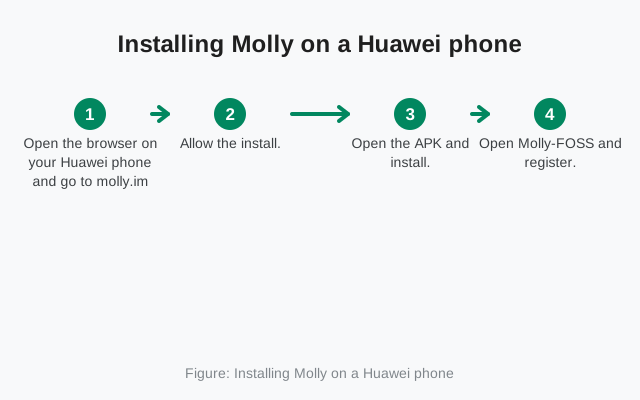
- Open the browser on your Huawei phone and go to molly.im, the developers' own site. Download the Molly-FOSS APK. Do not get it from a mirror or a forum link.
- Allow the install. HarmonyOS and EMUI will ask you to allow installs from the browser (or your file manager, if you moved the file). This is the normal "unknown apps" permission; allow it just for the app you are installing from.
- Open the APK and install. The package installs like any other app. If you use F-Droid, you can instead add the official repository at molly.im/fdroid and install Molly-FOSS from there, which also handles future updates.
- Open Molly-FOSS and register. Enter your phone number and complete SMS or call verification. If you are migrating from another phone or app, restore your backup during setup; see our Signal-to-Molly migration guide.
- Set up notifications as described in the next section, before you decide everything works.
If the install flow feels unfamiliar, our general Huawei install guide and the HarmonyOS install guide cover the same permission steps for the official app; the taps are the same. Prefer the official Signal app instead? The same guides apply, with the notification caveat from the first section.
Molly is distributed by its own developers. The only safe sources are the official site and its official F-Droid repository.
Open molly.imF-Droid users: add molly.im/fdroid as a repository instead.
Notifications without Google services
Notifications are the one part of a Google-free setup that needs your attention. Without Google's push service, nobody can wake your app from the outside, so Molly-FOSS uses UnifiedPush: you install a small distributor app, it holds the connection, and it wakes Molly when a message arrives. Our UnifiedPush guide walks through distributor choice and setup.
Two settings on the phone side matter as much as the distributor. First, make sure notifications are enabled for Molly in the system settings; this sounds obvious and is the actual cause of a large share of "notifications don't work" complaints. Second, find the battery settings for Molly and exempt it from aggressive battery optimization if your phone offers that option. Huawei's power management is famously enthusiastic about killing background apps, and a messaging app that gets killed cannot receive anything, UnifiedPush or not. You are not doing anything exotic here; you are just telling the phone that this particular app is allowed to stay alive.
Test it properly: have someone send you messages while the phone sits untouched for ten minutes, then with the screen off for longer. If messages arrive promptly in both cases, your setup is good. If they only arrive when you open the app, the distributor is not waking Molly, which usually means the battery exemption did not stick or the distributor needs its own background permission. Fix the phone-side settings first before blaming the app.
What works and what doesn't
| Feature | Status on Molly-FOSS / Huawei |
|---|---|
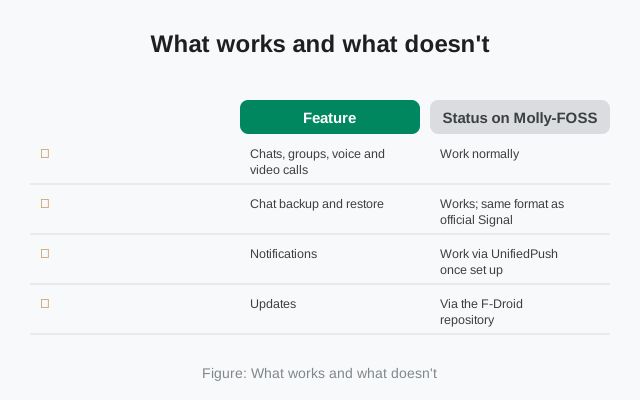
| Chats, groups, voice and video calls | Work normally |
| Chat backup and restore | Works; same format as official Signal |
| Notifications | Work via UnifiedPush once set up |
| Updates | Via the F-Droid repository, or manual APK from molly.im |
| Anything requiring Google Play services | Not available |
| Release timing | Trails official Signal; fork rebuild gap applies |
The honest limits, stated plainly: features that are inherently tied to Google's services do not exist in a Google-free build, because there is nothing on the phone for them to talk to. That is not a Molly defect; it is the definition of a Google-free phone. Everything that is pure Signal protocol, which is to say the messaging itself, works exactly as it does anywhere else. Your contacts on iPhones, Pixels, and Galaxies will never know you are on a Huawei phone running a fork.
Also be realistic about the release gap. Molly's builds follow Signal's releases with a delay while the small team reviews and rebuilds. On a Huawei phone this matters slightly more than usual, because you cannot fall back to the Play Store version. Check molly.im or your F-Droid repository periodically rather than assuming you are current.
First-run checklist
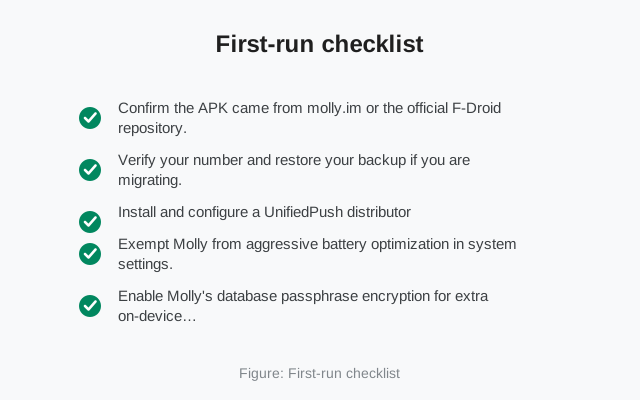
- Confirm the APK came from molly.im or the official F-Droid repository. If it came from anywhere else, uninstall and start over.
- Verify your number and restore your backup if you are migrating.
- Install and configure a UnifiedPush distributor, then test notifications with the screen off.
- Exempt Molly from aggressive battery optimization in system settings.
- Enable Molly's database passphrase encryption for extra on-device protection.
- Send a test message and make a test call to a contact.
- Decide your update path: F-Droid repository (automatic checks) or manual downloads from molly.im.
from Signal's official site — file hosted by Signal, not by us
Huawei phones and Google-free Android are Molly-FOSS's home turf. The setup takes a little more care than installing from the Play Store, mostly around notifications, but once it is done you have the full Signal network in your pocket with no Google in the loop. For the broader picture of installing without Play, see our no-Play-Store install hub.
Frequently asked questions
Does Molly work on HarmonyOS?
Yes. Molly-FOSS installs on Huawei phones running HarmonyOS or EMUI without Google services. Download the APK from molly.im in the phone's browser and allow installs from the browser when asked. Check molly.im for the current minimum Android version requirements.
Why not just use the official Signal app on Huawei?
You can, but the official app relies on Google's push service for notifications, which does not exist on Huawei phones without GMS. Notifications become unreliable. Molly-FOSS replaces that dependency with UnifiedPush, which is why it is the recommended pick here.
Do I need a Google account for Molly-FOSS?
No. The FOSS build has no Google dependencies at all: no account, no Play services, no Google push. That is the point of the build.
Will my chats transfer to Molly on my Huawei phone?
Yes. Back up in your old app first, then restore during Molly's setup. Both apps understand the same backup format.
How do I update Molly-FOSS on Huawei?
The easiest path is the official F-Droid repository at molly.im/fdroid, which notifies you of updates. Otherwise, download new APKs manually from molly.im.
Is Molly-FOSS slower to get updates?
Molly releases follow Signal's releases with a gap while the independent team reviews and rebuilds each version. That applies to both builds, including FOSS.
Keep reading
- Molly UnifiedPush notifications: the push setup this whole guide depends on
- Install Molly safely: verified safe sources and verification
- Which Molly should you choose?: the general standard-vs-FOSS decision
- Signal APK on Huawei: the official-app install path for Huawei