
How to block and unblock someone on Signal, and what changes when you do
Published: October 7, 2026 Updated: October 8, 2026
Blocking someone on Signal cuts that person off: the blocked person can no longer message or call you, and Signal never tells them they were blocked. It takes a few seconds from the conversation screen, and you can undo it from your blocked list any time. Below: unblocking, and when to use block versus report, mute, or deleting the chat.
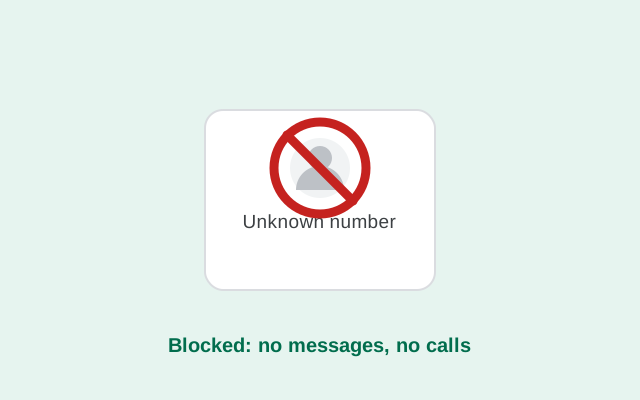
How to block someone
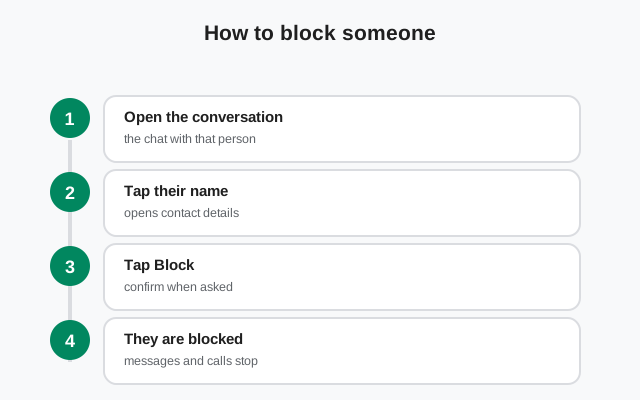
Blocking works from any conversation or contact view. The exact labels vary slightly by app version, but the flow is the same:
-
Open the conversation
Open your chat with the person you want to block. You can also block someone straight from a message request without accepting it first.
-
Open their contact details
Tap their name at the top of the conversation to open the contact or conversation settings screen.
-
Choose Block and confirm
Select Block and confirm. The conversation is closed off immediately. They cannot message or call you from that moment on.
Changed your mind a second later? Unblocking is just as quick (see below).
What the blocked person experiences
Here is the honest picture of what blocking does and does not do. Signal is designed so that blocking is quiet.
- They get no notification. Signal does not tell someone they were blocked. There is no "you have been blocked" message, no system notice in their app.
- Their messages stop reaching you. Anything sent after the block never arrives in your chats. From your side it is as if they went silent.
- Their calls do not come through. A voice or video call from them simply never rings on your phone.
- Your profile becomes unreachable to them. They cannot start new conversations with you while the block is in place.
- They might guess, but Signal does not confirm. If their messages never get replies and calls never connect, a person may suspect they were blocked, but the app itself gives them no confirmation either way. That ambiguity is deliberate.
- Old messages are not erased for them. Blocking stops future contact only. The chat history on their phone stays put. If you want your side of the history gone too, delete the conversation separately.
from Signal's official site — file hosted by Signal, not by us
How to tell if someone blocked you
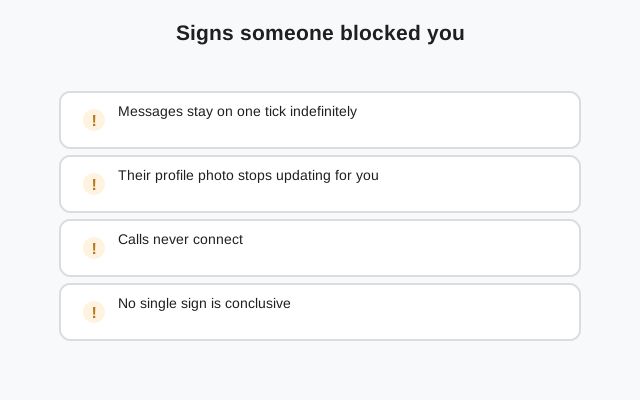
People ask this constantly, so here is the straight answer: Signal gives you no definitive way to know. There is no icon, no status, no message. Everything you can observe is indirect, and every indirect sign has innocent explanations.
- Your messages get no reply. The weakest signal of all. They could be busy, they could have notifications off, or they could have blocked you. You cannot tell which from silence alone.
- Calls never connect. If every call rings out or fails immediately over days, a block is possible, but so is an uninstalled app, a dead phone, or a changed number.
- Their profile looks frozen. An unchanged profile photo or "last seen" that never updates can mean a block, or it can mean they simply never change those things.
- The honest test: another channel. If you genuinely need to know, reach them another way: a text message, a call to their number, a mutual friend. Do not build a case out of app behavior alone; it will mislead you as often as it helps.
And the reverse courtesy applies: if you blocked someone, accept that they may eventually figure it out from the silence. The app will not announce it, but patterns speak.
How to unblock someone
Unblocking restores normal contact. Their future messages and calls will come through again.
-
Open the blocked list
Go to Settings → Privacy → Blocked. Every person you have blocked is listed here.
-
Unblock the person
Tap the person and choose Unblock. The block lifts immediately.
Two things to know: messages they sent while blocked are gone. Unblocking does not deliver the backlog. And unblocking does not re-add them to your phone's contacts; if you deleted the contact entry too, save it again.
Blocking stops Signal contact, not everything else
A Signal block is powerful inside Signal and meaningless outside it. Worth remembering when the situation is serious:
- They can still call or text your number directly. Blocking in Signal does not block regular phone calls or SMS. If someone is harassing you across channels, block the number at the phone level too (your phone app's own block list).
- They can still find you if you share spaces. A blocked person who shares a group with you still sees your messages in that group. Blocking plus leaving the group is the full separation.
- New accounts are a loophole. A determined person can register a new number and contact you again. If that happens, block the new contact too. Also consider tightening who can find you under Settings → Privacy → Phone number.
- For threats, go beyond the app. Blocking handles the contact. Threats, stalking, or fraud deserve a report to local authorities, not just a block. Save screenshots of threatening messages before you block, since blocking plus deleting can destroy evidence you might need.
Managing your blocked list
- Review it occasionally. The blocked list is easy to forget. If someone you meant to unblock months ago is still there, their messages have been silently dropped the whole time. A quick check at Settings → Privacy → Blocked takes ten seconds.
- Accidental blocks happen. It is surprisingly easy to block the wrong person from a message request. One tap on a similar-looking name is all it takes. If a contact suddenly "went quiet," check the blocked list before assuming anything else. This is also a known cause of contacts seemingly disappearing.
- Blocking is per account. If you re-register Signal on a new number, your blocked list does not automatically carry over in every case. Check it after moving numbers.
Blocking and group chats
Blocking is about direct contact between you and one person. Groups are shared spaces, so the rules are a little different:
- You stay in shared groups together. Blocking someone does not remove either of you from groups you both belong to.
- They cannot contact you directly. The block still stops their one-to-one messages and calls, even if you share a group.
- Leaving is the stronger move for groups. If the problem is a group rather than a person, leaving the group (or asking an admin to remove the person) solves it more cleanly than blocking alone.
Block vs report spam vs mute vs delete
People mix these up. Each tool solves a different problem. Pick the right one and you will not have to redo it later.
| Action | What it does | When to use it |
|---|---|---|
| Block | Stops their messages and calls; no notification to them; reversible | Harassment, ex-partners, anyone you never want to hear from |
| Report spam | Flags the sender to Signal as spam; usually combined with blocking | Scams, phishing links, bulk unsolicited messages |
| Mute | Silences notifications but messages still arrive | Busy group chats, chatty contacts you still want to read later |
| Delete chat | Removes the conversation from your phone only | Cleaning up; does not stop them messaging you again |
| Block + report | Full cutoff plus a spam flag to Signal | Scam messages in message requests: the recommended combo |
Frequently asked questions
Does Signal tell someone when I block them?
No. Signal sends no notification to the blocked person. Their messages simply stop reaching you and their calls stop connecting. They may guess from the silence, but the app never confirms it.
Can a blocked contact still see my profile or stories?
A blocked contact cannot message or call you, and they cannot start new conversations with you. Blocking is designed as a full cutoff of direct contact between you and that person.
What happens to messages sent while someone was blocked?
They never arrive. Messages sent during the block are dropped, not queued. Unblocking later does not deliver the backlog. Only new messages sent after unblocking come through.
How do I unblock someone on Signal?
Go to Settings → Privacy → Blocked, tap the person, and choose Unblock. The block lifts immediately and their future messages and calls will reach you normally.
Does blocking delete our chat history?
No. Blocking only stops future contact. Your chat history stays on your phone, and theirs stays on theirs. Delete the conversation separately if you want the history gone from your side.
Should I block or report a spam message?
Do both: report flags the sender to Signal so other users are protected, and block stops them from contacting you again. For a simple wrong-number message, just delete it.
How can I tell if someone blocked me on Signal?
You cannot know for sure. Signal provides no indicator. Unanswered messages and calls that never connect are hints, but each has innocent explanations like an uninstalled app or a changed number. The only reliable check is reaching them through another channel.
Does blocking in Signal also block normal phone calls?
No. A Signal block only stops contact inside Signal. The person can still call or text your number directly, so use your phone's own block list as well if the harassment spans channels.
Related guides: message requests explained, contacts not showing, phone number privacy, or the full troubleshooting hub.