
Signal contacts not showing? Fixes that bring them back
Published: October 7, 2026
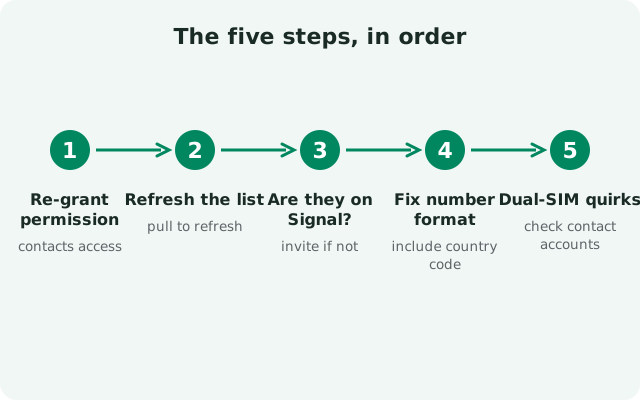
If your contacts aren't showing in Signal, the cause is a permission problem nine times out of ten. Signal builds its contact list from your phone's address book: it can only display contacts it is allowed to see, and only the ones who actually have Signal accounts. This guide walks through the fixes in order: re-granting the contacts permission, refreshing the list, fixing number formats, and sorting out dual-SIM and account quirks.
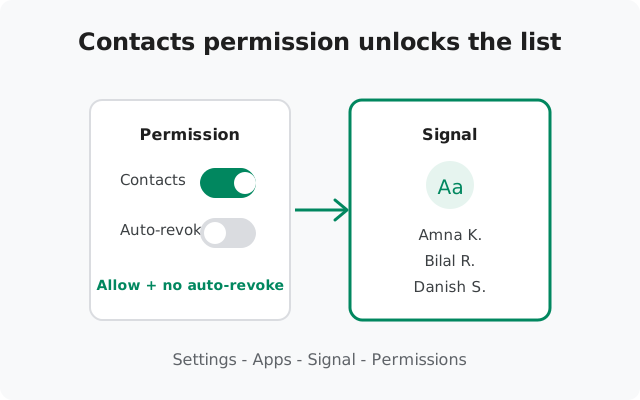
Step 1: Re-grant the contacts permission
This is the fix that works most often, so do it first even if you're "sure" the permission is on. System updates and permission auto-resets change it silently.
-
Open Signal's permissions
Go to Settings → Apps → Signal → Permissions (or long-press the Signal icon → App info → Permissions).
-
Set Contacts to "Allow"
Tap Contacts and choose Allow. Not "Ask every time," and not "Don't allow." On newer Android versions, "Ask every time" means Signal loses access between sessions, so contacts appear and disappear randomly.
-
Check for auto-revoke
On the same permissions screen, look for "Remove permissions if app is unused" (or "Pause app activity if unused") and turn it off for Signal. If you don't open Signal for a few months, Android can silently revoke its contacts permission. Your contact list goes empty overnight.
-
Restart Signal and check
Force-close Signal, reopen it, and open a new conversation to see if contacts are back.
Step 2: Refresh Signal's contact list
Signal doesn't always notice the moment you save a new contact. Force a refresh:
- Pull to refresh. In Signal, tap the compose (new message) button, then pull the contact list down. The list refreshes and newly added contacts appear.
- Restart the app. Fully close Signal (swipe it away from recent apps) and reopen it. The contact list rebuilds on launch.
- Wait a few minutes for new registrations. If your friend just installed Signal, their number needs to propagate through Signal's directory first. Give it 5–10 minutes, then refresh again. This is a sync delay, not a bug.
Step 3: Check the contact is actually on Signal
Signal only lists contacts who have Signal accounts registered. It can't show someone who doesn't use the app. That's the most common "missing contact" of all.
- Look for the invite option. In the new-conversation list, contacts without Signal appear under an invite section (wording varies by version). If your person is there, they simply don't have Signal yet. Send them an invite.
- Confirm which number they're on. Ask which number they registered with. People often have two numbers and registered Signal on the one you didn't save.
- Changed numbers break the match. If your contact changed their number recently, your saved number no longer matches their Signal account. Update the number in your phone's contacts and refresh.
Step 4: Fix number formats and duplicates
Signal matches your phone-book entries against its directory by phone number, so the format matters:
- Include the country code. A number saved as
0300 1234567may not match the registered+92 300 1234567. Edit the contact to include the full international format with the+prefix. - Merge duplicates. If the same person is saved twice, once with and once without a country code or under two different names, Signal can show neither cleanly. Merge them in your phone's contacts app.
- Check for stray characters. Parentheses, dashes, and spaces are usually fine, but odd characters pasted from websites can break matching. Clean the number to digits plus the leading
+. - Watch out for landlines and short codes. A landline number saved for a person will never match a Signal account. Signal accounts are mobile numbers.
Step 5: Dual-SIM and contact-account quirks
- Signal uses one registered number. On a dual-SIM phone, Signal is registered to a single number: the one you verified. Contacts are matched against your address book regardless of SIM, so dual-SIM itself rarely hides contacts. But if you re-registered on your second SIM's number, your contacts see a "new" you, and group memberships can look odd.
- Check which contact account you're viewing. Many phones merge contacts from Google, the SIM card, WhatsApp, and the phone itself. If a contact lives only on SIM 2 or in a disabled account, and your contacts app is set to show only Google contacts, Signal can't see it either. In your phone's contacts app, enable all accounts (or "All contacts") in the display settings.
- Work profiles hide contacts. If your phone has a work profile, contacts saved inside it are invisible to apps in your personal profile, including Signal. Move the contact to your personal address book or install Signal in the work profile.
Privacy settings that hide people
A few privacy-related behaviors can make contacts seem missing when they're really just unreachable:
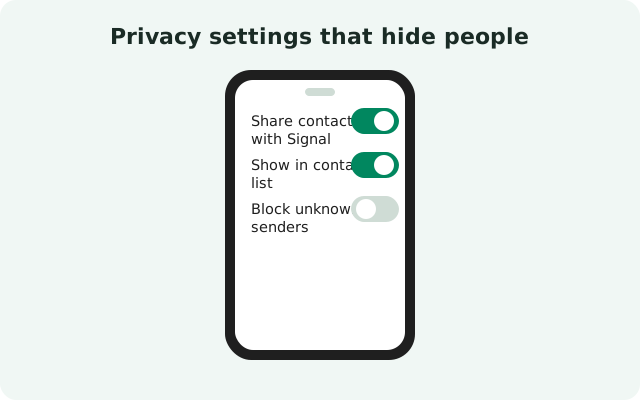
- Phone-number privacy. Signal lets users control who can see their number and who can find them by number (Settings → Privacy → Phone number). If a contact set discovery to nobody, you can still message them if they're in your contacts. Strangers can't find them, though, and edge cases in matching can make them harder to surface.
- Blocked contacts disappear. If you blocked someone (even accidentally), they vanish from your contact list and conversations. Check Settings → Privacy → Blocked and unblock if needed.
- Message requests. Messages from people not in your contacts land in message requests, not your main list. If "my contact's messages aren't showing," check the message requests screen first. Our message requests guide explains why messages land there.
from Signal's official site — file hosted by Signal, not by us
Symptom table: match it, fix it
| Symptom | Most likely cause | Fix |
|---|---|---|
| No contacts at all in Signal | Contacts permission denied or auto-revoked | Settings → Apps → Signal → Permissions → Contacts → Allow; disable auto-revoke |
| Contacts appear and disappear randomly | Permission set to "Ask every time" | Change to "Allow" permanently |
| One specific contact missing | Not on Signal, wrong number, or missing country code | Check invite list; confirm number; add +country code |
| New contact not appearing | List not refreshed, or brand-new Signal registration | Pull to refresh; wait 10 minutes and retry |
| Contact shows as a bare number, no name | Duplicate or malformed contact entry | Merge duplicates; clean the number format |
| Contacts vanished after a phone update | Update reset permissions | Re-grant contacts permission (Step 1) |
| Work colleagues missing | Saved in the work profile | Move to personal contacts or use work-profile Signal |
| Someone I blocked is gone (oops) | Blocked list | Settings → Privacy → Blocked → Unblock |
Frequently asked questions
Why are my contacts not showing up in Signal?
The most common reason is the contacts permission: it was denied, set to "ask every time," or auto-revoked after a period of not using the app. Re-grant it at Settings → Apps → Signal → Permissions → Contacts → Allow, then refresh the list.
Does Signal need access to my contacts to work?
Signal works without it. You can still message anyone by typing their number, but the contact list, names, and invite suggestions all depend on the permission. Without it, you'll see bare phone numbers instead of names.
I added a contact but they don't appear in Signal. Why?
Either the list hasn't refreshed (pull down to refresh in the new-conversation screen), the number is saved without a country code, or the person isn't on Signal yet. If they just registered, wait about 10 minutes for Signal's directory to update.
Can I use Signal on a dual-SIM phone without contact problems?
Yes. Signal registers to one number and reads your whole address book regardless of SIM. Problems only arise if you re-register on the other SIM's number or if contacts live in a hidden account (SIM-only contacts with display filters on).
Someone's messages go to message requests instead of showing as a contact. Why?
Message requests are for people not in your contacts. Signal is telling you it doesn't recognize the sender. Save their number to your contacts (with country code) and future messages will thread normally.
Related guides: re-registering Signal, not receiving messages, or the full troubleshooting hub.