
The Full Tour of Hiding Your Phone Number on Signal
Published: October 7, 2026 · Updated: October 8, 2026
Yes, you can hide your phone number on Signal almost completely. Two settings under Settings > Privacy > Phone Number control who can see your number and who can find you by it, and pairing them with a username means new contacts never need your number at all. The one honest limit: you still need a number to register. This guide walks through every screen, what group members and callers see, and finishes with a 5-minute checklist.
from Signal’s official site — file hosted by Signal, not by us
Why your number is the weak link
Your phone number is the one identifier that follows you across your whole digital life. It rarely changes, it is tied to a carrier account (and in many countries to your real identity through SIM registration), and it is the channel for spam calls, SIM-swap fraud, and unwanted lookup. A chat app that shows your number to every stranger you message hands all of that to anyone who says hello.
Signal spent years with exactly that model: the number was the account, the contact method, and the visible identity, all in one. Usernames split those jobs apart. The number became the credential that registers the account; the username became the handle you share. That split is why a "hide my number" tour is now worth doing. There is actually something to hide behind.
The settings screen tour
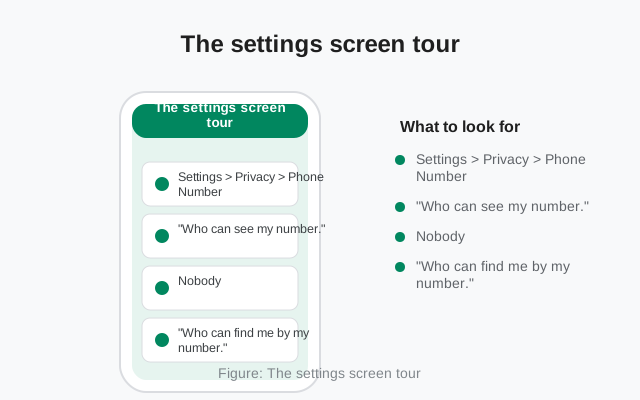
Open Signal on your phone and go to Settings > Privacy > Phone Number. You will find exactly two toggles. They look similar and do different things, so slow down here.
Who can see my number
This controls whether your number appears on your profile's details screen inside Signal. Two choices: Everybody or Nobody. The default is Nobody. With Nobody, people you chat with do not see your number on your profile unless they already have it saved in their own phone's contacts.
Who can find me by my number
This controls whether someone can type your phone number into Signal's search and discover that you have an account. Two choices: Everybody or Nobody. The default is Everybody. That is how Signal has always worked, and it means anyone who already has your number can look you up and send a message request.
Read those two defaults together and you get Signal's compromise: hidden from view, still reachable by people who know the number. If you want the number fully out of circulation, you change the second setting to Nobody and share only your username. The app also enforces a dependency here: setting "find me" to Nobody forces "see my number" to Nobody too. The stricter setting drags the looser one along, which is the right behavior: a number that cannot be searched should not be displayed either.
Contact discovery vs. number exposure
Two different things get mixed up here, so here is the split that makes the settings make sense.
Contact discovery is Signal checking your phone's contact list to show you who is already on Signal. That check happens on your device, and it does not publish your number to anyone else. Discovery is Signal learning about your contacts; it is not Signal telling your contacts about you.
Number exposure is the other direction: whether people see your number in chats, on your profile, or when they search for it. That is what the two toggles in Settings > Privacy > Phone Number control.
The trade-off people actually hit: turn off "Who can find me by my number" and your existing contacts will not see you appear as a Signal contact automatically the way they used to. They see you once you message them first. If that convenience matters more to you than the privacy gain, keep discovery open and lock down only visibility ("Who can see my number" to Nobody). That middle ground is a legitimate choice, not a failure.
The username path: contact without numbers
Once both settings are on Nobody, you still need a way for people to reach you. That is the username. You set it in your Profile settings: a name you choose plus at least two digits, like name.42. People type the full username (digits included) into a new chat, confirm your profile, and message you. The number never enters the exchange.
Three details keep this working smoothly. First, the username and the profile name are different things: the profile name is the display name shown in chats, while the username is the handle people search for. Second, usernames are unique across Signal and disposable: change or delete yours any time, which you cannot do with a phone number. Third, the number-hiding settings and the username feature were designed together, so they compose cleanly: hidden number plus shared username is the intended "contact me without knowing my number" path, not a hack. The usernames privacy guide covers the model in more depth.
What groups and calls show
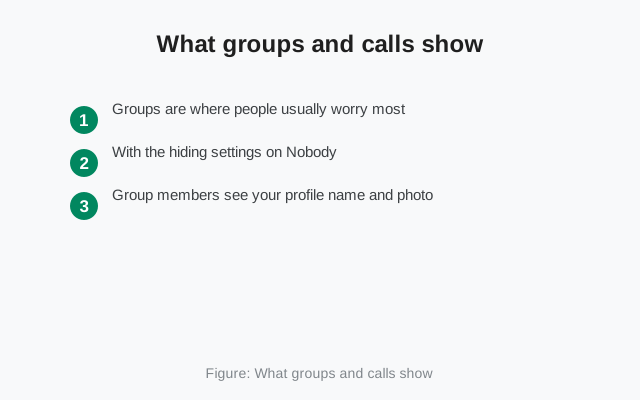
Groups are where people usually worry most: twenty strangers in one chat, and does every one of them see your number? With the hiding settings on Nobody, no. Group members see your profile name and photo, not your number. The same goes for calls: the person on the other end sees the profile attached to the account, and your number stays out of the call screen.
Two honest edge cases. First, if someone in the group already has your number in their phone's contacts, they know it because you (or someone else) gave it to them, Signal's settings control what Signal reveals, not what people already knew. Second, if you previously chatted with someone by phone number and they later contact your username, Signal merges the conversations and they learn the username belongs to the same person. Usernames hide you from strangers, not from existing contacts.
Blocking someone: what changes and what doesn't
Blocking is the emergency brake, and it is worth knowing exactly what it does and does not do.
What changes: their messages and calls stop reaching you. Nothing of theirs gets through.
What doesn't change: what they already know. If they could see your number before you blocked them, because your setting was on Everyone or because they have the number in their own contacts, blocking does not take that knowledge back. And if you share a group with someone you blocked, you still see each other's messages there: blocking is one-to-one and does not remove anyone from groups. To fully separate, leave the group or ask an admin to remove one of you.
Block from the contact's profile or the chat's settings. Unblocking later restores normal contact, and nothing about your number settings changes because of a block. The full how-to lives in our block-and-report guide.
What profile visitors see
Tap a contact's name in Signal and you get their profile card: photo, profile name, about text, and, if the settings allow, the phone number. With "Who can see my number" on Nobody, that number line simply is not there. What remains is what you chose to show: the profile name and photo you set, plus your username only if you shared it or enabled the option to show it.
One more screen matters: your Profile settings, where you edit the photo, name, about text, and username. A hidden number means little if your profile photo is a clear face shot and your about text names your workplace. The profile page is part of the same tour, number hiding and profile hygiene go together, and the profile setup guide walks through the whole screen.
The honest limit: registration
Here is the part most guides skip: you cannot use Signal without a phone number. Registration and sign-in require one, today, no exceptions. Usernames did not remove the number from the system, they removed it from the social layer. Think of it in two layers. The registration layer still uses the number: proving you control a number is how Signal stops mass fake-account creation. The social layer, who finds you, who sees your number, how people reach you, is where you now live on a username.
Some people register with a secondary or VoIP number to keep their primary number disconnected from the account. That is a legitimate choice, but know the trade-off: lose access to the registration number and account recovery gets harder. Whatever number you register with, the settings in this guide keep it out of daily circulation. Signal stores very little about you beyond that, the metadata guide lists exactly what.
Where your number can still leak
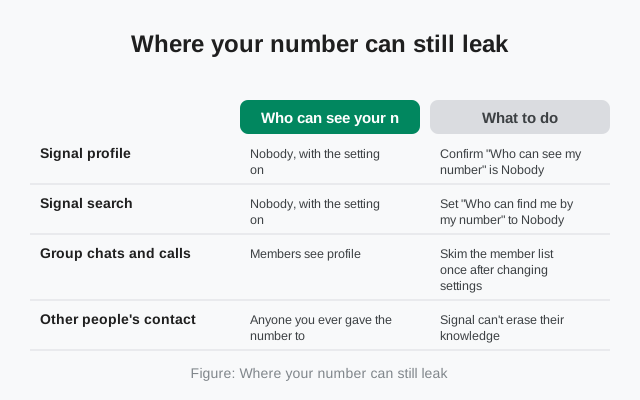
The settings control Signal. They do not control everything around Signal. Run this audit of the places your number can still surface.
| Place | Who can see your number | What to do |
|---|---|---|
| Signal profile | Nobody, with the setting on | Confirm "Who can see my number" is Nobody |
| Signal search | Nobody, with the setting on | Set "Who can find me by my number" to Nobody |
| Group chats and calls | Members see profile, not number | Skim the member list once after changing settings |
| Other people's contacts | Anyone you ever gave the number to | Signal can't erase their knowledge, use a registration number you control |
| Your social media bios | Everyone | Remove the number from public bios; share the username instead |
| Screenshots of old chats | Anyone with the image | Old screenshots showing the number are outside Signal's control |
The pattern is simple: Signal can hide your number from Signal's surfaces, but it cannot un-ring the bell of numbers you already shared. The settings lock the doors; you choose what you already handed out.
The 5-minute lock-down checklist
Do these in order. It genuinely takes about five minutes.
Set a username
Profile settings. Pick something that does not identify you if you want separation from your real identity, the digits are part of it.
Set "Who can see my number" to Nobody
Settings > Privacy > Phone Number. This is the default, but confirm it.
Set "Who can find me by my number" to Nobody
Same screen. The step most people miss, it is not the default, and it is what takes your number out of search.
Share only the username going forward
New contacts, groups, and communities get the username or its QR code. Never type the number into a bio or post again.
Check one group and your profile card
Open a group and confirm members see your profile name and photo, not the number. Have a friend check what your profile shows them.
That is the whole tour. Two settings, one username, five minutes, and your number moves from being your public identity to a quiet credential that only registers your account. For what happens when someone already has your number and tries to look you up, the discovery guide continues from here.
Frequently asked questions
Can you really hide your phone number on Signal?
Almost completely. With both Phone Number settings on Nobody and a username in use, new contacts see your profile but never your number. The honest limit: registration still requires a number.
What is the difference between the two phone number settings?
'Who can see my number' hides the number on your profile. 'Who can find me by my number' stops people from discovering you by typing your number into search. Set both to Nobody for maximum privacy.
Do group members see my phone number?
No, as long as the hiding settings are on Nobody. Group members see your profile name and photo. The exception: someone who already has your number saved in their own contacts knows it regardless.
Do I still need a phone number to register on Signal?
Yes. Registration and sign-in require a phone number today. Usernames and hiding settings change how people find and contact you, not how accounts are created.
Will hiding my number break anything?
Existing contacts are unaffected. The main change: people can no longer find you by typing your number, they reach you through your username instead. Make sure you have one set first.
What is the difference between contact discovery and number exposure?
Contact discovery is Signal checking your contacts on your device to find who uses Signal; it publishes nothing about you. Number exposure is whether other people see your number in chats, on your profile, or through search; the two Phone Number privacy settings control that.
Does blocking someone hide my phone number from them?
No. Blocking stops their messages and calls from reaching you, but it does not take back anything they already knew. If they could already see your number before you blocked them, blocking does not erase that.
Keep reading
- how usernames changed the privacy model: usernames vs phone numbers guide
- the complete settings walkthrough: phone number privacy screens
- who can find you by number: the discovery guide
- what Signal keeps about your account: the metadata breakdown