
Is Signal safe for kids? A parent's guide
Published: October 7, 2026 · Updated: October 8, 2026
Signal has no parental controls, no content filters, and no supervision dashboard, so the honest answer is: Signal is as safe for kids as the supervision around it. The app itself is private and ad-free, which removes some risks other messengers carry, but it also means you cannot see what your child is doing the way some family-oriented apps allow. There is no age gate beyond needing a phone number to register. This page states the reality plainly, names the actual risks (strangers via usernames and groups, disappearing messages hiding bullying), and gives you practical steps that work without preaching.
The honest answer, up front
Let us skip the scare tactics and the reassurance in equal measure. Signal is not a children's app. It was built for adults who want private communication, and it does not include any of the machinery parents expect from kid-oriented products:
- No parental controls.
- No screen-time limits.
- No content moderation.
- No way to monitor conversations from another device.
- No approval flow for new contacts.
If your safety plan depends on software supervision, Signal will disappoint you, and you should know that before your child installs it rather than after.
What Signal does offer: a smaller surface for accidental harm
What Signal does offer, almost as a side effect, is the absence of several risks that plague mainstream kids' messaging. There are no ads, so there is no ad-driven rabbit hole. There is no algorithmic feed, no suggested content, no strangers recommended to your child by an engagement engine. There are no public profiles to stumble across, no games with chat lobbies, no in-app purchases. Compared with the average social app a teenager uses, the surface for accidental harm is dramatically smaller. That is a genuine advantage, and it is worth weighing fairly.
The remaining risks are the human ones
The remaining risks are the human ones, and they are the same risks as any private messenger: who your child talks to, and what happens in those conversations. Signal's privacy features, disappearing messages especially, cut both ways here. They protect your child's privacy from snoopers and data brokers, and they also make it easier for bullying, grooming, or other harm to leave no trace. You cannot have one without the other; that is the nature of private communication. Your job as a parent is not to pick a perfectly safe app, because none exists, but to set up the situation around the app so the risks stay manageable.
Age, phone numbers, and the registration reality
Signal requires a phone number to register. That is the entire gate. There is no age verification, no ID check, no parental-consent flow, and no "kids mode" to enable afterward. If a child has a phone number that can receive an SMS code, they can register, and the app treats them exactly like an adult user. Be clear-eyed about what this means: the barrier is access to a phone number, not maturity.
The terms set an age minimum; nothing enforces it
Signal's terms of service set a minimum age (13 in most regions, higher where local law requires), but there is no mechanism enforcing it beyond the honor system. This is worth saying plainly because many parents assume "no age gate shown" means "fine for any age." It means no such thing. The decision about whether your child is ready for an unmonitored private messenger is yours, and the app will not make it for you or second-guess you.
The phone-number requirement has one useful side effect for parents: your child needs a number, which usually means a SIM you pay for or a family plan you control. That gives you a natural checkpoint. If you are the one providing the number, you are also in a position to set the terms:
- The app gets installed with you present.
- The privacy settings get configured together.
- The expectations get discussed before the first message is sent.
Do not skip that checkpoint. An app installed with parental involvement and one installed secretly are different situations with different risk profiles.
A practical note on numbers
A practical note on numbers: because Signal accounts are tied to phone numbers, changing numbers means re-registering. If your child uses a number that might change (a temporary SIM, a relative's number), sort out a stable arrangement first. And keep the registration honest: do not register your child with your own number to "keep an eye on things," because you will lock yourself out of your own account and create a mess for both of you. Supervise the real account instead.
The real risks for kids on Signal
Contact from strangers
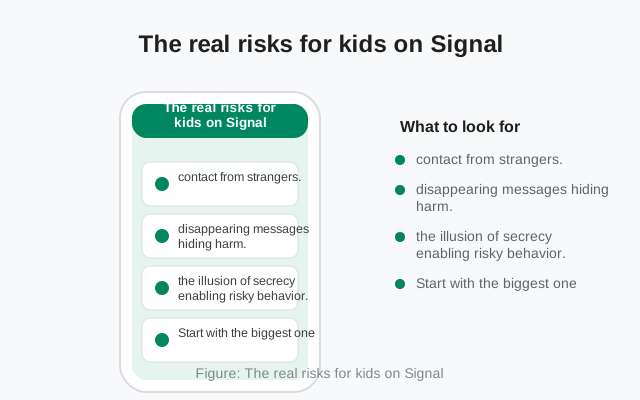
Start with the biggest one: contact from strangers. Signal now supports usernames, which means your child can be found and messaged without sharing a phone number. Group invite links can circulate anywhere: a link posted in a gaming forum or a school chat can pull dozens of strangers into one group. Neither feature is dangerous by itself, but both widen the circle of who can reach your child beyond the contacts you know. The mitigation is settings plus habit: keep the phone number hidden (it is, by default, from non-contacts), be cautious about who gets the username, and treat unexpected group invites as guilty until proven innocent.
Disappearing messages hiding harm
Second: disappearing messages hiding harm. The same feature that protects privacy can hide bullying, harassment, or grooming, because the evidence deletes itself. This is the hardest trade-off on this page, and there is no technical fix; it is inherent to the feature. The practical answer is social, not technical. Make sure your child knows that disappearing messages do not make anything "not real," that screenshots exist, and that they can and should tell you about anything that upsets them regardless of whether the messages are still there. A child who trusts you enough to report is better protected than any setting.
The illusion of secrecy enabling risky behavior
Third: the illusion of secrecy enabling risky behavior. Teenagers who believe a conversation "can't be seen by anyone" may share things they would never say on a monitored platform: personal photos, location details, secrets. Signal's encryption protects against outsiders, not against the recipient. Teach the one rule that covers everything: never send anything you would not want screenshotted and shared, because encryption does not stop the person on the other end from doing exactly that. Our guide on screenshots and screen security explains the technical side.
The milder but common ones
Fourth, the milder but common ones: late-night messaging disrupting sleep (no built-in bedtime mode), group chats becoming venues for exclusion or pile-ons, and the general intensity of always-on peer communication. These are parenting issues, not Signal issues, but they will show up inside Signal because that is where the conversations happen. The app will not help you manage them. That is what the next section is for.
Practical setup checklist for parents
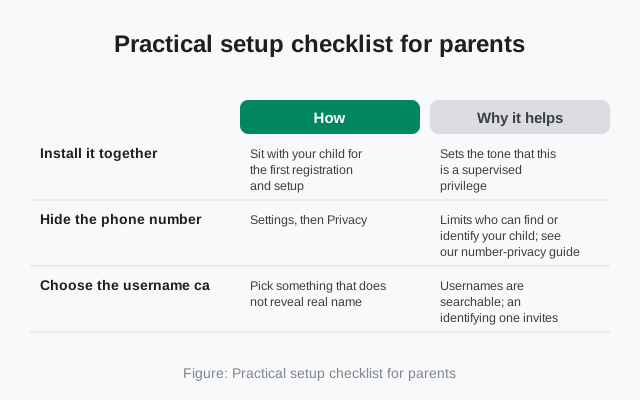
The information-gain element for this page: the setup checklist. Do these together with your child during installation, not after.
| Step | How | Why it helps |
|---|---|---|
| Install it together | Sit with your child for the first registration and setup | Sets the tone that this is a supervised privilege, and lets you configure everything correctly from the start |
| Hide the phone number | Settings, then Privacy: keep the number visible to nobody outside contacts | Limits who can find or identify your child; see our number-privacy guide |
| Choose the username carefully | Pick something that does not reveal real name, school, or age | Usernames are searchable; an identifying one invites the wrong attention |
| Set a strong Signal PIN | Settings, then Account: registration lock on, PIN stored where you both can find it | Prevents account takeover via SIM swap; write the PIN down somewhere safe |
| Enable screen lock | Settings, then Privacy: screen lock with a short timeout | Stops siblings or friends picking up the phone and reading chats |
| Agree on group rules | No joining groups from public invite links without checking with you first | Group links are the main way strangers reach kids on Signal |
| Decide on disappearing messages | Discuss whether to use them, and with whom; consider leaving them off for younger kids | Removes the feature that can hide bullying while trust is still being built |
| Keep the app updated | Let the website build auto-update, or update via Play Store | Security fixes only protect users who install them |
Notice what is not on the list: spyware, "parental control" apps that read your child's messages, or secret monitoring. Those tools poison trust, and a child who knows they are being secretly watched simply moves the conversation somewhere you cannot see at all. The checklist above is all visible, all done together, and all explained honestly. That is a feature, not a limitation.
Revisit the setup every few months, the same way you would revisit any agreement with a growing child. Settings drift, new features appear (usernames did), and your child's social world changes. A ten-minute check-in beats a one-time lockdown that slowly rots.
The conversation that matters more than settings
Here is the uncomfortable truth this page has been building toward: no checklist protects a child who will not tell you when something is wrong. The settings above buy you margin. The relationship buys you everything else. If your child believes that reporting a problem means losing the phone, they will not report the problem. They will handle it alone, badly, the way teenagers have always handled things adults made unsafe to mention.
Have the conversation explicitly
So have the conversation explicitly, and make the terms clear. "If anyone ever makes you uncomfortable on Signal, or asks you for photos, or says something that scares you, tell me. You will not be in trouble, and I will not take the app away for telling me." Then keep that promise when it is tested, because it will be tested. The first time you break it is the last time you hear about anything. This is not soft parenting advice; it is the load-bearing structure of the entire safety plan.
Cover the specific scenarios
Cover the specific scenarios, not just the general principle. What to do if a stranger messages them (do not reply, block, tell you). What to do if someone in a group starts bullying (leave the group, screenshot first if they can, tell you). What to do if someone asks for photos (no, block, tell you, every time, no exceptions). What to do if a friend shares something alarming about themselves (tell a trusted adult; being a good friend sometimes means breaking a confidence). Concrete scripts beat abstract warnings for every age group.
Model the behavior
Finally, model the behavior. If you use Signal yourself, let your child see you verifying safety numbers, declining sketchy group invites, and keeping your own number private. Children copy what they see far more reliably than they follow what they are told. A parent who treats their own messaging hygiene seriously raises a child who does the same, and that lesson outlasts every setting on this page.
from Signal's official site — file hosted by Signal, not by us
Frequently asked questions
Does Signal have parental controls?
No. Signal has no parental controls, content filters, or supervision dashboard. Safety for kids depends on supervised setup and open communication, not on app features.
What is the minimum age for Signal?
Signal's terms set a minimum age (13 in most regions, higher where local law requires), but there is no age verification during registration. The only requirement is a phone number that can receive an SMS code.
Can I monitor my child's Signal messages?
No, and that is by design: messages are end-to-end encrypted. Secret monitoring tools poison trust and push kids to platforms you cannot see. Supervised setup and honest conversation work better.
Are disappearing messages dangerous for kids?
They can hide bullying or grooming since evidence deletes itself. Consider leaving them off for younger kids, and make sure your child knows they can always tell you about anything upsetting, whether or not the messages still exist.
Can strangers contact my child on Signal?
Yes, via usernames or group invite links. Keep the phone number hidden from non-contacts, choose a non-identifying username, and agree that public group invites get checked with you first.
Keep reading
- hiding the phone number on Signal: the most important privacy setting for young users
- Signal's screen lock: keeping chats private on a shared or borrowed phone
- SMS scams and SIM-swap protection: protecting the account itself