
Deleting for everyone works. It just can't rewrite history
Published: October 7, 2026 · Updated: October 8, 2026
Signal's "delete for everyone" removes a message from every recipient's device, and their chat shows the message is gone. That helps with typos, wrong chats, and quick regrets. But deletion cannot undo what already happened: screenshots, quotes, read notifications, backups, or copies on offline devices. Never trust deletion with something it cannot protect.
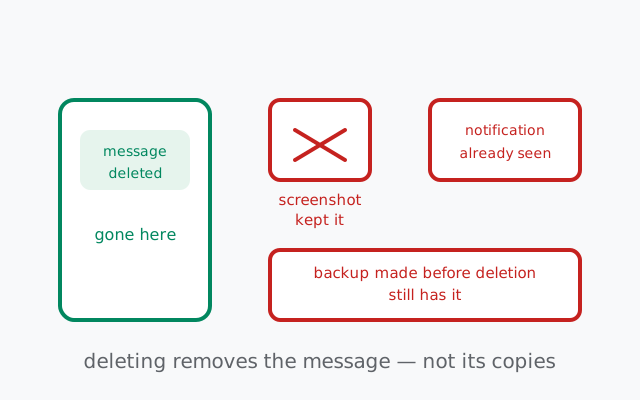
The core mental model is simple: deleting removes the message object from devices Signal can reach. It cannot remove the copies that already escaped into screenshots, notifications, backups, quotes, and human memory. Keep that sentence in your head and the rest of this page is details.
What "delete for everyone" actually does
When you delete a message for everyone, Signal sends a deletion instruction to every device in the conversation. Each device that receives it removes the message from the chat: the text, the photo, the voice note, whatever it was. On your own device it disappears too. What recipients see afterward is a chat with a gap where the message was (Signal marks the deletion rather than pretending the message never existed. That is the honest design, since pretending otherwise would be a lie the app cannot keep).
This works on messages you sent. It cannot touch messages other people sent. You cannot delete someone else's words from the chat, only your own. That asymmetry is deliberate: your delete button controls your contributions, not the record of what others said.
It also works on all message types: text, photos, videos, voice notes, files. The deletion instruction does not care what the content was; it removes the message object wholesale. And it works in both one-to-one chats and groups. In a group, the instruction goes to every member's device.
So far so good. Now the part that matters: deletion is a request to devices, not a time machine. Everything below is about what happens when the request arrives too late, or when copies already left the building through channels the request cannot reach.
The time window: how long you have
You cannot delete just any message from history. Signal limits how old a message can be before "delete for everyone" stops being offered for it. After the cutoff, the option disappears and the message is permanent as far as remote deletion goes. I am describing this qualitatively on purpose: the exact window is an implementation detail that can change between versions, and quoting a number that later shifts would be worse than useless.
What matters is the shape of the rule, not the number:
- Recent messages: deletable. The just-sent message, the typo from a minute ago, the photo sent to the wrong chat: these are the cases the feature is built for, and they work.
- Old messages: not deletable for everyone. Past the cutoff, the option is gone. You can still delete the message for yourself (more on that below), but you cannot reach into other people's devices anymore.
- The practical rule: act fast or not at all. If you are going to delete for everyone, do it immediately, within moments of sending. Every minute you wait is a minute in which screenshots happen, notifications get read, and backups run. The window is a backstop; your speed is the real protection.
Do not build habits around the far edge of the window. "I can delete it later" is how people send things they should not have sent. The feature is an undo button for accidents, not a safety net for recklessness.
from Signal's official site — file hosted by Signal, not by us
What it cannot undo: the five escapes
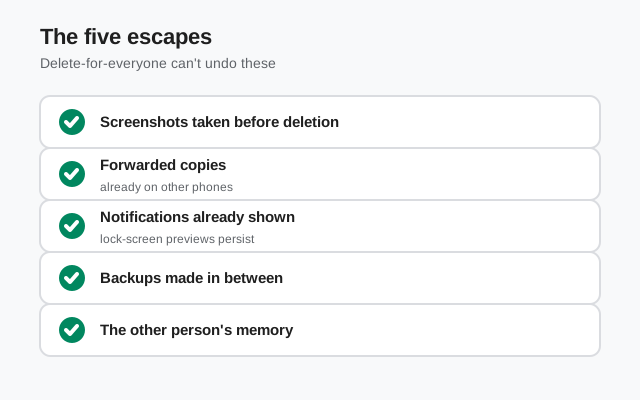
Here is the honest inventory: every way a message survives "delete for everyone." Memorize this list and you will never over-trust the feature.
- 1. Screenshots and screen recordings. Anyone who captured your message before you deleted it keeps the capture. Signal cannot reach into a recipient's camera roll, screenshot folder, or a second phone pointed at the screen. This is the most common escape and the least fixable. That is also why our screenshot guide exists. A message that lived on someone's screen for even a few seconds may already be permanent.
- 2. Quotes and replies. If someone quoted your message in a reply before you deleted it, the quoted text lives inside their message: a separate message object your deletion does not touch. Deleting the original leaves the quote standing, with your words intact, attributed to you. In a fast-moving group chat, quotes happen within seconds. This is the escape people forget most often.
- 3. Notifications already seen. On most phones, an incoming Signal message appears as a notification, often with the message text right there on the lock screen. If the recipient saw (or even half-saw) the notification before you deleted the message, the content already reached their eyes through a channel deletion cannot retract. Lock-screen notification previews are a one-way door: once seen, seen forever. (This is also why the lockdown checklist tells you to hide notification content.)
- 4. Backups made before deletion. If a recipient's device made a backup, whether a phone backup or a chat backup, while your message was still on it, the message lives on in that backup. Deleting the message from the live chat does not rewrite history inside backup files. You have no visibility into when other people's devices back up, which means you can never assume a deleted message is gone from their backups.
- 5. Offline devices that sync later. The deletion instruction is a message like any other. It has to reach the recipient's device. A phone that is off, in airplane mode, or without signal does not receive the instruction until it comes back online. In the gap, the original message sits on that device, fully readable. Worse: if the device never comes back online, or the instruction fails to deliver, the message simply stays. Deletion is best-effort delivery, not a guarantee.
There is a sixth, softer escape worth naming: human memory. Someone who read your message remembers it. No software fixes that, and it is worth saying plainly because people implicitly expect technology to solve what is actually a social problem. If the words mattered enough to delete, they mattered enough to be remembered.
Delete for me vs delete for everyone
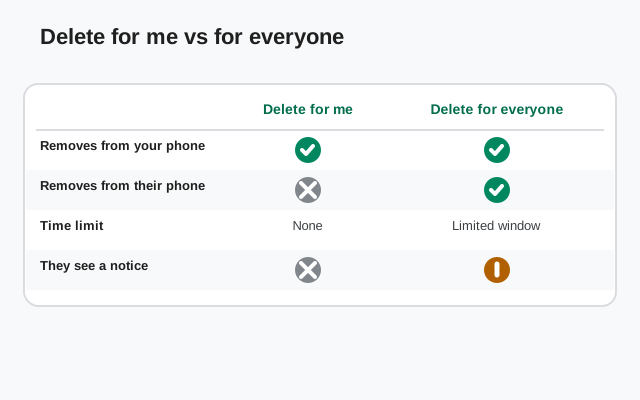
Signal offers two deletions and they do very different things. Do not confuse them:
| Delete for me | Delete for everyone | |
|---|---|---|
| What it does | Removes the message from your device only | Sends a deletion instruction to every device in the chat |
| Others still see it? | Yes. Untouched on their devices. | No. Removed where the instruction arrives in time. |
| Time limit | None. Delete your own copy of anything, anytime. | Yes. Only recent messages qualify. |
| Whose messages | Any message in your chat, yours or theirs | Only messages you sent |
| Use it for | Cleaning up your own chat history, decluttering | Undoing a just-sent mistake |
The common mix-up: someone deletes a message "for me," sees it vanish from their own screen, and assumes it is gone everywhere. It is not. Every recipient still has it. If you meant to retract something, "for me" is the wrong button. Check which option you tapped before you feel relieved.
The button presses themselves are covered in our delete and edit guide: this page is about what those buttons cannot undo.
Best practices: the honest playbook
The honest playbook is simple: delete immediately for just-sent mistakes, assume anything older was already seen, and use disappearing messages so there is less to regret. Here is what that looks like in practice:
| Situation | Do this | Why deletion is not the answer |
|---|---|---|
| Typo / wrong chat, noticed instantly | Delete for everyone immediately, then send a correction | This is the one case deletion is built for. Act within seconds. |
| Sent something sensitive by mistake | Delete for everyone and tell the recipient directly: "please delete that, it was a mistake" | Deletion handles the message object; the direct ask handles screenshots, quotes, and memory |
| Regret something from hours ago | Delete for everyone if still offered, but assume it was seen | Hours is enough for every escape on the list: screenshots, notifications, backups all happened already. |
| Want old chats to not exist | Use disappearing messages with a short timer going forward | Deletion is retroactive triage; timers are proactive hygiene. Timers have their own honest limits. |
| Cleaning up your own phone | Delete for me freely | No time limit, no side effects. It only affects your device. |
And three habits that make deletion nearly unnecessary:
- Read before you send. The two-second re-read catches the wrong-chat disaster, the autocorrect betrayal, and the message that should have been a draft. Deletion is the backup plan; the re-read is the plan.
- Default to disappearing messages. With a timer on, there is less history to regret. Messages evaporate on their own, and you rarely need the delete button at all.
- Treat "send" as permanent. The healthiest assumption in messaging: once sent, it exists. Deletion sometimes helps, but a habit built on "I can always delete it" will eventually meet a screenshot.
Frequently asked questions
Does delete for everyone on Signal really delete the message?
It sends a deletion instruction to every device in the chat, and devices that receive it remove the message. But it cannot remove screenshots, quoted copies, notifications already seen, backups made before deletion, or copies on offline devices.
How long do I have to delete a message for everyone on Signal?
There is a time limit. Only recent messages can be deleted for everyone. The exact window can change between versions, so the practical rule is: act within moments of sending, or assume the message is permanent.
Can I delete someone else's message for everyone?
No. You can only delete messages you sent. You can delete anyone's message for yourself (from your own device only), but remote deletion is limited to your own contributions.
If someone quoted my message, does deleting it remove the quote?
No. A quote is a separate message containing your words. Deleting your original leaves the quoted copy intact. This is one of the most overlooked limits of the feature.
What is the difference between delete for me and delete for everyone?
Delete for me removes the message from your device only, with no time limit, for any message. Delete for everyone sends a removal instruction to all devices but only works on your own recent messages.
Keep reading
- Disappearing messages — limits: proactive hygiene vs retroactive deletion
- Screenshot risks on Signal: the escape no deletion can fix
- The full lockdown checklist: every setting that matters, in impact order
- Privacy guides hub: every Signal privacy guide in one place