
There is no official portable Signal Desktop: every “portable” download is unofficial
Published: October 7, 2026 · Updated: October 8, 2026
There is no official portable version of Signal Desktop, and there never has been. Signal publishes one desktop app per operating system (Windows, macOS, and Linux) through signal.org/download, and none of them run as a no-install USB app. Any website offering "Signal Portable," a "Signal USB edition," or a zip file that promises Signal with no installation is distributing an unofficial build made by a third party. These builds are a classic route to hijacked accounts and infected machines. This page explains why no portable build exists, how to spot the fakes, and exactly what to do if you already ran one.
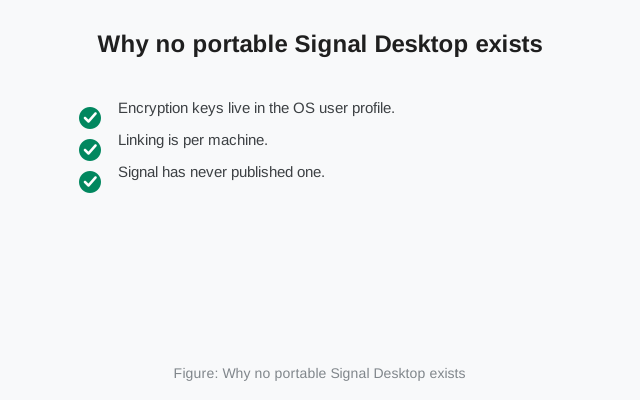
Why no portable Signal Desktop exists
A portable app, in the usual sense, runs from a USB stick with no installation and leaves no trace on the host computer. Signal Desktop cannot work that way, for reasons baked into its security design:
- Encryption keys live in the OS user profile. Signal Desktop stores its identity keys and local message database in your operating system's user data folder. A true no-install build would have to carry those keys around on removable media. That would make key theft as easy as pocketing a USB stick. The design deliberately ties the keys to the machine.
- Linking is per machine. Each desktop install gets its own set of keys during the QR-code linking flow, approved on your phone. A portable build passed from computer to computer would break this one-machine-one-identity model.
- Signal has never published one. Not as an experiment, not as a beta, not for any platform. The download page offers standard installers for Windows, macOS, and Linux. That is the complete list.
So when a site offers "Signal Portable," one of two things is true: either they repackaged Signal's real installer into a zip (in which case you are running a build someone modified), or they built something from scratch wearing Signal's name. Neither is something you want holding your private messages.
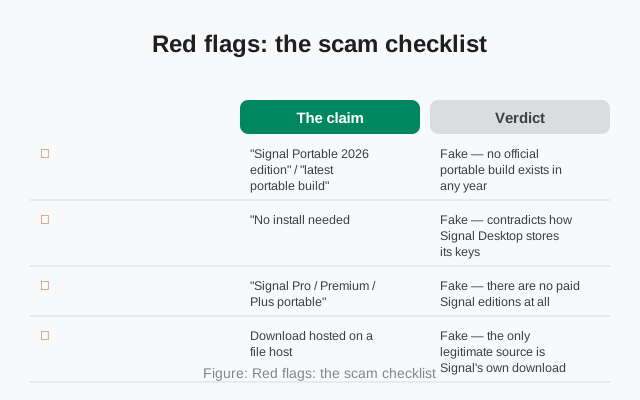
Red flags: the scam checklist
Run any "portable Signal" offer against this table. One hit is enough to walk away:
| The claim | Verdict |
|---|---|
| "Signal Portable 2026 edition" / "latest portable build" | Fake: no official portable build exists in any year |
| "No install needed, runs straight from USB" | Fake: contradicts how Signal Desktop stores its keys |
| "Signal Pro / Premium / Plus portable" | Fake: there are no paid Signal editions at all |
| Download hosted on a file host, not signal.org | Fake: the only legitimate source is Signal's own download page |
| ZIP or RAR instead of the standard installer | Fake: repackaged builds can hide anything |
| "Disable your antivirus to run it" | Malware tell: close the tab immediately |
| Asks for your phone number or SMS code during "setup" | Account-theft tell: real desktop linking uses a QR scan approved on your phone, never typed codes |
The pattern to memorize: Signal's real desktop app is always an installer, always from signal.org/download, always linked with a QR code. Anything that differs on any of those three points is not Signal's app.
What an unofficial build can actually do
People underestimate repackaged apps because "it looked like Signal and it opened my chats." Here is what a modified build is technically capable of. Looking right proves nothing:
- Key exfiltration. A modified client can quietly send your identity keys to its maker. With those keys, someone can read your incoming messages. You would never see a warning. The app would behave perfectly normally.
- Bundled malware. The classic payload: information stealers that harvest browser passwords and crypto wallets, miners that spike your CPU, or droppers that install ransomware later. The "portable" wrapper is just the delivery truck.
- Fake update loops. Some unofficial builds disable real updates and push their own "updates" instead, keeping you on the tampered build forever while the genuine app moves on.
- Credential phishing. Builds that ask for your phone number and SMS verification code during setup are harvesting the exact codes that control your account.
The uncomfortable truth: you cannot tell a clean repack from a malicious one by using it. The interface is copied pixel for pixel; the difference is invisible code. That is why the rule is absolute: if it did not come from signal.org/download, do not run it, rather than "check carefully."
from Signal's official download page — installers are hosted by Signal, not by us
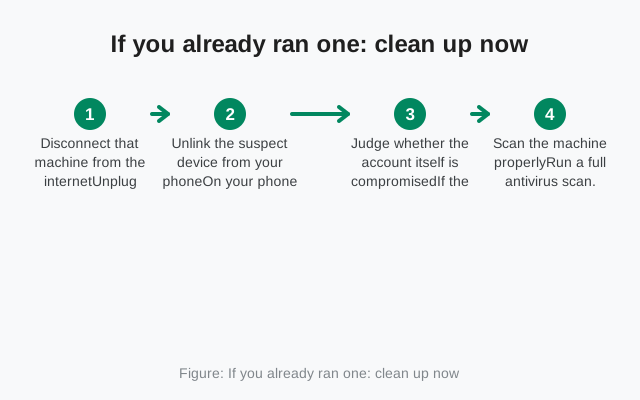
If you already ran one: clean up now
Do not panic, but do not wait either. Work through these in order:
Disconnect that machine from the internet
Unplug ethernet or turn off Wi-Fi. This pauses any exfiltration in progress while you work. You can do the next steps from your phone.
Unlink the suspect device from your phone
On your phone: Settings → Linked devices, tap the device you do not recognize (or the one you know ran the unofficial build), and unlink it. Its keys are revoked immediately. It stops receiving new messages at once. While you are there, unlink anything else you do not recognize.
Judge whether the account itself is compromised
If the build only ever showed you a QR code and you approved it on your phone, unlinking is usually enough. But if it asked for anything beyond that (a phone number, an SMS code, a password, a "verification" step), treat the account as compromised: re-register Signal on your phone (our re-registration guide covers it) to rotate your keys.
Scan the machine properly
Run a full antivirus scan. On Windows, consider a second-opinion scan with a different vendor's free scanner. One engine can miss what another catches. Do not reinstall the real Signal Desktop on that machine until it scans clean.
Install the genuine app: only from signal.org
Once the machine is clean, download Signal Desktop from signal.org/download and link it fresh with the QR flow. Delete every trace of the unofficial build first.
Watch your Linked devices list for a week
Open Settings → Linked devices on your phone every day or two. Any entry you did not create means something is still wrong. Unlink it and repeat the cleanup.
The legitimate alternative
"But I just wanted Signal without installing anything." The honest answer: there is no safe way to get that. Signal has no web client by design: a browser tab cannot hold encryption keys the way the desktop app does. So the choices are the ones Signal actually offers:
- Install the standard desktop app. It takes a few minutes, needs administrator rights once, and then it is done. Our Windows install guide, Mac guide, and Linux guide walk through each OS.
- Use Signal on your phone. The phone is the primary device and the full experience. If the goal was avoiding an install on a computer you do not own, the phone in your pocket already runs Signal.
- Use your own machine. If the portable-build urge came from wanting Signal on a work or library computer, the safer move is carrying your own laptop (a machine you control) rather than running mystery software on one you do not.
None of these are as convenient as a USB stick app. Convenience is exactly what the scam sells. The price of the genuine article is one normal installation.
How to make sure your installer is genuine
Three checks, thirty seconds:
- The URL. The download started at signal.org/download. Not a URL shortener, not a "mirror," not a download portal with seventeen download buttons.
- The file type. A standard installer for your OS: the same kind of file every other legitimate desktop app uses. Not a zip full of executables, not a "portable pack."
- The linking flow. The genuine app shows a QR code and asks you to approve it inside Signal on your phone. If an installer asks you to type codes, enter passwords, or disable security software, stop.
The same skepticism applies on mobile: our fake Signal APK guide and APK verification guide cover the Android side of unofficial builds, and the mirror warning explains why third-party download sites are never the answer.
from Signal's official site — file hosted by Signal, not by us
Frequently asked questions
Is there an official portable version of Signal Desktop?
No. Signal has never published a portable, USB, or no-install edition for any operating system. The only desktop app is the standard installer from signal.org/download.
I found 'Signal Portable' on a download site. Is it safe?
No. Unofficial builds are a known route to account theft and malware. A modified client can silently send your encryption keys to its maker while looking perfectly normal.
Can I run Signal Desktop from a USB stick?
Not officially. Signal Desktop stores its encryption keys and message database in the operating system's user profile, which a portable build cannot do safely.
Does Signal have a web version I can use instead?
No. Signal has no web client by design. Encryption keys need the desktop app or the phone app, not a browser tab.
I downloaded it but never ran it. Am I safe?
If nothing executed, the risk is minimal. Delete the file, run an antivirus scan to be thorough, and get the real installer from signal.org/download.
How do I know my Signal Desktop installer is genuine?
It came from signal.org/download, it is a standard installer (not a zip of executables), and it links via a QR code approved on your phone. Never typed codes or disabled antivirus.
Keep reading
- installing the real Signal Desktop on Windows: the genuine installer walkthrough
- spotting fake Signal APKs: the same scam on Android
- malware signs in unofficial builds: what tampered apps do
- verifying downloads properly: verification habits that transfer