
How to Tell a Real Signal APK From a Fake One
Published: October 7, 2026 · Updated: October 8, 2026
org.thoughtcrime.securesms, and its signing certificate matches the SHA-256 fingerprint Signal publishes on that page. A fake fails at least one of those checks. Any file from a mirror site, a Telegram forward, or a "Pro/Plus" edition is fake until proven otherwise. Usually it is just fake.Fake Signal APKs are one of the most common ways people get malware on their Android phones. The trick works because it is simple: attackers take the real Signal app (or just something that looks like it), add spyware or adware, and host it on a site that looks almost legitimate. The app icon is right, the name is right, and the chat screen looks right. Everything feels normal while your messages, contacts, and account quietly go somewhere they should not.
The good news is that telling real from fake is not a matter of instinct. Android's signature system gives you hard proof, and Signal publishes everything you need to check. You do not need special skills. You need the right file and five minutes.
from Signal's official site — file hosted by Signal, not by us
The three checks that matter
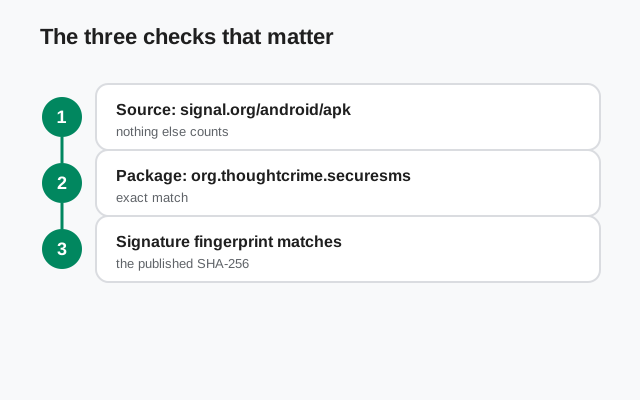
You do not need to be a developer to verify an APK. Three checks catch virtually every fake:
Where did the file come from?
The real file comes from signal.org/android/apk. Anything downloaded from anywhere else is suspect by default.
What is the package name?
The real app's package name is
org.thoughtcrime.securesms. A fake cannot keep this name and still pretend to be a different app. Many fakes use slightly different package names instead, and checking yours takes seconds.Does the signature match?
Signal publishes the SHA-256 fingerprint of its signing certificate on its download page. A file signed by Signal's key matches; a repackaged fake signed by the attacker's key does not. This is the check that cannot be faked.
If all three line up, the file is genuine. If any one fails, treat the file as hostile. There is no "close enough" with signatures.
Where fake Signal APKs come from
Knowing where fakes live helps you avoid them in the first place. These are the usual suspects:
- Mirror and "APK download" sites. Generic APK mirrors re-host app files. Some are sloppy, some are malicious, and none of them can prove the file they hand you is the one Signal published.
- Telegram channels and group forwards. Channels named things like "Signal APK Updates" push "new versions" that never came from Signal. Forwarded files are one of the fastest ways fakes spread. How these channels operate is covered in our guide to fake Signal Telegram channels.
- YouTube descriptions and video comments. "Download Signal Pro APK" videos rank well and their description links lead to monetized download pages serving trojaned files.
- Lookalike websites. Domains that mimic signal.org (extra words, different endings) host "official" downloads that are not official at all. Always check the address bar. Our fake Signal websites guide catalogs every typosquat pattern these sites use.
- Third-party app stores and "mod" sites. Any site offering "Signal Pro," "Signal Plus," or "unlocked" editions is distributing fakes. Those editions do not exist. See the Signal Pro APK scam for the full anatomy of this lie.
Notice what is not on this list: Signal's own download page and the Google Play Store's real Signal listing. Those are the only two places a genuine Signal app comes from.
Check 1: is the source the official download page?
This is the simplest check and the one that prevents nearly every problem. The official page is signal.org/android/apk: type it yourself or use a bookmark, rather than clicking links from videos, messages, or search ads.
Lookalike domains are the main trap here. Scammers register names that look right at a glance: signal-download, signalapp-official, signall-messenger, signal with a different ending. A quick habit that kills most of these: read the domain from right to left. The part just before the first single slash is the real domain. If it is not exactly signal.org, you are not on Signal's site.
Also check the connection: the address bar should show https://. Signal's site uses HTTPS, which means the page you see is really from Signal's servers and was not modified on the network. An HTTP download page (or a page with certificate warnings) is a hard stop. Do not download from it.
Check 2: does the package name match?
Every Android app has a package name: a unique ID that Android uses to tell apps apart. Signal's is org.thoughtcrime.securesms. (The unusual name is a leftover from Signal's history: the app began life as TextSecure, made by Open Whisper Systems.)
Why this matters: Android will not let two apps with the same package name be installed side by side. A fake that keeps Signal's real package name would have to replace your real Signal. That is why many fakes use a slightly different package name, like org.thoughtcrime.securesms.pro or something entirely different. If the installed app's package name is not exactly org.thoughtcrime.securesms, it is not Signal.
How to check it: open the app's page in Android Settings (Settings → Apps → Signal → look at the app info screen), or use any open-source APK info app from a trusted source to inspect the file before installing. Compare letter by letter. Scammers count on you skimming.
Check 3: does the signature fingerprint match?
This is the decisive check. When Signal builds the APK, it signs it with Signal's private key. Signal publishes the SHA-256 fingerprint of that signing certificate on its download page. Any copy of the app signed by the real key shows that exact fingerprint; a repackaged fake signed by the attacker's key shows a different one.
The attacker cannot fake this. Producing the matching fingerprint requires Signal's private key. "Steal Signal's signing key" is a different universe of attack from "repackage an APK on a mirror site." Repackaging, the actual method behind nearly all fake APKs, always breaks the signature match.
To verify, use the apksigner tool from the Android SDK Build Tools with the command Signal's page recommends, and compare the printed certificate digest with the fingerprint on the page, character by character. Our full walkthrough covers this step by step: verify the Signal APK's SHA-256 fingerprint. If you only do one technical check, make it this one.
One thing to keep straight: the website build and the Play Store build use different signing keys, so a Play-installed Signal shows a different fingerprint than the website APK. That is expected. Compare website-build files against the fingerprint on the download page, not against your Play-installed copy.
Check 4: does the filename look right?
The official website build follows a consistent naming pattern:
The version number changes with releases. 8.29.3 is the current website build, but the structure stays the same: Signal-Android-website-prod-universal-release- followed by the version and .apk.
This check is the weakest of the four, because a filename is trivial to fake. A file named exactly right can still be a fake, and a file with a renamed copy of the real download is still real. Treat the filename as a smell test, not proof: Signal-Pro-v9.99-mod-unlocked.apk is obviously bogus, but a correct-looking name proves nothing on its own. The signature check is what proves it.
A real case: the fake "Signal Encryption Plugin"
In 2025, the security company ESET reported two spyware campaigns, called ProSpy and ToSpy, that spread through fake websites impersonating Signal and ToTok. The ProSpy campaign is the textbook example of why this page exists, so it is worth knowing exactly how it worked.
- The lure. Fake websites offered a "Signal Encryption Plugin" and a "ToTok Pro" upgrade. Victims had to install the file by hand, because neither file was in any official app store.
- The payload. Once installed, the fake app asked for access to contacts, text messages, and stored files, then sent that data back to the attackers.
- The hiding trick. After setup, the fake "Signal Encryption Plugin" renamed itself to "Play Services" and changed its icon, so victims scrolling their app list would not notice it or remove it.
- The one-line lesson. Signal has no plugins, add-ons, or "pro" upgrades. Any file offering one is fake by definition. No fingerprint check needed.
The campaign was reported by ESET researcher Lukáš Štefanko and covered by The Hacker News, TechRadar, and Hackread. It targeted users in the UAE, but the method works anywhere: a trusted brand name, a plausible-sounding "plugin," and a manual install outside any store.
Red-flag checklist
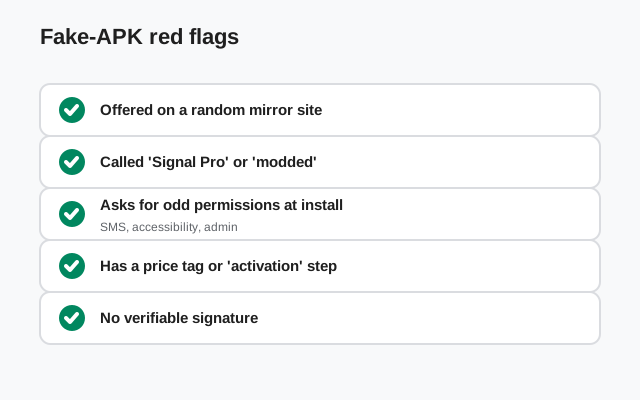
Run through this list for any Signal download that did not come straight from Signal's page. One hit is suspicious; two is a verdict.
| Red flag | What it usually means |
|---|---|
| The site also offers "Pro," "Plus," or "Premium" editions | Those editions do not exist. The site is distributing fakes (see the Pro APK scam). |
| The download URL is not signal.org | Mirror, re-host, or lookalike domain. The file cannot be trusted without a signature check, and usually fails it. |
| The page asks you to disable Play Protect or your antivirus | Legitimate downloads never ask this. It is the single most blatant sign of malware distribution. |
| The installer asks for a "Signal password" or payment | Signal is free and has no account password. This is phishing or a subscription trap. |
| The version number is higher than the official current build | Scammers invent future versions ("v10.2 Pro") to look newer than the real app. Check the real version first. |
| Aggressive popups, countdown timers, or "your download will expire" | Pressure tactics to make you install before you think. Real downloads do not expire. |
| The file arrived as a forwarded message or email attachment | Forwarded APKs are a classic malware vector. Get a fresh copy from the source instead. |
| The app icon looks slightly off: wrong shade, stretched, blurry | Repackaged fakes often reuse low-quality copied artwork. Subtle, but worth a glance. |
Permission red flags
Signal is a messenger, so it legitimately asks for things a messenger needs: contacts (to find your friends), microphone and camera (for calls), notifications, and storage or media access (for sending photos). Permissions become a red flag when they do not match what a messenger does.
Watch for these in particular:
- Accessibility Services access. This is the big one. Accessibility access lets an app read your screen and simulate taps. It is how banking trojans steal credentials and how spyware reads other apps' content. The real Signal does not ask for it. A "Signal" app that demands accessibility access on install is malware until proven otherwise.
- Device administrator rights. Device admin lets an app lock your screen, wipe data, and resist uninstallation. No messenger needs this.
- SMS read access framed as "verification." Signal verifies your number with a code you type in. An app that wants blanket SMS access at install is positioning itself to intercept verification codes for other services.
- Requests to install additional APKs or "updates" from inside the app. The real website build updates itself through Signal's own signed updater. A fake that downloads extra payloads after install is fetching its real malware in stages.
- Overlay / "draw over other apps" permission on first launch. Overlay permission enables click-jacking and fake login screens. Treat an early overlay request as hostile.
A good habit: when any app asks for a permission, ask yourself what feature needs it. If you cannot name the feature, deny the permission. Android lets you grant permissions later when the feature actually needs them.
Why fake Signal APKs exist
Nobody repackages Signal for fun: there is money in it, several kinds:
- Spyware-for-hire. The most serious fakes are built for surveillance: reading messages, logging keystrokes, tracking location, and exfiltrating contacts. These are sometimes aimed at specific people (a partner, an employee, a journalist) and sometimes sprayed widely.
- Ad fraud and subscription traps. The most common fakes are less dramatic: they show aggressive ads, sign you up for premium SMS services, or push "cleaner" apps that are themselves adware. Boring, but profitable at scale.
- Credential theft. Fake login screens and SMS interception turn a messaging app into a key that opens your other accounts: email, banking, crypto wallets.
- Botnets. Some repackaged apps quietly enroll the phone in a botnet for DDoS attacks or proxy resale. Your phone works fine; it is just also working for someone else.
Understanding the motive helps you understand the disguise. The fake has to look and feel like Signal long enough for you to keep it installed. So it usually is Signal, with extra code stitched in. That is exactly why surface inspection ("it looks like Signal") is worthless and the signature check is everything: the stitched-in code changes the signature, always.
What to do if you already installed a fake
Do not panic, but act quickly and in this order:
Disconnect and uninstall
Turn off Wi-Fi and mobile data to cut the app's connection, then uninstall the app. If it resists uninstallation (a sign of device-admin abuse), revoke its device administrator rights in Settings → Security first, then uninstall.
Assume your Signal account is exposed
If you registered your number in the fake app, treat the verification code and any chats as compromised. Reinstall the real Signal from signal.org/android/apk and re-register. This moves your account to the genuine app.
Change passwords for important accounts
Email first, then banking and anything tied to SMS two-factor codes, since a malicious app may have intercepted SMS. Do this from a clean device if you can.
Check for leftovers
Look in Settings → Apps for anything you do not recognize that appeared around the same time, and check Settings → Security → Device admin apps for entries you did not approve.
Run a reputable mobile security scan
A scan from a well-known security vendor can catch known variants and leftover payloads. It is a cleanup aid, not a verdict, but useful here.
Then report it: submit the fake's URL through Google Safe Browsing's phishing report form (safebrowsing.google.com/safebrowsing/report_phish/), so browsers and search engines warn other people about it too.
Frequently asked questions
How can I tell if my installed Signal is the real one?
Check the package name (org.thoughtcrime.securesms) in Settings → Apps, confirm you downloaded it from signal.org or the real Play Store listing, and verify the signature fingerprint against the one on Signal's download page. If all three check out, it is real.
Is a fake Signal APK dangerous if I never open it?
An installed-but-never-opened fake is much less dangerous, since its malicious code has not run, but some malware registers background services at install. Uninstall it and do not rely on "I never opened it" as safety.
Can antivirus detect a fake Signal APK?
Sometimes. Antivirus catches known fake variants, but a fresh repackaging may not be in any database yet. A clean scan is reassuring but not proof. The signature check is proof.
Are APK mirror sites ever safe for Signal?
Even honest mirrors add risk: you are trusting the mirror's file handling, and you lose the direct chain from Signal to you. For Signal specifically there is never a reason to use one. The official download is free and direct.
Someone sent me a Signal APK on WhatsApp. Is it safe?
No, not without verification. Forwarded files are a classic malware vector, and the sender may not know the file is tampered. Download a fresh copy from signal.org and verify its signature.
Does the real Signal APK ask for accessibility access?
No. The genuine Signal app does not request Accessibility Services or device administrator rights. Either request from a "Signal" app is a strong malware indicator.
Related guides
- Signal APK safety hub: all verification and scam guides in one place
- Is the Signal APK safe?: the honest full safety assessment
- How to verify the SHA-256 fingerprint: the decisive signature check, step by step
- The "Signal Pro" APK scam: why Pro/Plus/Premium editions are always fake
- Why APK mirror sites are risky: the case against third-party downloads