
Use Signal usernames for business - keep your personal number private
Published: October 7, 2026 · Updated: October 8, 2026
Yes. Since February 2024, Signal has let you create a unique username and share it instead of your phone number. Clients message @yourbusiness and never see your personal number. Registration still requires a phone number behind the scenes, and it stays tied to your account - a username does not replace it. For a small business, this solves the oldest problem with using Signal professionally: handing customers your private number just so they can chat with you. This guide explains how usernames work, the exact setup, the privacy settings that matter, and the honest limits you should know before you put a username on your cards.
from Signal's official site — file hosted by Signal, not by us
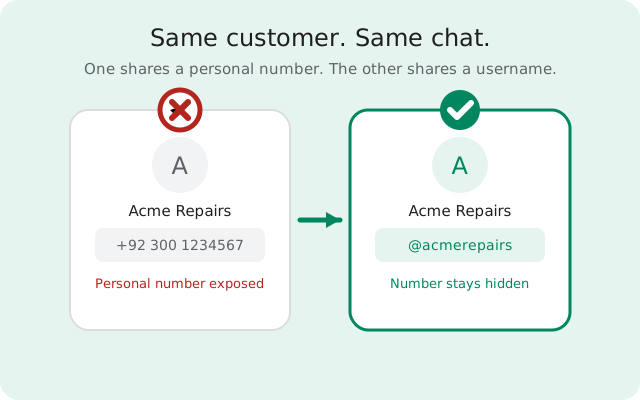
Why usernames changed business use of Signal
Before usernames, Signal had a deal-breaker for business: every contact started with a phone number. To message a client, you gave them your number. To let a client message you, same thing. For a freelancer, a shop owner, or a small support team, that meant your personal number ended up on invoices, websites, and business cards. With it came spam calls, late-night messages, and the quiet discomfort of strangers holding a key to your private life. People solved it with a second SIM or a separate work phone, which is to say most people did not solve it at all.
Usernames fixed the contact surface. You pick a handle, something like @acmerepairs, and that is what you publish. Clients tap it, a chat opens, and your phone number never enters the conversation. The number still exists behind the account - Signal needs it to register you - but it is no longer the price of admission to talk to you. That one change made Signal usable for customer contact in a way it simply was not before.
This matters most for businesses where the person and the brand are the same thing: freelancers, tradespeople, consultants, small clinics, online sellers. Big companies have business lines and phone systems; a one-person operation has a pocket and a phone. A username gives that one-person operation a public contact that behaves like a business line without buying anything extra.
How usernames actually work
Signal introduced usernames in a February 2024 blog post, alongside phone-number privacy controls. The design is deliberately simple, and that simplicity is worth understanding, because a few of the limits people trip over come straight from how it was built.
A username is a unique handle, not an identity
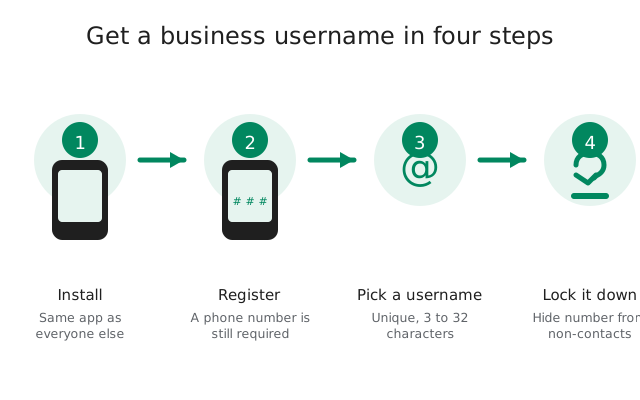
Each username can belong to only one account, and you can change yours whenever you like. They run from 3 to 32 characters and can use letters, numbers, underscores, and periods. If the name you want is taken, you pick another - first come, first served, same as most platforms. There is no business verification, no badge, no way to reserve a name for your company. We say that plainly because some businesses assume a username carries some kind of official status. It does not.
Your number is still the account
This is the fact people misunderstand most. You must register with a phone number, and the number stays attached to your account even if nobody ever sees it. Usernames did not remove the number requirement; they removed the number from the contact surface. Think of it like this: the number is your login, the username is your doorbell. Clients ring the doorbell. They never see the wiring.
Two privacy settings control the rest
In Settings, Signal lets you decide who can see your phone number and who can find you by it. For business use, the sensible combination is: show your number to nobody, and let nobody find you by it. People then reach you only through the username, the QR code, or a group you share. Our hide-your-number walkthrough covers these settings screen by screen.
Sharing is built in
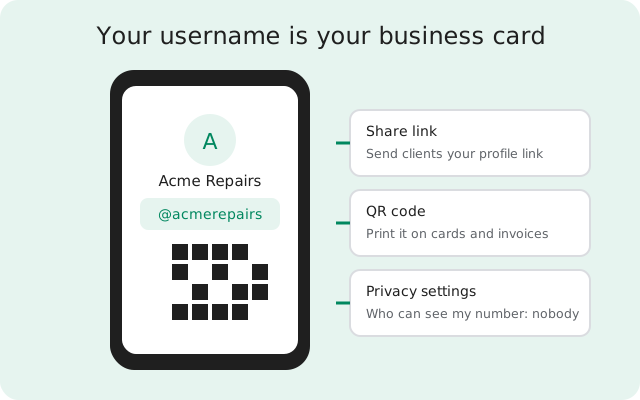
Every username comes with a shareable link and a QR code. Send the link in an email, print the QR code on a card, or put it on your website. Anyone who taps or scans it lands in a chat with you. You do not need to exchange numbers first, and they do not need your number at all.
Username vs phone number: what clients see
This is the information worth printing out. When you share a phone number, the client gets a permanent, personal identifier that reaches you anywhere, on any app, forever, and you cannot take it back. When you share a username, the client gets a Signal-only handle that you can change or abandon at any time. The table below makes the trade concrete.
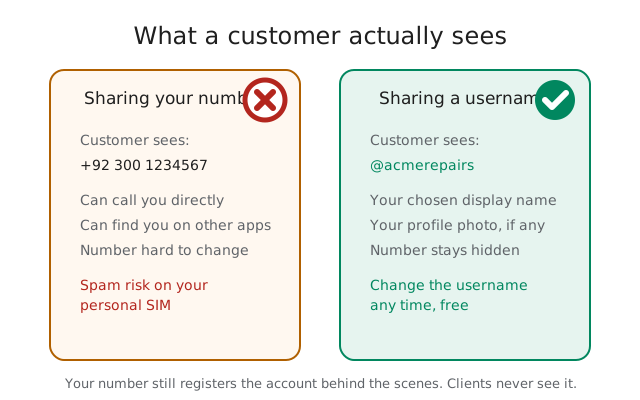
| What the client gets | Phone number | Username |
|---|---|---|
| Can message you on Signal | Yes | Yes |
| Sees your personal number | Yes, always | No - hidden by your settings |
| Can call or text your real SIM | Yes | No |
| Can find you on other apps by the same detail | Often yes | No |
| You can change it if it leaks | Painful - new SIM, new number everywhere | Free, instant, in settings |
| Works if you change phones or numbers | Clients must update their contact | Keeps working - it follows the account |
| Proves you are the real business | Weakly - numbers get spoofed | No - anyone can claim a name first |
The last row deserves a second look. A username does not prove identity. It proves that this account claimed the name first. For client-facing use, confirm who you are through a channel people already trust - your website, a known email, a face-to-face meeting - before anything sensitive is discussed. Teach staff the same. A scammer can register @acmerepairs-support the day after you launch @acmerepairs, and your clients will not know the difference unless you told them your exact handle through a trusted channel.
Setting up a business username, step by step
The whole process takes about ten minutes. Do it on the phone you will actually use for client messages, because the username lives on the account registered to that number.
Install and register normally
Install Signal the way you trust - the APK download guide covers getting it directly from Signal, or use the Play Store listing. Register with a phone number you control and will keep. This is the one part you cannot skip: no number, no account, no username.
Set your profile first
Open Settings, then Profile. Set the display name clients will see - your business name, not your personal name - and add a profile photo if you want one. The display name is what shows in the chat list; the username is the handle people use to find you. Make them match so clients are not confused.
Claim the username
In Settings, tap Username and choose one. Pick something short, memorable, and obviously yours: your business name, ideally. Check the spelling twice. If it is taken, add a suffix like your city or "support" rather than a random string of digits. Remember you can change it later, but every change means updating your cards and links.
Lock the number privacy
In Settings, under Phone Number privacy: set "Who can see my number" to Nobody, and "Who can find me by number" to Nobody. This is the step that makes the whole thing work. Without it, your username is decoration on top of an exposed number.
Generate the share link and QR code
From your profile, open the share options. Copy the link and save the QR code image somewhere safe. These are your public contact assets from now on - treat the QR image like a logo file.
Test it from a stranger's phone
Borrow a phone that does not have you as a contact, scan the QR code or open the link, and confirm two things: the chat opens, and your number is nowhere on the screen. If you can see your number, go back to step 4. This test takes thirty seconds and it is the only way to be sure.
Putting the username on cards, invoices, and your website
Put it where clients already look
Once the username is live and tested, put it where clients already look for you. On a business card, the QR code beats the printed handle: people scan, they do not type. On invoices, add a line like "Questions about this invoice? Message @acmerepairs on Signal." On your website, link the handle near your contact details with a plain explanation - "Message us on Signal" - because some visitors will not know what a username is.
Habits that make it stick
A few habits make this work better. Keep the username consistent everywhere; if your Instagram is @acmerepairs, do not make the Signal one @acme-repairs-2026. Announce the handle through channels clients already trust, so they know it is really you - your website, your existing email signature, a post on your verified social account. And when the username changes, update every place at once. A stale handle on an old invoice is a support ticket waiting to happen, or worse, a message landing at whoever claimed the old name after you gave it up.
One more implication for teams
For teams, the username model has one more implication: each person has their own account and their own username. There is no shared business inbox, no queue, no "support@" that three people answer. If clients message @acmerepairs and that is one person's phone, that person is the support desk. Plan for it: decide who answers, what the hours are, and what happens when that person is on leave. Our team guide covers the staffing side in more detail.
The honest limits
Usernames are good, and they are not magic. Here is what they cannot do, stated plainly so nobody plans around the wrong thing.
You still need a phone number to register
There is no way to create a Signal account without one. If the reason you want Signal is to avoid phone numbers entirely, this is the wall. The number is hidden from clients, but it exists, it is attached to the account, and losing access to it can mean losing the account.
There is no business edition
No admin console, no shared inboxes, no verified business badges, no way to manage staff accounts centrally. A username is a personal account feature that businesses borrow. If someone leaves the company, their username leaves with them, and you cannot transfer it.
Names are first come, first served
Signal does not reserve business names or adjudicate disputes the way a trademark office does. If a competitor or a squatter holds your name, your options are to pick a variant or to contact them - there is no brand-protection process to invoke.
A username is not two-factor anything
It is a contact handle. It does not authenticate you, encrypt anything extra, or prove to clients that you are legitimate. The encryption and safety-number verification work exactly as they do for any Signal chat, and the privacy-side comparison goes deeper on what changed and what did not.
Clients still need Signal
A username only reaches people who have the app. If your clients live on WhatsApp or SMS, a Signal handle on your card is decoration. Meet clients where they are, and use the username for the ones who are here.
None of this makes usernames a bad choice. It makes them what they are: a clean way for a small business to be reachable without publishing a personal number. Used with the privacy settings locked down and the identity expectations set honestly, that is exactly what most small businesses need.
Frequently asked questions
Can I use Signal for my business without showing my phone number?
Yes. Create a username and set your phone-number privacy so nobody can see or find you by your number. Clients reach you through the username, QR code, or share link, and your number stays hidden. You still need a number to register the account.
Do Signal usernames replace the phone number?
No. The phone number is still required to register and stays attached to the account. Usernames replace the number only on the contact surface - what clients see and use to reach you.
Can I change my business username later?
Yes, you can change your username any time in Settings. But the old name becomes available to anyone, so update your cards, invoices, and website links at the same time, and tell regular clients through a trusted channel.
Is a Signal username verified like a business account?
No. There is no verification, badge, or business edition. A username only shows that this account claimed the name. Confirm your identity to clients through channels they already trust, like your website or a known email.
Can two staff members share one business username?
No. A username belongs to one account on one person's phone. There is no shared inbox. Decide who answers client messages and plan cover for leave, or keep client contact with one named person.
Keep reading
- the honest team guide for small businesses
- the full usernames setup walkthrough
- how usernames changed Signal privacy
- locking down number privacy, step by step
- our compliance notes for regulated teams