
Should your business team run on Signal? The honest answer
Published: October 7, 2026 · Updated: October 8, 2026
The short answer: Signal works well for small, trust-based teams that want private conversation, but it is not business software. There is no admin console, no way to centrally control accounts, no retention policies, and no support contract. If your team is a handful of people who need confidential chat, calls, and file sharing without feeding an ad machine, Signal is excellent. If you need compliance archiving, onboarding and offboarding controls, or an audit trail, Signal is the wrong tool and no settings screen will change that. This guide walks through what business use of Signal looks like in practice, where it shines, and the limits you must plan around before you roll it out.
from Signal's official site — file hosted by Signal, not by us

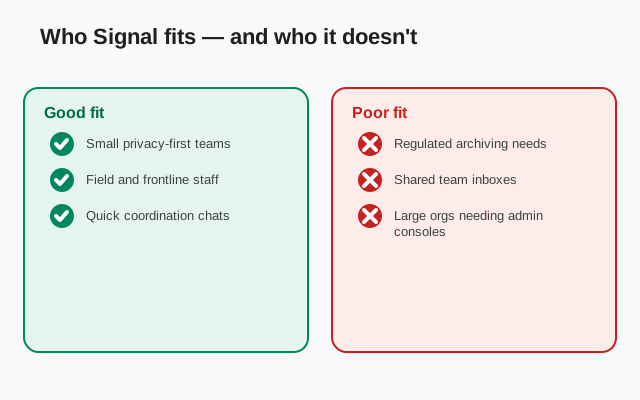
Who Signal fits - and who it does not
Where Signal quietly works great
Signal was built for people, not companies. That is the first thing to internalize, because everything on this page flows from it. A team of six founders, a clinic's front desk, a ten-person agency coordinating client work: these are the settings where Signal quietly works great. The conversations are real, the privacy is real, and nobody in the loop is the product being sold. The cost is zero and the learning curve is whatever your team already knows from texting.
Where it does not fit
The other side of the line matters just as much. A company under financial regulation that must retain every client message for years cannot use Signal as its system of record. A company that needs to deactivate accounts when employees leave cannot rely on an app where accounts belong to individuals and their personal phone numbers. A company whose contracts demand a named support contact and a service-level agreement will find nothing to sign. These are not edge cases; they are ordinary business requirements, and Signal does not meet them because it was never designed to.
The real question: size and stakes
So the fit question is really a size and stakes question. Small team, high-trust people, conversations that are sensitive but not legally archivable, and you are inside the zone. Growing team, regulated industry, formal IT policy, and you need to think of Signal at best as a side channel, never the backbone. Most honest Signal-for-business stories are the first kind, and this page is written for them, with the second kind's warnings kept visible so nobody mistakes one for the other.
What actually works well for teams
Group chats
Start with the real strengths, because for the right team they are decisive. Group chats are simple and fast: create a group, add team members, and you have a channel for the project, the shift rota, or the leadership circle. Groups support large numbers of members, admins can manage membership, and group links let people join without you adding each person by hand. For a team that lives in a few focused groups, this covers most of daily coordination.
Usernames
Usernames changed the business calculus for Signal. You can now give staff and clients a username or a QR code instead of a personal phone number. A freelancer can put a Signal username on an invoice. A sales rep can share a QR code on a business card. Clients reach the business without anyone's private number circulating. Registration still requires a phone number behind the scenes, and your number-privacy settings control who can see it, but the day-to-day contact surface is the username, not the number. That single feature removed the biggest practical barrier to using Signal with people outside the company.
Voice, video, files, and disappearing messages
Voice and video calls are end-to-end encrypted and genuinely good quality, one-to-one or in groups. A team that would otherwise juggle a separate calling app gets it built in. File sharing covers documents, images, and voice notes, enough for the everyday exchange of a contract draft, a photo from the field, or a quick voice memo when typing is too slow. And disappearing messages let a group agree that routine chatter deletes itself after a chosen time, from seconds up to weeks, which keeps the chat history from becoming a permanent record of every casual remark. The honesty caveat belongs here too: disappearing messages reduce exposure, they do not guarantee deletion, because a recipient can screenshot or photograph the screen. Never treat them as a retention policy.
Why privacy-minded teams choose it
Underneath all of this sits the reason privacy-minded teams choose Signal in the first place: messages are end-to-end encrypted, the service is designed to know very little about you, and there is no advertising business feeding on the conversation. For a business, that means client discussions are not being mined for ad targeting and the metadata trail is minimal. It is a genuine advantage over ad-supported platforms, and for some teams it is the whole reason they are here.
Setting Signal up for a team, step by step
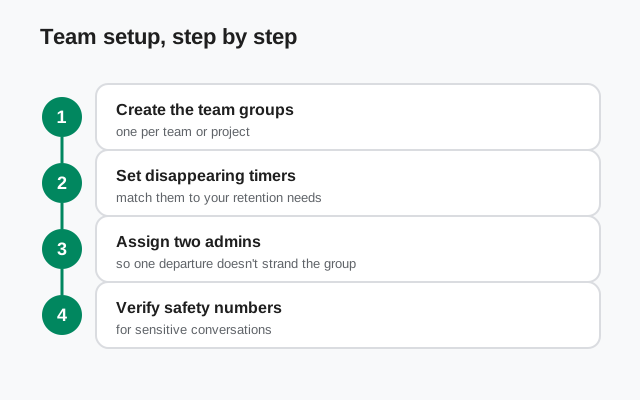
There is no "Signal for Business" signup, no org dashboard, and no bulk provisioning. Every person installs the same consumer app and you coordinate the setup with a short written policy. That sounds primitive next to enterprise tools, and it is, but for a small team it takes an afternoon. Here is a practical sequence that works.
Agree the policy first
Before anyone installs anything, write one page: which conversations belong in Signal and which do not, who creates groups, what the disappearing-message defaults are, and what happens when someone leaves. The policy is the admin console you do not have. Keep it short enough that people actually read it.
Everyone installs the same way
Standardize on one install source so nobody ends up on a tampered build. The download guide walks through getting the app directly; on phones with the Play Store, the store listing is fine too. Everyone registers with a phone number they control, then sets a username and locks down number-privacy settings so colleagues and clients see the username, not the number.
Create the group structure deliberately
One group per real unit of work: the whole team, each project, leadership, and social. Resist the urge to make twelve groups; every group is a notification stream and a moderation surface. Name groups clearly, pin the ones that matter, and give each group at least two admins so membership survives one person being unavailable.
Set disappearing-message defaults per group
Routine coordination groups can run short timers, a day or a week. Groups where decisions get made should keep history longer or not disappear at all, because "who agreed to what" is exactly the record you do not want to auto-delete. Match the timer to the group's purpose, not to a single company-wide rule.
Plan the offboarding step now
When someone leaves, there is no deprovision button. Your policy should say: the group admins remove the person from every group, the person deletes work conversations from their device, and any shared credentials or contacts get rotated. It is manual, so write the checklist while heads are cool, not during a messy departure.
The retention problem, stated plainly
This is the section that decides whether Signal is viable for your company, so read it carefully. Signal is not a records-retention system. Messages live on devices, encrypted, and there is no central archive, no admin export, and no way to guarantee that a message sent today exists anywhere tomorrow. If your industry or your contracts require you to keep business communications for a set period, Signal cannot be the tool that holds them.
Disappearing messages make this sharper. They are a privacy feature, not a compliance feature. Turning on auto-deletion to keep chats tidy is fine for a small team's casual coordination. Turning it on to make records vanish in a regulated business is a different act entirely, and in some settings it can look like destroying evidence. If your company has retention duties, litigation holds, or regulators who ask for message archives, disappearing messages are a liability, not a convenience. This is the single most common way businesses misuse Signal: they adopt it for privacy and accidentally adopt it as an eraser.
The practical rule is simple. If a conversation might one day need to be produced, audited, or reviewed, do not have it in Signal. Have it in your email, your ticketing system, or whatever your retention policy covers, and use Signal only for the coordination around it. Keep a written line between "chat" and "record," and make sure the team knows which is which. Our compliance notes go deeper on records duties for regulated teams.
Signal vs the enterprise tools
Teams usually compare Signal against Slack, Microsoft Teams, or WhatsApp Business. The comparison is only fair if you compare on the right axis: Signal optimizes for privacy and simplicity; the enterprise tools optimize for administration and integration. Here is how that plays out.
| Need | Signal | Typical enterprise tool |
|---|---|---|
| End-to-end encryption by default | Yes, for all chats and calls | Rarely; usually transport encryption only |
| Admin console and user provisioning | No | Yes, central control |
| Message retention and archiving | No central archive | Yes, configurable retention |
| Single sign-on (SSO) | No | Yes, standard |
| Cost | Free | Per-user subscription |
| Contact clients without personal numbers | Yes, usernames and QR codes | Varies; often needs a business number |
| Support contract / SLA | No | Yes, on paid plans |
| Integrations and bots | Essentially none | Rich app ecosystems |
Read the table as a trade, not a scorecard. Signal wins on privacy and cost and loses on everything administrative. A team choosing Signal is choosing to handle administration with written policy instead of software. That is a legitimate choice for small teams and a reckless one for large regulated ones. The Signal vs Slack breakdown walks through this comparison in more detail.
What Signal can't do for you
Every page in this business section carries this heading, because the honest limits are the most useful thing we can tell you. Here is Signal's list.
Signal cannot give you an admin console
You cannot see who has installed it, force settings on anyone's device, or remotely wipe a former employee's chats. Account control lives with the individual and their phone number. Your policy document is your only admin tool.
Signal cannot archive your messages for compliance
There is no central retention, no legal-hold feature, and no export API for e-discovery. If the law or your contracts require records, Signal is not where those records live.
Signal cannot verify identity for you
A username is not an ID badge. Anyone can register any available username, and display names are self-chosen. For client-facing use, confirm identity through a channel you already trust before discussing anything sensitive, and teach the team to verify safety numbers for important contacts.
Signal cannot protect a compromised or seized device
Encryption protects messages in transit; on the phone they are readable by design. A phone with spyware, or a phone taken from someone's hands unlocked, gives up its chats regardless of the app. Device security is a separate job: strong lock screens, current OS updates, and disappearing messages as damage control, not a guarantee.
Signal cannot provide support or uptime promises
There is no business support line and no SLA. If the service has a bad day, your team waits like everyone else. For a small team's coordination this is acceptable; for anything customer-facing or time-critical, have a fallback channel.
Best-fit team sizes
Where does Signal actually fit? In practice, three bands emerge. Two to fifteen people is the sweet spot: everyone knows everyone, the policy fits on one page, and group chats map naturally onto the real team. Coordination is fast, private, and free, and the missing admin features are barely felt because the "admin" is whoever started the group.
Fifteen to fifty people is the stretch zone. Signal still works for the inner circles, project teams, and leadership chats, but you will feel the missing controls: onboarding is manual, offboarding needs a checklist, and group sprawl becomes a real problem. Many teams in this band use Signal alongside their main platform, keeping the sensitive or informal conversations in Signal and the official record elsewhere.
Beyond fifty, or any regulated headcount, Signal should not be the backbone. The lack of provisioning, retention, and audit makes it unmanageable at scale, and the compliance risks grow with every employee. Use it for specific small groups with clear boundaries, or not at all. If you are here, the honest advice is to pick a platform built for organizations and keep Signal for personal use.
One last practical note for every band: keep work and personal chats visually and mentally separate. Signal uses one app for both, so the policy should say which groups are work and what the expectations are. A one-line rule, "work groups get work timers and work topics," prevents most of the mess.
Frequently asked questions
Can a business officially use Signal?
Yes, there is no rule against it, but there is also no business edition. You use the same consumer app as everyone else, with no admin console, no support contract, and no compliance tooling. It works for small teams with simple needs.
Does Signal have an admin panel for companies?
No. There is no admin console, no user provisioning, no SSO, and no way to centrally manage or wipe employee accounts. Administration is done with written policy and manual group management.
Can clients message our business on Signal without our personal numbers?
Yes. Usernames and QR codes let clients reach you without anyone sharing a phone number. Set your number-privacy settings so only the username is visible, and put the username on cards, invoices, or your website.
Is Signal compliant with message retention laws?
Signal itself keeps no central archive and offers no retention controls, so it cannot satisfy retention duties on its own. If your industry requires archiving business messages, those conversations must happen in a system your retention policy covers.
Are disappearing messages enough for a company data policy?
No. They reduce the amount of old chat sitting on devices, but they do not prevent screenshots, and they can conflict with legal retention duties. Treat them as a privacy convenience, never as a compliance mechanism.
Keep reading
- our compliance notes for regulated teams
- the Signal vs Slack breakdown
- the team onboarding walkthrough
- how disappearing messages really behave