
How Encrypted Are Signal Backups?
Published: October 7, 2026 · Updated: October 8, 2026
Signal backups are end-to-end encrypted, and that phrase has a precise meaning here: your device builds the archive, encrypts it with keys only your device holds, and only then sends it to Signal's servers. Nobody at Signal, and nobody who steals a copy from their servers, can read it without your recovery key. This page explains how that encryption actually works, what the 64-character key protects, what Signal's servers can see, and honestly, where the protection stops.
from Signal's official site — file hosted by Signal, not by us
What "encrypted backup" means here
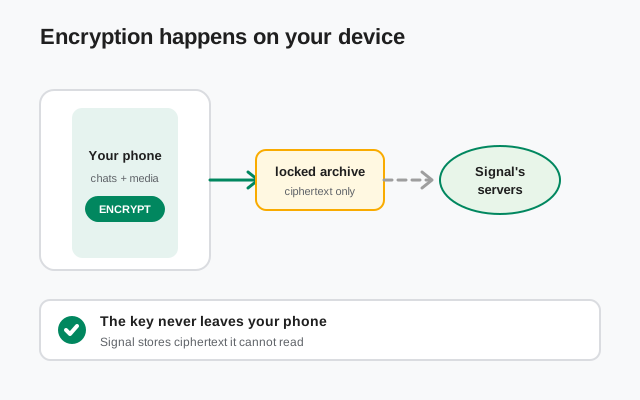
When Signal says its backups are end-to-end encrypted, it means the ciphertext is produced on your phone and the unlocking key never travels to Signal. That is the whole guarantee. It does not mean "encrypted in transit" (that is table stakes; every site does that) and it does not mean "encrypted with a password Signal knows" (that would let Signal read everything).
Signal describes the hosted design as zero-knowledge: the archive is not linked to your account identity or your payment method, and media is encrypted a second time with a key unique to your backup and padded to hide its real size. The padding detail matters: without it, someone holding two archives could match identical file sizes and work out who shares a group. Signal thought about that, and closed it.
One honest limit to state up front: everything below describes how the system is designed to work. You cannot personally audit the code running on Signal's servers. Nobody can. What you can rely on is the part you can see: the key stays on your device, the upload is ciphertext, and the open-source client code does the encrypting. Trust here is really trust in key custody, which is why the recovery key section is the heart of this page.
Where the encryption actually happens
On your phone. Always. Your device collects your messages and media, packs them into an archive, derives encryption material from your recovery key, locks the archive, and uploads the locked result. The servers receive a blob of random-looking data and hold it until you ask for it back during a restore.
This order (encrypt, then upload) is what makes the whole thing work. If it were the other way around (upload, then encrypt on the server), Signal would have to handle your plaintext, and the zero-knowledge claim would be fiction. Hosted backups add one invisible extra layer: a supplemental key that rotates daily inside a hardware Trusted Execution Environment, giving the archive forward secrecy on top of your own recovery key. You never interact with it directly, but it means an archive stolen today is harder to attack over time.
The 64-character recovery key
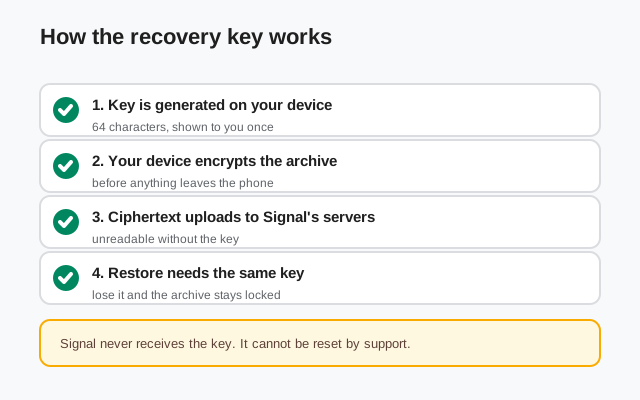
The recovery key is a long string of letters and numbers grouped in fours, generated on your device the first time you set up backups. Signal never sees it, cannot reset it, and will never ask for it. It is not your Signal PIN: the PIN verifies your account during registration and restores your profile, contacts, and groups; the recovery key decrypts your message archive. Different jobs, both needed.
"Key-derived" simply means the encryption of your archive is tied to this key and nothing else. Whoever holds the key and can register your phone number can read the archive. Nobody else can. That single property is why the entire security of your backup history reduces to one practical question: where is your key, and who else could have it?
If you ever pasted the key somewhere careless, or someone saw it, generate a new one from Settings → Backups immediately. One caution: a new key protects future archives, not old ones. Archives encrypted with the old key stay decryptable by whoever has it, so treat a key scare as a reason to also delete the old archives. See our guide to deleting old Signal backups.
Legacy vs current: the 30-digit passphrase
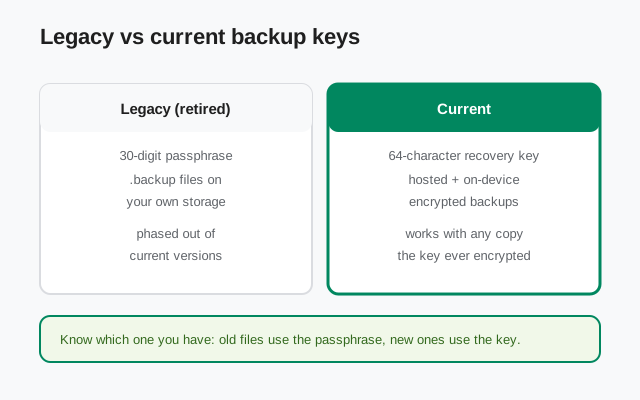
If you have been backing up Signal for years, you may remember a 30-digit passphrase: long strings of numbers used to encrypt old .backup files saved on your own storage. That system is retired. Current versions of Signal use the 64-character recovery key for both hosted backups and the newer on-device backups.
The strict distinction matters because the two are not interchangeable. A 30-digit passphrase will not unlock a modern archive, and the 64-character key will not unlock an old .backup file. If you still have legacy .backup files on your storage, keep their passphrase somewhere safe until you are sure you no longer need them, or delete the files deliberately, as explained in our deletion guide.
What Signal's servers can actually see
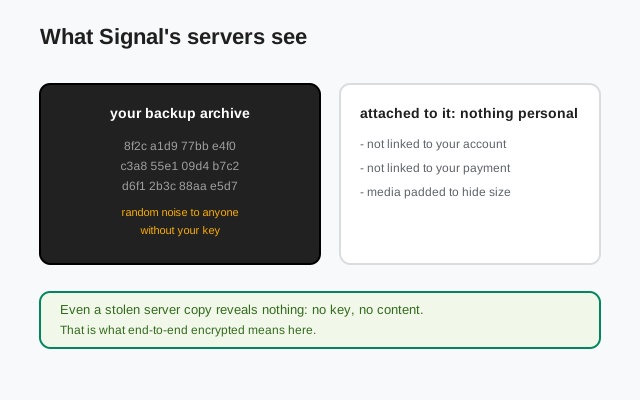
Here is the honest accounting. With a hosted backup, Signal's servers hold: an encrypted archive (ciphertext), built by your phone, replaced daily. Signal describes the archive as not linked to your account identity or your payment method. Media inside is encrypted again with a backup-specific key and padded to hide true sizes.
What they cannot see: your message contents, your media, your contacts list from the archive, or your recovery key. The design is deliberate: a nonprofit that cannot afford to be a target of data seizures built a system where there is nothing valuable to seize.
What they still know, because Signal has to operate a messaging service: your phone number (registration requires it), approximate account activity (you registered, you exist), and on the paid tier, the fact that you pay. That is metadata-level honesty, not a flaw. No messaging service can work without knowing who its users are. The important separation is that knowing your number does not help them read your archive.
Threat model: who this protects against
Threat modeling is asking the boring question: who exactly am I protected from? For Signal backups, the honest answer:
- A server breach or data seizure. Covered. The attacker gets ciphertext without keys. This is the strongest protection in the whole system.
- A rogue insider at Signal. Covered, for the same reason. There is nothing readable to take.
- Someone finding an old backup file on a discarded SD card or cloud drive. Covered, as long as they do not have the passphrase or key that encrypted it.
- Someone who unlocks your phone. Not covered. Your chats are readable in the app once the phone is unlocked. Backups do not protect against device access. Screen lock and keeping your phone with you do.
- Someone who learns your recovery key. Not covered. The key is the entire lock. Phishing for keys is exactly how real-world attacks happen, which is why we keep repeating: never share it, never screenshot it.
- Spyware or malware on your phone. Not covered. If an attacker reads your screen or your keystrokes, encryption of the archive is irrelevant. Keep your OS updated.
- A SIM swap against your number. Partially related: someone who takes over your number could register Signal and attempt a restore, but only if they also have your recovery key. The PIN (registration lock) is the other half of this defense.
The pattern is simple: backup encryption protects data at rest on other people's computers. It was never meant to protect data on your own unlocked screen. Keep the two jobs separate in your head and you will make good decisions.
Encryption myths vs reality
| "Signal reads my backups to target features" | No. The archive is ciphertext the company cannot decrypt, and it is not linked to your account. There is no reading to be done. |
|---|---|
| "The 30-digit passphrase still works" | Only for legacy .backup files it created. It cannot unlock modern archives. Those need the 64-character recovery key. |
| "My PIN can unlock my backup" | No. The PIN verifies your account and restores your profile and contacts. The recovery key decrypts messages. Neither does the other's job. |
| "A paid plan means stronger encryption" | No. Free and paid use identical encryption. The paid tier buys storage space for older media, not stronger math. |
| "Deleting the app deletes my backups" | Not necessarily. Hosted archives live on Signal's servers, and local backup files stay on your storage. Deletion is a separate, deliberate step. |
| "Encryption means I'm safe from everything" | It means your archive is safe from everyone without your key. Unlocked devices, phished keys, and spyware are outside what backup encryption covers. |
FAQ
Are Signal backups really end-to-end encrypted?
Yes. The encryption happens on your device before upload, and it is derived from a 64-character recovery key that Signal never receives. Signal's servers store only ciphertext.
What is the difference between the 30-digit passphrase and the 64-character key?
The 30-digit passphrase belongs to retired legacy .backup files. Current hosted and on-device backups use a 64-character recovery key generated on your device. They are not interchangeable.
Can Signal decrypt my backup?
No. Without your recovery key, the archive is unreadable. That also means Signal cannot recover the key for you if you lose it.
Can police or hackers read a stolen backup archive?
Not the contents. The archive is ciphertext without your key. What is not protected: an unlocked phone (the chats are readable there), a compromised key, or spyware on the device.
Are disappearing messages included in backups?
Messages set to disappear within 24 hours are excluded from backups by design. Anything you set to a longer timer is backed up normally.
Keep reading
- Secure Backups explained: how the hosted backup system works, free vs paid
- Your recovery key, explained: storage, rotation, and what to do if you lose it
- Lost your backup passphrase?: the honest recovery options
- Delete old Signal backups safely: removing archives you no longer need
- Restore a Signal backup: using the key to bring your chats back