
Signal Login: getting a Signal account without a phone number (beta)
Published: October 7, 2026 · Updated: October 8, 2026
Signal Login is a beta-only feature, first seen in the Android 8.28 beta, that lets you create a Signal account without a phone number. Instead of a number plus an SMS code, you get an Account ID and a recovery key, and you pay a small one-time anti-spam fee. Signal's release notes describe it as an in-app purchase that is never directly associated with the new account.
It is important to say this plainly: Signal Login has not launched. It is still in beta, with limits and details that can change. Most people should still register with a phone number for now. This guide covers only what has been verified about the beta: no launch dates, no speculation.
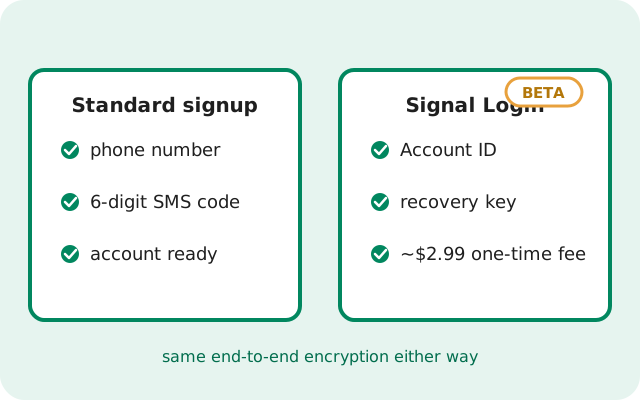
What is Signal Login, exactly?
Signal Login is an alternative registration path Signal is testing. Today, every Signal account starts with a phone number that can receive an SMS or voice call. Signal Login offers a second option: an account identified by an Account ID instead of a phone number.
Why build this at all?
A phone number is a convenient anti-spam filter: getting one costs effort, which keeps bulk fake accounts down. A numberless path needs a different filter, which is why the beta pairs it with a small one-time fee (Signal's release notes do not name a figure). The fee is not for profit; it exists to make mass fake-account creation expensive. Signal's release notes describe the payment as an in-app purchase that is never directly associated with the new account.
Everything after registration works the same
The same end-to-end encrypted chats, calls, disappearing messages, and usernames. Signal Login changes how you prove you are a real person at signup, not how the app works afterwards.
How it relates to usernames
Also note that Signal Login sits alongside Signal's existing username feature, not on top of it. Usernames already let you chat without sharing your phone number; Login goes further by removing the number from registration itself. If your goal is simply keeping your number private inside chats, a username on a normal number-registered account already solves that today, with none of the beta's rough edges.
Not a second app, not a fork
It is a feature inside the regular Signal Android app, currently visible only in the beta channel.
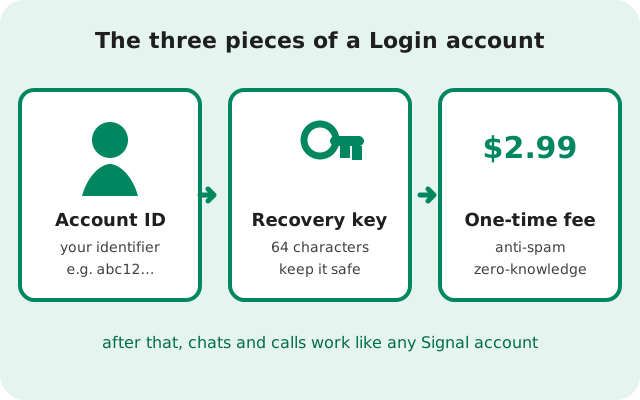
How does Signal Login work?
The beta flow has four parts. Exact screens may shift while it is in beta, but the pieces Signal has described are:
- Get the beta. Signal Login has been observed in the Android 8.28 beta. You need a beta build to see the option at all; it is not in the stable release. See joining the Android beta if you want to follow along.
- Choose the numberless path. At registration, the beta offers creating an account without a phone number instead of the usual number entry.
- Receive your Account ID and recovery key. Signal issues an Account ID, the identifier other people can use to reach you, plus a recovery key you must save. Lose the recovery key and you lose the account, the same way losing a backup key loses a backup.
- Pay the one-time fee. Signal describes it as a small one-time fee to prevent spam, paid as an in-app purchase that is never directly associated with your account. Paid once, not a subscription.
After that, setup continues like a normal first run: profile, contacts, and chats all work the same. If you ever need the standard path instead, our first-run setup guide covers number registration step by step.
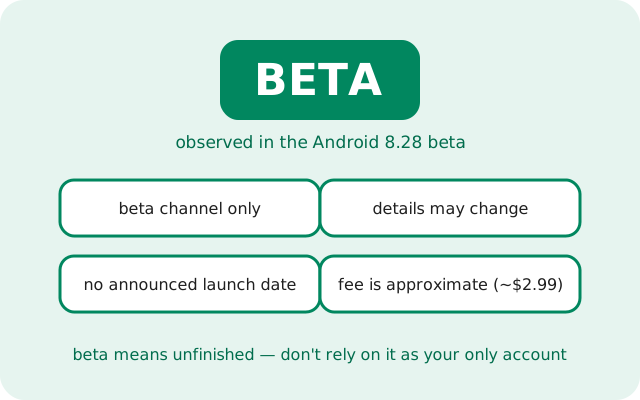
What are the beta limits right now?
Because Signal Login is still in beta, the honest answer to most "can I" questions is "not yet, or not reliably". Here is what the beta status means in practice:
- Beta channel only. You will not find it in the stable app from Signal's official APK page or the Play Store. It has been observed in the Android 8.28 beta.
- Details can change. Beta features get renamed, reworked, or shelved. Treat every detail on this page as "as observed in beta", not as a promise.
- No announced launch date. Signal has not announced when, or whether, numberless accounts reach the stable release. We will not invent one here.
- No published amount. Signal's release notes say only “a small one-time fee”; they do not name a figure, so treat any specific price you see elsewhere as unverified.
- Not a migration path (yet). There is no verified way to convert an existing phone-number account into a Login account. Assume you would be starting a separate account.
Bottom line: if you need a working Signal account today, register with a number. Use the beta only if you understand you are testing unfinished software.
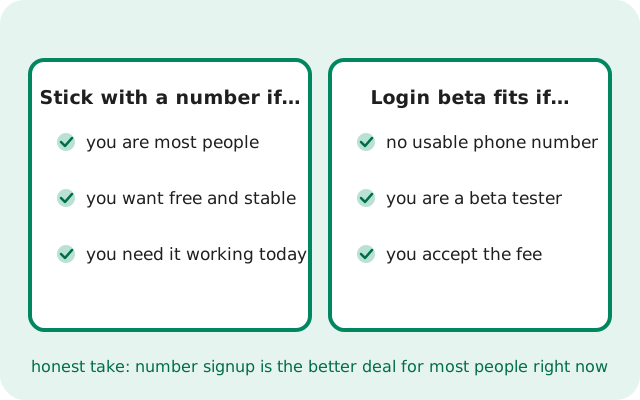
Who is Signal Login actually for?
Signal Login exists for people the phone-number requirement locks out:
- someone without a usable mobile number,
- someone in a place where receiving SMS verification is unreliable, or
- someone who simply wants an account that was never tied to a number.
It also suits beta testers and the technically curious who are comfortable with unfinished features and a small fee, and who keep a separate stable account for daily chats.
Now the honest framing: most users should still use a phone number. Number registration is free, stable, tested by hundreds of millions of people, and fully supported. The beta path costs money, can change without notice, and has no migration story if you later want to switch. If none of the "locked out" situations describe you, the standard path is simply the better deal right now.
Think of it as a door Signal is building for people who cannot use the main entrance, not as a replacement entrance everyone should switch to.
Signal Login vs phone-number signup: how they compare
Side by side, the two registration paths differ in exactly the ways you would expect. Everything after signup, encryption, features, usernames, is the same.
| Signal Login (beta) | Phone-number signup | |
|---|---|---|
| Account identifier | Account ID | Phone number |
| Cost | Small one-time anti-spam fee (amount not published) | Free |
| Verification | Zero-knowledge payment | 6-digit SMS or voice-call code |
| What to keep safe | Recovery key (lose it, lose the account) | Signal PIN and backup recovery key |
| Availability | Android beta only (observed in 8.28) | Everywhere Signal runs |
| Maturity | Experimental: can change | Stable and fully supported |
If you are weighing your options today, also read other ways to use Signal without a phone number, which covers the currently available alternatives alongside the beta.
from Signal's official site — file hosted by Signal, not by us
Frequently asked questions
Has Signal Login launched?
No. As of this writing it is beta-only, observed in the Android 8.28 beta. Signal has not announced a launch date for the stable release.
How much does a numberless account cost?
Signal's release notes describe a small one-time fee to help prevent spam. The notes do not name an amount. It is a single payment, not a subscription, handled as an in-app purchase that is never directly associated with the new account.
Is Signal Login available on iPhone or desktop?
The beta sightings have been on Android. There is no verified information about iOS or desktop availability, so we will not speculate.
Do I still get end-to-end encryption?
Yes. Signal Login only changes how you register. Chats, calls, and media use the same end-to-end encryption as number-registered accounts.
What happens if I lose my recovery key?
Treat it like a backup key: Signal cannot recover it for you. Save it somewhere safe the moment you receive it.
Can I convert my existing account to Signal Login?
There is no verified migration path from a phone-number account to a Login account. Assume they are separate accounts.
Should I wait for Signal Login instead of registering now?
No. Register with a number today if you need Signal; the beta has no announced launch date and its details can change.
Keep reading
- joining the Android beta: how to get beta builds like 8.28
- what's new in Signal 8.28: the beta build where Login was observed
- other ways to use Signal without a number: currently available alternatives
- the current stable version: what most users should install