
Your Signal message is stuck on one check: heres what that means
Published: October 7, 2026 Updated: October 8, 2026
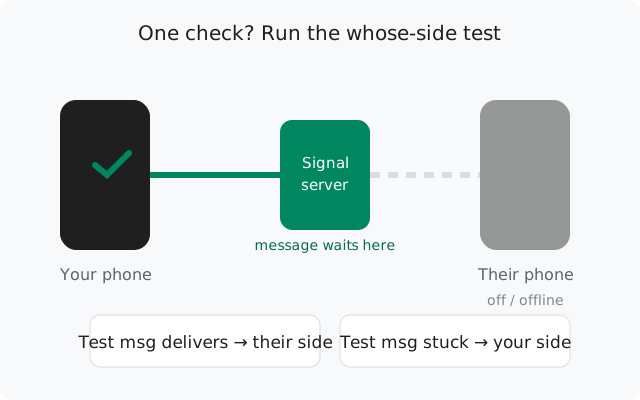
A Signal message stuck sending usually shows one check mark: it reached Signal's servers but hasn't been delivered to the other person's device yet. In most cases this is not your phone's fault at all. Their phone is off, in airplane mode, out of coverage, or its battery manager killed Signal. The key diagnostic: if it's stuck for one contact but others deliver fine, it's their side. If every contact is stuck on one check, it's your side. This guide covers both.
The whose-side test
Do this first, before touching any setting: send a test message to a different contact (someone you know is online).
- Test message delivers (two checks), original is stuck on one: your phone is fine. The problem is entirely on the recipient's side. Skip to their side: there is nothing wrong with your app.
- Test message also stuck on one check: the problem is on your side: your connection to Signal's servers is unhealthy. Go to your side.
This one test saves most people from an hour of pointless reinstalling. A surprising number of "Signal is broken" cases are just "the other person's phone died".
Diagnostic table
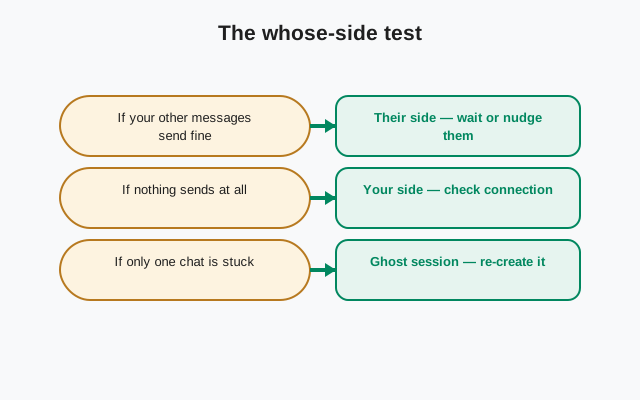
| What you see | Whose side | What to do |
|---|---|---|
| One contact stuck for hours, others fine | Theirs | Wait, or ask them to check their phone |
| Everyone stuck on one check | Yours | Connection fixes |
| Stuck right after they reinstalled Signal | Theirs (session) | Accept safety-number change, reset session |
| Stuck after you unblocked someone | Session | Reset secure session in the conversation |
| Delivers the moment they open the app | Theirs (battery) | Their battery manager kills Signal |
| One check for days, they say phone is fine | Theirs (ghost device) | Dead sessions |
When it's your side
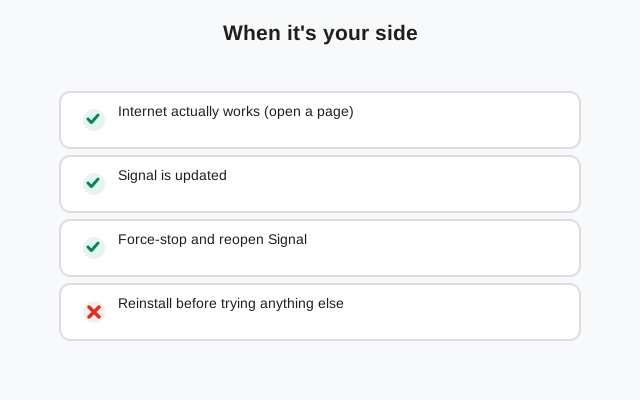
If every message sticks on one check, your phone reaches Signal's servers poorly or intermittently. Work through these in order:
Force a reconnect
Toggle airplane mode on and off, then close and reopen Signal. A stale connection is the most common your-side cause.
Check VPN and private DNS
Turn off your VPN and set Private DNS to Off or Automatic (Settings → Network → Private DNS). Filtering DNS providers and VPNs are the top silent blockers. Full details in the master sending guide.
Fix background restrictions
Set Signal's battery to Unrestricted and allow background data. If your connection only lives while the app is open, messages queue up as one-check the moment you close it.
Check Signal's server status
Rare, but real: during a Signal outage, messages pile up on one check for everyone. Check support.signal.org before reinstalling anything.
When it's their side
If only one contact is stuck, your job is mostly to wait, but it helps to know why, so you don't panic:
- Phone off, dead battery, or airplane mode: the most common reason. Your message waits safely on Signal's server and delivers the moment their phone reconnects. Nothing is lost.
- No coverage: they're in a dead zone, traveling, or on a flight. Same as above. Delivery happens when they're back.
- Their battery manager kills Signal: the telltale sign is that your message delivers the instant they open the app. Their phone is fine while Signal is open but the background connection dies when they close it. They need the same battery exemptions on their phone (Unrestricted battery, background data allowed).
- They uninstalled Signal without unregistering: your messages try to reach a device that no longer exists. See ghost devices below.
- They blocked you: messages to someone who blocked you will never deliver past one check. There's no notification telling you this. That is by design, for the blocker's privacy.
If you can reach them another way, the most useful thing they can do is simply open Signal. Delivery is usually instant at that point.
Ghost devices and dead sessions
Sometimes the recipient's phone is on, Signal is open, and your message still sits on one check for days. The usual cause is a dead session: they used Signal on an old phone, got a new phone, and the old registration was never cleanly replaced. Your app keeps trying to deliver to encryption sessions that no longer exist.
Reset the secure session
Open the conversation, tap their name, and choose Reset secure session. This forces a fresh key exchange and clears the dead session.
Ask them to re-register
If resetting doesn't help, they should re-register their number on their current phone (the normal Signal setup flow). Re-registering invalidates all old device sessions at once.
Check for a number change
If they changed phone numbers without transferring the account, you're messaging a registration nobody owns anymore. Get their new number.
Group chats vs one-to-one
In a group, one check on your message means it hasn't reached at least one member's device yet. It may have delivered to everyone else. This is normal and not a problem with your phone. If your group messages consistently stick while one-to-one messages fly, one group member likely has a dead session (see above) or an ancient app version. Ask the group admin who hasn't updated in a while.
Last resorts
On your side, the honest escalation path is:
Update, then restart the phone
Latest build from signal.org/android/apk (8.29.3), then a full reboot.
Reinstall, with a backup
Back up chats first (Settings → Chats → Chat backups), then reinstall. This fixes corrupted local state, but it wipes history without a backup.
from Signal's official site, file hosted by Signal, not by us
Frequently asked questions
My Signal message has been on one check for days. Is it lost?
No. One check means its stored on Signals servers waiting for the recipients device. It delivers automatically when their phone reconnects. Messages are not lost while they show one check.
One check, but theyre online and replying in the group. Why?
Their one-to-one session with you is broken while their group sessions work. Usually a dead session from an old device. Reset the secure session in your conversation with them, or ask them to re-register.
Why does my message deliver the second they open Signal?
Their phones battery manager kills Signals background connection, so nothing delivers until the app is open. They need to set Signals battery to Unrestricted and allow background data.
I unblocked someone and now messages stick on one check. What happened?
Unblocking doesnt always rebuild the encryption session cleanly. Open the conversation, reset the secure session, and resend.
Can someone read my message while its on one check?
No. One check means it hasnt reached any of their devices yet. It sits encrypted on Signals server, which cannot read it, until their phone picks it up.
Does one check mean they blocked me?
Not necessarily. An offline phone looks identical. But a permanent one-check to someone you know is active is consistent with being blocked. Signal deliberately doesnt tell you which it is.
Related: the master guide to messages not sending, fixing messages you never receive, battery fixes for delayed delivery, backing up before a reinstall, and the troubleshooting hub.