
Signal contacts not syncing? How to fix stale names and updates
Published: October 7, 2026 · Updated: October 8, 2026
If your Signal contacts are not syncing, you are dealing with a data freshness problem, not a missing-contacts problem. The names are wrong, old, or stuck. A contact you renamed last week still shows the old name, or new numbers do not appear. Nine times out of ten the fix is a forced refresh: pull down to refresh the contact list in Signal, restart the app, and re-check the contacts permission. This guide explains how Signal syncs contacts, why names go stale, and the exact order to fix it.
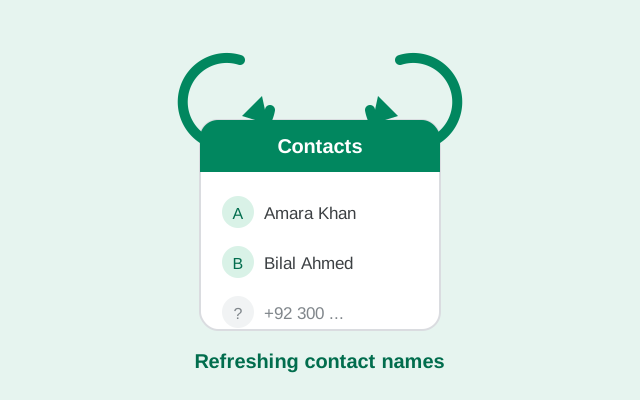
Sync problem or missing contacts? Check first
Before anything else, make sure you are fixing the right problem. "Not syncing" and "not showing" look similar but need different fixes.
- Sync problem: contacts are visible, but names are wrong, old, or stuck. A renamed contact keeps the old name. A new number does not get picked up. This page is for you.
- Missing contacts: the list is empty or most contacts are gone. That is almost always the contacts permission. Start with our guide on contacts not showing in Signal and come back here if names are still stale afterward.
How Signal syncs your contacts
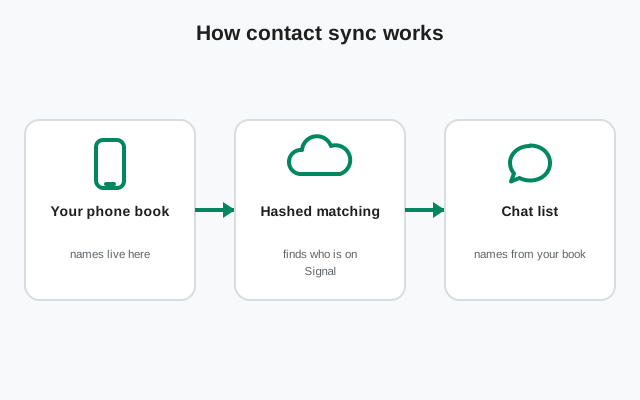
Signal does not keep its own separate address book that you manage by hand. It reads your phone's address book and matches the numbers against Signal's directory of registered users. Understanding that match is the key to every fix on this page.
- Signal reads, it does not store a copy you edit. Rename a contact in your phone's contacts app and Signal should pick up the new name at the next refresh. Edit the name inside Signal? There is no such option. The name lives in your phone book.
- Matching is by phone number. Signal compares the numbers in your address book with its directory. When it finds a match, that person appears as a Signal contact. The number format has to be right for the match to work, which is why country codes matter so much.
- Sync happens on launch and on refresh. Signal rebuilds the list when you open the app and when you pull down to refresh the new-conversation screen. It does not always notice changes the second you save them in another app.
Why the wrong name shows up
The name you see in Signal is not always the name you expect. There are two possible sources, and knowing which one Signal used explains most "wrong name" complaints.
- Your phone-book name comes first. If you saved someone as "Ahmed Bhai," Signal shows "Ahmed Bhai." The contact's own profile name does not override what you saved.
- No phone-book name, no familiar name. If a number is not saved in your contacts at all (a new chat from a stranger, or a message request), Signal falls back to the person's profile display name, or just shows the bare number. That is normal, not a sync failure.
- Renames take time to appear. You changed "Ahmed Bhai" to "Ahmed (Office)" yesterday and Signal still shows the old name. The refresh has not happened yet. Pull down to refresh the contact list and restart the app before assuming anything is broken.
- Two entries, one person. If you have the same person saved twice (once as "Ahmed" and once as "Ahmed Bhai"), Signal may show either one, or flip between them after updates. Merge duplicates in your phone's contacts app and the confusion stops.
Force a sync: the order that works
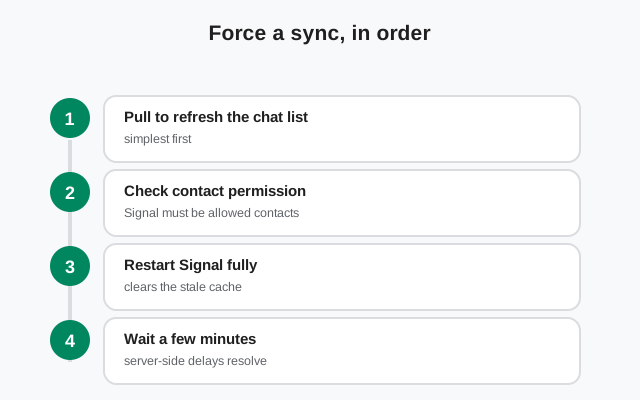
Do these in order. Most sync problems are fixed by step 2 or 3.
-
Pull down to refresh the contact list
Open Signal, tap the compose button to start a new conversation, then pull the list down. This is the manual sync trigger. Newly saved or renamed contacts appear after it.
-
Restart Signal completely
Swipe Signal away from your recent apps and open it again. The contact list rebuilds on launch, which catches changes the pull-refresh missed.
-
Re-check the contacts permission
Go to Settings → Apps → Signal → Permissions → Contacts and make sure it says Allow. Even a partial or "ask every time" setting can make sync behave inconsistently: names appear, then vanish. While you are there, turn off "Remove permissions if app is unused" so Android does not silently revoke it later.
-
Toggle the permission off and on
If it already says Allow, switch it to Don't allow, reopen Signal, then set it back to Allow. This forces Android to hand Signal a fresh copy of the address book and fixes syncs that got stuck in a half-updated state.
-
Check which contact accounts are visible
Open your phone's contacts app and look at its display settings. If it is set to show only Google contacts, but the renamed entry lives in your SIM or phone storage, Signal syncs the entry it can see: the old one. Switch the display to All contacts.
Number formats that break the match
Signal matches by number, so the number has to be clean. A name can be perfect and still never sync if the number is off.
- Add the country code. A contact saved as
0300 1234567may not match the registered+92 300 1234567. Save numbers in full international format with the leading+and sync problems drop sharply. - Changed numbers need updating. If your contact changed their number and registered Signal on the new one, your old saved number points at nothing. Update the contact entry, then refresh.
- Clean pasted numbers. Numbers copied from websites sometimes carry invisible characters or odd spacing. Retype the digits by hand if a specific contact refuses to sync.
- Landlines never match. A landline number saved for a person will never produce a Signal contact. Signal accounts are tied to mobile numbers.
Dual-SIM and account quirks
- Re-registering on the other SIM confuses everything. Signal is registered to one number. If you re-registered Signal on your second SIM's number, your contacts now see a "new" you, and your own synced view can look wrong. Pick one number and stay on it.
- Contacts hidden in other accounts. Phones merge contacts from Google, SIM cards, and device storage. If the updated entry is in an account your contacts app is not displaying, Signal syncs the stale one. Enable all accounts in the contacts app's display settings.
- Work profiles keep separate books. Contacts saved inside a work profile are invisible to Signal in your personal profile. Move the contact to your personal address book.
- New phone, partial transfer. After moving to a new phone, the address book sometimes transfers incompletely. Names arrive but numbers are truncated, or vice versa. If sync problems started right after a phone change, check a few contact entries by hand for damage.
When it is a server-side delay
Sometimes everything on your phone is correct and the delay is on Signal's side. Two cases:
- Brand-new registrations. If your contact installed Signal ten minutes ago, their number is still propagating through Signal's directory. Wait 5–10 minutes, then pull to refresh. No setting on your phone speeds this up.
- Number changes on their side. When someone changes their Signal number, the directory entry updates, but your phone may hold the old match for a while. Updating the saved number and refreshing usually resolves it within the hour.
If a contact has not synced after a full day despite correct numbers and permissions, something else is wrong. Work back through the permission toggle in the steps above, because a stuck permission state is still the most likely cause.
from Signal's official site — file hosted by Signal, not by us
Symptom table: match it, fix it
| Symptom | Most likely cause | Fix |
|---|---|---|
| Renamed contact still shows the old name | List has not refreshed since the rename | Pull down to refresh the contact list; restart Signal |
| Contact shows as a bare number instead of a name | Number not saved in your phone book, or saved under a different number | Save the exact number (with country code) in your contacts |
| Name flips between two versions | Duplicate contact entries | Merge duplicates in your phone's contacts app |
| New number does not appear | Missing country code or sync not triggered | Add +country code; pull to refresh; restart app |
| Names go stale again every few weeks | Permission auto-revoked by Android | Turn off "Remove permissions if app is unused" for Signal |
| Sync worked, then broke after a phone update | Update reset permissions | Re-grant Contacts → Allow; toggle off and on |
| One contact never syncs, others are fine | Bad number format or changed number | Retype the number with full international format |
| Contact just joined Signal, not showing | Server-side directory delay | Wait 10 minutes, then pull to refresh |
Frequently asked questions
Why are my Signal contact names not updating?
Signal reads names from your phone's address book and refreshes the list on launch or when you pull down to refresh. If a rename has not appeared, the refresh has not happened yet. Pull down to refresh the new-conversation list and restart the app.
Does Signal use my phone contact names or profile names?
Your phone-book name comes first. If you saved someone as "Ahmed Bhai," that is what you see. The contact's own profile display name only appears for numbers you have not saved, and falls back to the bare number otherwise.
How do I force Signal to sync contacts?
Open the new-conversation screen and pull the list down to refresh, then restart Signal. If names are still stale, toggle the contacts permission off and back on at Settings → Apps → Signal → Permissions → Contacts.
Why does one contact show as just a number?
Either the number is not saved in your phone book at all, or it is saved in a different format than the registered number. Save the exact number with its country code in your contacts and refresh the list.
Can dual-SIM phones cause contact sync problems?
Rarely by itself. Signal reads your whole address book regardless of SIM. Problems start if you re-register on the other SIM's number, or if contacts live in a hidden account that your contacts app is not displaying.
How long does it take for a new Signal user to appear in my contacts?
Usually 5–10 minutes while the new registration propagates through Signal's directory. If it has been longer than that, check the number format and pull down to refresh.
Related guides: fix contacts missing entirely, understand message requests, not receiving messages, or browse the full troubleshooting hub.