
How to Delete Your Signal Account: The Exact Steps
Published: October 7, 2026 · Updated: October 8, 2026
Deleting your Signal account is permanent and takes two minutes, and only works on the phone where the account is set up. Open Signal, go to Settings > Account > Delete Account, enter your phone number, and confirm. That is the whole procedure. Before you tap confirm, back up your chats and read the “what survives” section first.
The exact steps
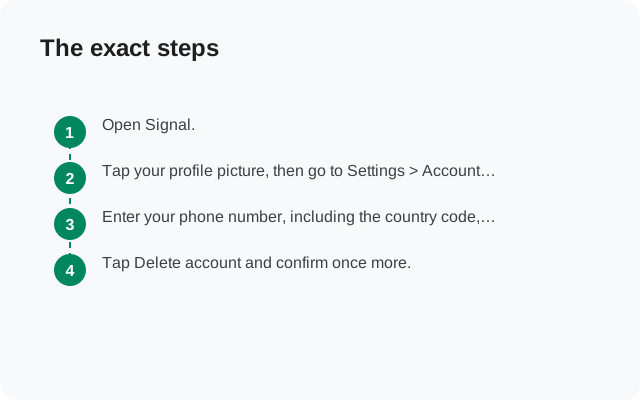
On the phone where you set up the account:
- Open Signal.
- Tap your profile picture, then go to Settings > Account > Delete Account.
- Enter your phone number, including the country code, and continue.
- Tap Delete account and confirm once more.
That is it. Your number stops being recognized as a Signal user immediately. Two notes: deleting from Signal Desktop does not do this (desktop can only wipe its own local data; the account itself lives on the phone). There is no way to do this from a browser, by email, or by asking support. Signal states it plainly: they cannot delete your account for you, and they do not accept deletion requests by email or any other method, because they cannot verify the account belongs to you.
What deletion actually removes
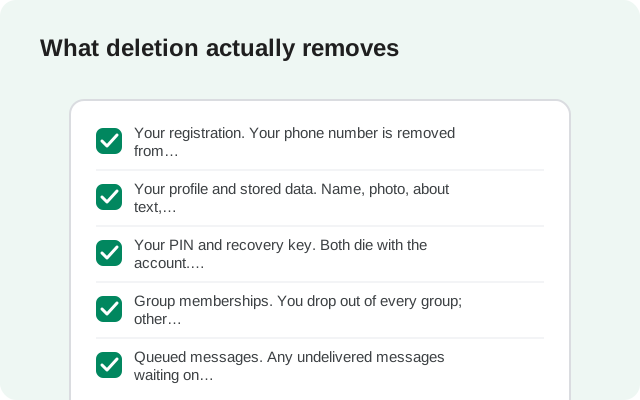
Once you confirm, Signal wipes the server-side record of you:
- Your registration. Your phone number is removed from Signal’s directory. Nobody can find you as a Signal user anymore, and new messages to your number go nowhere.
- Your profile and stored data. Name, photo, about text, settings, contacts, and block list held in the encrypted backup system are deleted along with the account.
- Your PIN and recovery key. Both die with the account. There is nothing left to forget or remember.
- Group memberships. You drop out of every group; other members see you leave.
- Queued messages. Any undelivered messages waiting on Signal’s servers for you are discarded.
- Linked devices. Desktop and tablet sessions tied to the account are unlinked.
What survives (read before confirming)
Deletion is thorough on Signal’s side and powerless everywhere else. What it cannot touch:
- Messages already on your contacts’ phones. Every message you ever sent that was delivered lives on the recipient’s device. Deleting your account does not (and cannot) pull those back. If there are conversations you regret, deletion is not the fix; those copies are out of your hands regardless.
- Your local database, until you remove it. Deleting the account does not wipe the app from your phone. Your message history stays in the local database until you uninstall Signal or clear its data. If your goal is “no trace on this device,” deletion alone does not achieve it: uninstall after.
- Anything anyone else kept. Screenshots, exports, forwarded messages are obviously outside Signal’s reach.
- Your phone number itself. The carrier number is untouched. You can re-register it on Signal tomorrow and start over as a brand-new account.
The catches nobody tells you
- It must be done from the registered, working phone. Signal requires the app to be actively working on the phone where the account was set up. Lost the phone? Broken beyond repair? There is no remote delete button. Your fallback is the automatic cleanup: Signal deletes accounts after 120 days of inactivity.
- It is irreversible. No undo, no grace period, no “recover my account” flow. Once confirmed, the only way back onto Signal is a fresh registration with none of your old data.
- Groups notice. You will vanish from every group at once, which can prompt questions. If you are leaving for privacy reasons, that sudden disappearance is itself a signal. Consider leaving groups quietly first, then deleting.
- Your contacts keep your old profile cached briefly. Name and photo may linger in their apps until their clients refresh. Cosmetic, but don’t be surprised.
The 30-second pre-delete checklist
Run through this list in the minute before you confirm. It catches nearly every regret story:
- Backup made and verified? Not just created: opened and confirmed readable, with the passphrase stored separately from the backup file.
- Important contacts warned? Tell the people who matter that the number is leaving Signal, and give them your new contact details another way. After deletion you cannot message them from that account to explain.
- Groups handled? Leave groups you administer gracefully or hand admin to someone else first. Deletion drops you instantly with no handover.
- Linked devices unneeded? They get unlinked automatically, but if a desktop holds the only copy of some conversation, export what matters first.
- Right phone? Confirm you are deleting from the phone where the account is registered. Deleting from the wrong device is not possible, but double-checking costs nothing.
- Sure it is deletion you want? If the real goal is silence, muting and uninstalling achieves it with an undo option. Deletion does not have one.
Rule one: back up before you delete
If there is even a small chance you will want those conversations later (for memories, records, legal reasons, anything), make an encrypted backup before you delete. The order matters and cannot be reversed:
- Create the backup with the Android backup guide and store the backup file plus its passphrase somewhere safe.
- Verify the backup is readable (a backup you cannot open is not a backup).
- Only then delete the account.
A backup made after deletion is useless. There is nothing left to back up. And note the asymmetry: a backup preserves your history, but nothing preserves the account. The number-to-Signal mapping, the groups, the profile: all of that is gone forever the moment you confirm.
Not sure? Lighter alternatives
Deletion is the right tool when you want the number gone from Signal. For everything else, there is usually a lighter option:
- Just stop using it. Uninstall the app and walk away. The account lingers, unreachable, and Signal’s 120-day inactivity rule deletes it on its own. No ceremony required.
- Switch numbers instead. If the real problem is an old number, re-register Signal with your new number rather than deleting. Cleaner result, same effort.
- Go quiet without deleting. Mute every conversation, disable notifications, remove your profile photo. The account exists but makes no demands on you.
- Only want it off one computer? On Signal Desktop, delete the application data from Preferences > Privacy. That wipes that computer only. Your account and phone are untouched.
Be honest with yourself about which problem you are solving. “I want fewer notifications” is a settings problem, not a deletion problem. “I don’t want this number on Signal anymore”: that is what Delete Account is for.
If you come back later
Rejoining is just registering again: install Signal, verify the number, create a PIN, set up your profile. You start completely fresh: no contacts, no groups, no history, no memory of the old account on Signal’s side. Your old contacts will see you as a brand-new Signal user. If you kept an encrypted backup from before deletion, you can restore message history onto the new install during setup; without it, history starts from zero.
from Signal's official site — file hosted by Signal, not by us
Frequently asked questions
Can I delete my Signal account from a new phone?
Only if the account is registered and working on that phone. Signal requires the app to be actively working on the phone where the account was set up. You cannot delete an account that is not registered on the device in your hand.
Can Signal support delete my account for me?
No. Signal states that they cannot delete accounts on request (not by email or any other method) because they cannot verify that the account belongs to the requester. You must do it yourself from the app.
Will my contacts know I deleted my account?
They will notice you are gone: you drop out of group chats, and direct messages to you stop delivering. Signal does not send anyone a “deleted their account” announcement, but the absence is visible.
Can I get my account back after deleting it?
No. Deletion is permanent and irreversible. You can register the same phone number again, but it creates a completely new account with none of your old data, groups, or history.
Does deleting the Signal app delete my account?
No. Uninstalling only removes the app from your phone; your account stays registered on Signal's servers until you delete it from inside the app, or until 120 days of inactivity trigger automatic deletion.
I lost my phone. How do I delete my Signal account?
You cannot delete it remotely. If you recover access to the number on a new phone, register there and then delete from Settings > Account > Delete Account. Otherwise, the account will be deleted automatically after 120 days of inactivity.
Keep reading
- Back up Signal before you delete: the encrypted backup guide and passphrase
- Restoring a Signal backup: how to bring history onto a fresh install
- Locked out of Signal: recovery paths if deletion is not what you meant
- Re-registering after a reinstall: what happens to sessions and history
- Troubleshooting hub: every Signal fix guide in one place
- what deletion wipes and what survives — the data side: what gets wiped and what stays