
Report a fake Signal APK: where and how
Published: October 7, 2026 Updated: October 8, 2026
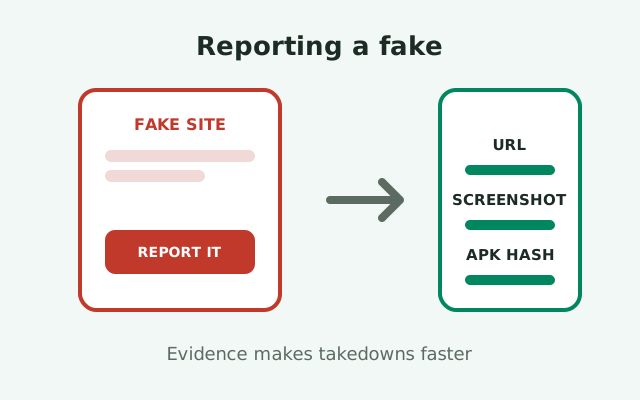
Found a fake Signal APK or a phishing site pretending to be Signal? Report it: to Google Safe Browsing, through the Play Store's report flow if it is an impostor app, to the fake site's registrar or host abuse contact, and to Signal's own support channel. One report will not end the scam, but reports are what get domains flagged in browsers, apps pulled from stores, and phishing pages taken down. Most people who spot a fake never report it because they do not know where reports go. This page fixes that: the exact destinations, what evidence to attach, and honest expectations about what happens next.
Why reporting is worth your time
The first reason: raising the scammer’s costs
It is easy to feel that reporting a fake site is pointless. The scammer will register another domain tomorrow, the app will reappear under a new name, and your ten minutes will have bought nothing. That feeling is understandable and mostly wrong about the mechanism. Takedowns do not work by eliminating scammers; they work by raising the scammer's costs and shrinking each fake's lifespan and reach. A phishing site that lives for six hours because browsers flag it quickly harms far fewer people than one that lives for six weeks because nobody reported it.
The second reason: compounding
The second reason is compounding. Abuse teams prioritize based on report volume and quality. One detailed report with a URL, screenshots, and a file hash is worth more than fifty vague ones, and every report adds to the pattern that triggers automated defenses. Google Safe Browsing, browser phishing filters, and Play Store review systems all learn partly from what users report. Your report becomes part of the training data that protects the next person who searches for a download.
The third reason: a paper trail
The third reason is personal: if the fake already harmed you or someone you know, the report creates a paper trail. Banks, carriers, and law enforcement all ask "did you report it, and to whom" when fraud is involved. Having filed reports at the right destinations turns a vague complaint into a documented incident. So report for the strangers you will never meet, and report for yourself. Both reasons are good.
What reporting is not
What reporting is not: a rescue service. Filing a report does not get your money back, un-send the credentials you entered, or clean malware off your phone. Those are separate jobs, covered in our guides to spotting fake APKs and APK malware cleanup. Report in parallel with fixing your own situation, not instead of it.
Where to report: the four destinations
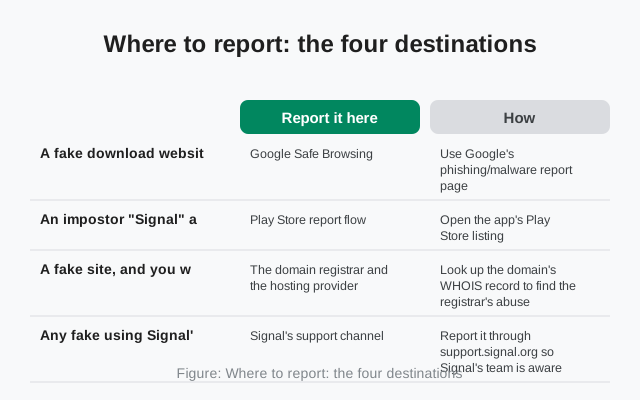
The information-gain element for this page: the complete reporting map. Different fakes go to different places, so match the fake to the destination.
| What you found | Report it here | How |
|---|---|---|
| A fake download website (phishing or malware) | Google Safe Browsing | Use Google's phishing/malware report page: paste the full URL, describe what the site does, submit. This feeds the warnings shown in Chrome, Firefox, Safari, and Android |
| An impostor "Signal" app in the Play Store | Play Store report flow | Open the app's Play Store listing, tap the flag or "Flag as inappropriate," choose the impersonation or malware reason, and describe what makes it fake |
| A fake site, and you want it taken down at the source | The domain registrar and the hosting provider | Look up the domain's WHOIS record to find the registrar's abuse contact email, and report the phishing or malware with the URL and evidence. Many hosts also have their own abuse-report forms |
| Any fake using Signal's name, logo, or pretending to be Signal | Signal's support channel | Report it through support.signal.org so Signal's team is aware of the impersonation |
A few practical notes on each. For Safe Browsing reports, precision matters. Report the exact page URL serving the fake download, not just the domain's homepage. And say plainly what it does ("this page offers a modified Signal APK signed by an unknown key" or "this page asks for Signal verification codes"). Reviewers process thousands of reports; the clear ones get actioned first.
For the Play Store, know what you are looking at before you report. The real Signal listing is published by Signal Foundation. Impostor apps often use names like "Signal Pro," "Signal Plus," or "Signal Messenger 2026" with a lookalike icon. Report the listing, not the developer's other apps, and in the description note the specific impersonation: wrong publisher name, fake "official" claims, or behavior like requesting permissions the real app would not need at install.
For registrar and host abuse reports, keep your tone factual and your evidence attached. Abuse desks are not investigators; they act on clear, documented violations of their terms. A short email with the URL, a screenshot, and one sentence describing the harm ("phishing page harvesting Signal verification codes") outperforms a long angry essay. If you get no response in a reasonable time, escalate to the hosting provider separately; registrars and hosts are different companies with different abuse teams.
What evidence to include
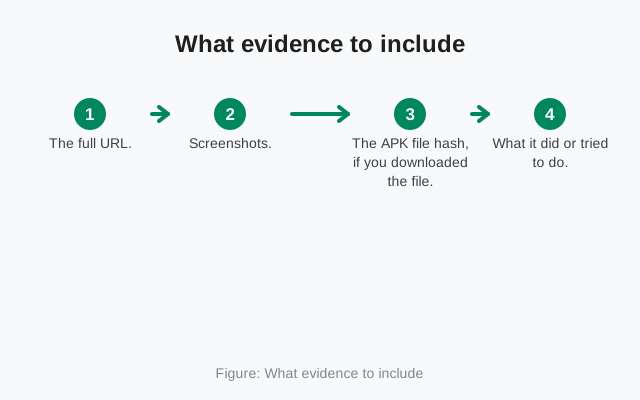
Good evidence is what separates a report that gets actioned from one that sits in a queue. Collect it before the fake disappears, because fakes are ephemeral: domains get rotated, pages get edited, and app listings get pulled and reposted. Screenshot first, report second.
- The full URL. Copy it exactly from the address bar, including the whole path. Do not paraphrase it, do not shorten it, and do not "clean it up." The exact URL is what gets blocklisted. If the fake spans multiple pages (a landing page plus a download page), report each URL.
- Screenshots. Capture the page as a visitor sees it: the fake branding, the download button, any claims like "official" or "pro version," and any forms asking for phone numbers, codes, or payment. On Android, screenshot the address bar too, so the domain is visible in the same image. Screenshots are your proof if the site changes before the reviewer looks.
- The APK file hash, if you downloaded the file. If you have the fake APK but did not install it, compute its SHA-256 hash and include it. Hashes let abuse teams and researchers identify the same malicious file wherever it reappears, even under new names and domains. Never install a suspicious file just to investigate it; the hash of the downloaded file is enough.
- What it did or tried to do. One or two sentences: "The download button served an APK signed by an unknown certificate, not Signal's published fingerprint." Or: "The page asked for my phone number and Signal PIN before downloading." Or: "The Play Store listing uses Signal's icon but is published by an unrelated developer and requests SMS permissions at install." Facts, not conclusions.
- Dates and context. When you found it, and how: a search result, a forwarded link, a social media post, an ad. This helps reviewers understand the distribution channel, which is often as valuable as the fake itself.
Store your evidence somewhere safe for a few months. If the case escalates, to a bank dispute, a carrier fraud claim, or law enforcement, you will be asked for exactly this material, and "the site is gone now" is a much weaker position than a folder of dated screenshots.
Reporting to Signal itself
Signal's support channel at support.signal.org is the right place to tell Signal about impersonation of its brand: fake sites using its name and logo, impostor apps, phishing pages harvesting verification codes, and scam support accounts. Signal's team cannot take down someone else's website directly, but they track impersonation campaigns, they can pursue trademark abuse through the proper channels, and in some cases they coordinate with platforms on fakes that target their users specifically.
What to include in your report
When you write to them, include the same evidence package: URLs, screenshots, hashes, and a clear description. Keep it concise. Support teams triage by clarity, and a well-organized report with the facts up front gets routed correctly the first time. Mention if the fake is actively distributing malware versus merely impersonating, because active malware changes the priority.
Set your expectations about the reply
Set your expectations about the reply. Signal's support operation is small relative to its user base, and impersonation reports are one queue among many. You may receive an acknowledgment rather than a running commentary on the takedown. That is normal. The value of the report is in the record it creates and the patterns it feeds, not in the email you get back.
Do not report to impostor accounts
One thing not to do: do not report fakes to random "Signal support" accounts on social media or messaging apps. As our fake support guide explains, Signal's team never operates through DMs, and anyone claiming to take your report over Telegram or WhatsApp is running a scam, not a help desk. The ticket system on the real support site is the channel. Everything else is theater.
Honest expectations: what happens after you report
Here is the timeline, honestly. A Safe Browsing report can lead to browser warnings within hours to days if the verdict is clear-cut phishing or malware. Those warnings are powerful: they intercept the victim at the moment of danger, across every major browser at once. Not every report triggers them, and borderline cases take longer, but this is the fastest lever you have.
Play Store reports take longer
Play Store reports typically take longer, from days to weeks, because each involves human review of the listing and the developer's history. Impersonation cases are usually straightforward once reviewed; the delay is queue depth, not doubt. If the same developer reposts under a new name, report the new listing too. Persistence on your side matches persistence on theirs.
Registrar and host takedowns are the slowest
Registrar and host takedowns are the slowest and most variable. Some providers act within 48 hours on clear phishing; others take weeks or ignore reports until a second complaint arrives. This is normal and frustrating in equal measure. The realistic goal is not instant removal but steady pressure: every report shortens the fake's profitable lifespan a little, and short-lived fakes cannot build the search ranking and reputation that make the scam work at scale.
What almost never happens
What almost never happens: the scammer getting caught because of your report alone. Individual fakes are run by operators who expect takedowns and plan for them. Law enforcement action requires patterns across many victims, which is exactly why your report matters in aggregate even when it feels futile alone. Report, keep your evidence, fix your own situation, and move on knowing you raised the cost of the scam. That is what a good report does, and it is enough.
from Signal's official site — file hosted by Signal, not by us
Frequently asked questions
Where do I report a fake Signal website?
Report phishing and malware sites to Google Safe Browsing, which feeds warnings into major browsers. For takedown at the source, also report to the domain registrar's and hosting provider's abuse contacts, found via the domain's WHOIS record.
How do I report a fake Signal app on the Play Store?
Open the app's listing, use the flag or 'Flag as inappropriate' option, choose the impersonation or malware reason, and describe specifically what makes it fake, such as the wrong publisher name.
What evidence should I include in my report?
The exact full URL, screenshots showing the fake branding and the address bar, the SHA-256 hash of any downloaded APK file, a short factual description of what it does, and when and how you found it.
Should I report fakes to Signal too?
Yes. Report impersonation of Signal's brand through support.signal.org with your evidence attached. Signal's team tracks impersonation campaigns even though they can't directly take down someone else's site.
How long do takedowns take?
Browser warnings from Safe Browsing can appear within hours to days. Play Store reviews take days to weeks. Registrar and host takedowns are the slowest and most variable. Report promptly and keep your evidence either way.
Keep reading
- spotting fake Signal websites: the typosquat patterns, so you recognize the next one
- telling real and fake Signal APKs apart: file-level checks for anything already downloaded
- the fake 'Signal support' scam: don't hand your report to a scammer
- fake Signal APK Telegram channels: the channel-based scam pattern