
Who Can Find You by Your Phone Number on Signal
Published: October 7, 2026 · Updated: October 8, 2026
By default, anyone with your phone number can type it into Signal and find your account. That is how Signal has always worked, but it is no longer the only option. One setting, Settings > Privacy > Phone Number > Who can find me by my number, decides whether your number is searchable, and a second decision, whether you use a username, decides whether anyone needs the number at all. This guide explains how discovery works, the four setting combinations, and how to change the default safely.
from Signal’s official site — file hosted by Signal, not by us
How discovery works on Signal
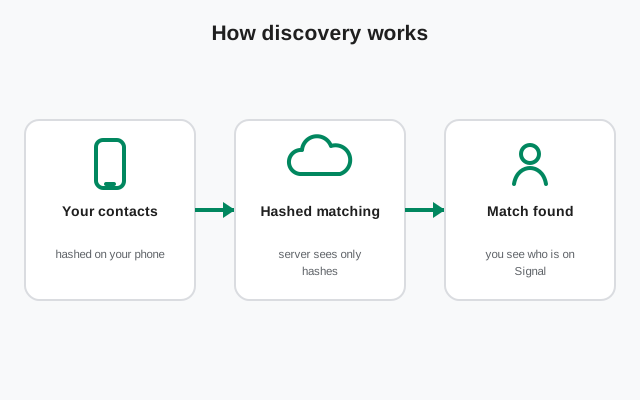
Signal needs to answer one question quickly: which of your phone's contacts already use Signal? To answer it without reading your address book in the open, Signal uses a private contact discovery process. Your phone checks which contacts match registered Signal users in a way designed so Signal's servers never hold your address book in plain form. The design goal is simple: find your contacts without learning your contacts.
The reverse lookup is the part this guide cares about: someone types a phone number into Signal's search, and Signal tells them whether that number belongs to a registered user. That lookup is the mechanism behind "find me by number." It has always been part of Signal, before usernames existed, it was the only way to start a chat. It is still on by default, because for most people being reachable by their number is the point of a messaging app.
Why the default is open
New users often assume the number-hiding defaults apply to search too. They do not. "Who can see my number" defaults to Nobody, but "Who can find me by my number" defaults to Everybody. Signal's reasoning is practical: the most common way people start using Signal is by finding friends who already have it, and friends have each other's numbers. An app where nobody can find you by the identifier everyone already knows would confuse most new users into thinking Signal is broken.
Privacy-minded users are not most users, though. If your number is posted anywhere public, or you hand it to strangers for work, the open default means anyone with the number can confirm you use Signal and send a message request. Whether that matters depends on your situation, but you should know it is the default before you decide it is fine.
The setting that controls discovery
Go to Settings > Privacy > Phone Number and look at the second toggle: "Who can find me by my number." Two options: Everybody or Nobody. Everybody means any Signal user can type your number and discover your account. Nobody means the number becomes unsearchable, typing it into Signal's search returns nothing.
Switching to Nobody has one enforced side effect worth knowing: the app also sets "Who can see my number" to Nobody if it is not already there. The logic holds, a number that cannot be discovered should not be displayed either. You cannot have a hidden-but-searchable number, which would be a strange configuration anyway. If you want the reverse (visible but not searchable), that combination is allowed, though it is unusual.
The four combinations
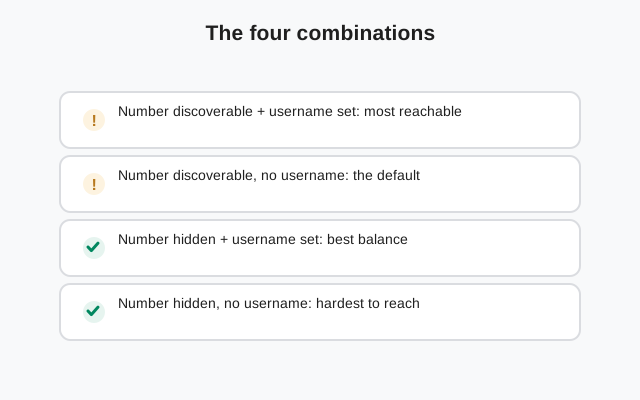
Two settings, two options each, four setups. Here is exactly what each one does.
| See my number | Find me by number | What it means in practice |
|---|---|---|
| Nobody | Everybody | The default. Your number is hidden on your profile, but anyone with it can look you up and message you. |
| Nobody | Nobody | Maximum privacy. Your number is invisible and unsearchable; people reach you only through your username. |
| Everybody | Everybody | Old-school mode. Anyone you chat with sees your number, and anyone with it can find you by search. |
| Everybody | Nobody | Rare mix. Your number shows in chats, but strangers cannot discover you by typing it into search. |
For most privacy-minded users, row two is the target. Note what row one and row two have in common: the same visible profile. The difference is entirely in discovery, one exposes you to number-based lookup, the other does not. If you came from the number-hiding tour, this table is the same matrix; the discovery angle is what this page adds.
Changing the default safely
Switching to "find me = Nobody" is safe, but do it in the right order so you do not accidentally cut yourself off from people.
Set a username first
If you turn off number discovery with no username set, people have no way to reach you at all. Set the username, test it with a friend, then lock the number.
Change the setting
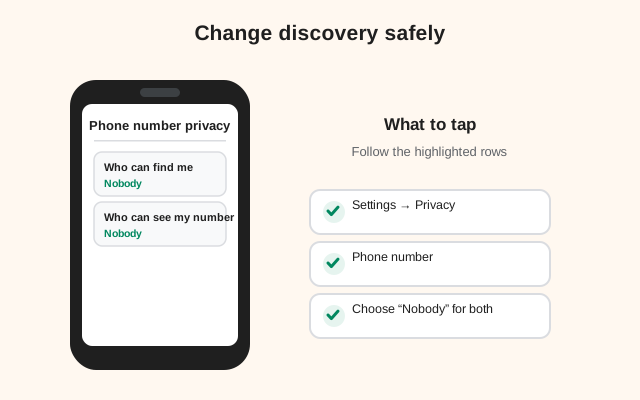
Settings > Privacy > Phone Number > Who can find me by my number > Nobody. Confirm "Who can see my number" is also Nobody.
Tell the people who matter
Existing contacts are unaffected, your old chats keep working. But anyone who was about to find you by number needs the username instead. Share it with the people you actually want to hear from.
Test from the outside
Ask a trusted friend to search your number in Signal. They should find nothing. Then have them search your username. They should find you. Two minutes, total certainty.
What does not change: your existing conversations, your groups, your linked devices, and your registration. The setting only controls future discovery by new people.
What strangers can still do
Turning off number discovery does not make you invisible. Anyone with your username can still send a message request, that is the point of having a username. Message requests land in a separate inbox where you can accept, reject, or block before any real conversation starts. A hidden number narrows who can find you; it does not narrow who can ask.
Also remember the existing-contact rule: people who already know your number, because you gave it to them or it is in their contacts, are not affected by any of this. The settings control what Signal reveals going forward, not what people already know. And in group chats, members see your profile (name and photo), not your number, but they do see that you are in the group, which is its own kind of visibility.
What if someone else gets your old number?
Phone numbers get recycled. If you change your number and abandon the old one, your carrier will eventually hand it to someone else, and that person can register it on Signal as their own. No discovery setting prevents this, because from Signal's point of view it is simply a new registration on a number that became free.
Signal has a change-number feature for exactly this reason: when you get a new number, update it inside the app (Settings > Account) rather than registering fresh. Your contacts are notified of the change, your groups and profile carry over, and the old number is released cleanly. If you skip this and just stop using the old SIM, do it promptly, the longer a dead number sits attached to your account, the larger the window for someone else to claim it.
This is also why the registration-number choice matters. A number you control long-term, one you will not surrender next month, is a better anchor than a temporary SIM. The discovery settings hide your number from search; keeping the number itself stable keeps it out of someone else's hands.
Common mistakes
Mistake one: changing only the visible setting. People set "Who can see my number" to Nobody and assume they are done. But that was already the default. The searchable setting is the one that actually needed changing.
Mistake two: blocking someone to hide from them. Blocking stops messages; it does not stop discovery. A blocked person with your number and an open discovery setting can still look you up. If you want someone unable to find you at all, the discovery setting is the tool, blocking is the tool for stopping contact, not for hiding.
Mistake three: posting the number elsewhere. A number that is unsearchable on Signal but plastered across your public social profiles is still findable, people just look it up off-platform. Number privacy is a system: lock the Signal settings, then check where else the number lives. For the full lock-down sequence, the settings tour walks it end to end.
Frequently asked questions
Can someone find me on Signal by my phone number?
By default, yes, anyone with your number can type it into Signal and discover your account. Change Settings > Privacy > Phone Number > Who can find me by my number to Nobody to stop that.
If I turn off find-by-number, can existing contacts still message me?
Yes. The setting only affects future discovery by new people. Your existing chats, groups, and linked devices are all unaffected.
Does blocking someone stop them finding my number?
No. Blocking stops messages, not discovery. To stop someone discovering you by number, set 'Who can find me by my number' to Nobody.
How does Signal check my contacts without reading my address book?
Signal uses a private contact discovery process designed so the server can confirm which contacts use Signal without holding your address book in readable form.
Can I be found by username instead?
Yes, that is the intended replacement. With number discovery off, people reach you through your username, which you can share, change, or delete any time.
Keep reading
- the full number-hiding settings tour: number hiding checklist
- usernames vs phone numbers: how the privacy model changed
- what Signal keeps about your account: metadata breakdown
- blocking and reporting contacts: how blocking works