
Signal APK file details, explained plainly
Published: October 7, 2026 · Updated: October 8, 2026
Signal Foundationfrom Signal's official site — file hosted by Signal, not by us.
The official Signal APK is the file Signal publishes on signal.org/android/apk. Its package name is org.thoughtcrime.securesms, and the current file is named Signal-Android-website-prod-universal-release-8.29.3.apk. That is the entire identity of the file: package name, official file name, and Signal's own page as the only source. Everything on this page unpacks those three facts.
We are an independent verification guide, not Signal. We do not host the file. The download button above opens Signal's own page, where Signal hosts the APK on its own servers.
The official file at a glance
| App | Signal Private Messenger, by Signal Foundation |
|---|---|
| Package name | org.thoughtcrime.securesms. This never changes, and it is how Android identifies the app |
| Current file name | Signal-Android-website-prod-universal-release-8.29.3.apk |
| Only official source | signal.org/android/apk |
| Who hosts the file | Signal's own servers (the download comes from updates.signal.org, Signal's official update domain) |
| Signing | Signed with Signal's website-build key. Signal publishes the SHA-256 fingerprint of its signing certificate on the download page so you can verify it. |
| Client license | AGPLv3 (the Signal Android client is open source) |
If any file you are offered disagrees with this table on package name, source, or signing, it is not the official website build. Our mirror warning guide explains what to do in that case.
What an APK actually is
APK stands for Android Package. It is the file format Android uses to distribute and install apps, the same way Windows uses .exe installers. When you install an app from the Play Store, the Play Store downloads an APK (or a set of them) in the background and installs it for you. When you download from Signal's page, you are simply doing that step yourself: you get the package file, and you hand it to Android's installer.
An APK is really a zip archive with a specific structure. Inside are the app's compiled code, its resources (images, layouts, translations), a manifest file describing the app (including the package name), and the developer's digital signature. That signature is what makes verification possible: it proves which key signed the file, and Android will not let a differently-signed file pretend to be an update to the same app.
Sideloading is the ordinary word for installing an APK yourself instead of through a store. It is a supported Android feature, not a hack. Android just asks you to confirm which app is allowed to install packages (usually your browser or file manager) through the "install unknown apps" setting. Our no-Play-Store install guide shows exactly where that setting lives on major phone brands.
What the official filename means
Signal's file names look technical, but every part means something. Here is the current file name broken down:
| Signal | The app name. Any official Signal file starts here. |
|---|---|
| Android | The platform this build is for. |
| website | The distribution channel: this is the website build, not the Play build. |
| prod | Production build: the real release, not a test or debug build. |
| universal | One file that works on all supported phone processors (more on this below). |
| release | Release build, as opposed to a beta or debug build. |
| 8.29.3 | The version number of this build. |
| .apk | The Android package extension. If a "Signal download" does not end in .apk (or .zip/.xapk from a converter), be suspicious. |
Learning this pattern pays off: the moment Signal ships a new release, you can read the new file name on the download page and know exactly what you are getting before you tap download.
What "universal" means
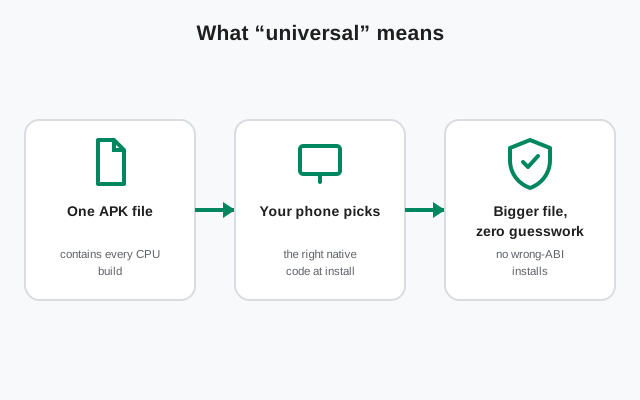
Phones use different processors. Most modern phones use arm64 chips, while some older or cheaper phones use 32-bit ARM chips. Many apps ship a separate APK for each processor type, which means you have to pick the right one.
Signal's website build avoids that problem by shipping a universal APK: a single file that contains the native code for every processor type Signal supports. You download one file, and it works on your phone regardless of which chip is inside. The word "universal" in the file name is Signal telling you exactly that.
The trade-off is file size. A universal APK is bigger than a per-processor APK would be, because it carries code your phone will never use. That is a deliberate choice by Signal: one simple download with no chance of picking the wrong architecture beats a smaller download that confuses people.
How big is the file?
Signal's download page does not print a fixed file size, and the size changes a little with every release, so we will not quote a number that goes stale. In practice, expect a download in the tens of megabytes: this is a full-featured messenger with voice and video calling, so it is not a tiny file.
Two things matter more than the exact number. First, your browser shows you the real size the moment the download starts, so you will know before it finishes. Second, keep comfortably more free space than the download size: Android needs room to hold the downloaded file and unpack it during installation. A few hundred megabytes of free space is a safe margin, and our download page covers the storage check in its requirements list.
What your phone needs before you install
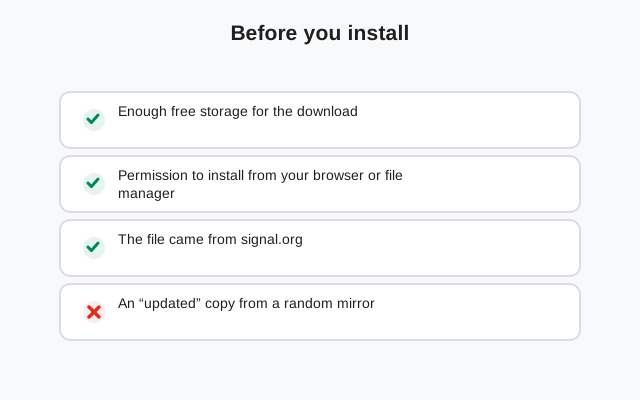
Run through this checklist before you download. Every item is a real requirement, not a suggestion:
-
A phone number that can receive SMS
Signal registers accounts with a phone number and verifies it with a code, usually by SMS. The number is your account identifier. A Wi-Fi-only tablet cannot register on its own, though it can be linked as a secondary device after you register on a phone.
-
An Android phone or tablet
This APK is Android-only. It will not install on an iPhone, and there is no official Signal APK for desktop operating systems. Desktop users should use Signal Desktop, linked to their phone.
-
Enough free storage
Keep a few hundred megabytes free so the download and the installation both fit. If storage is tight, clear cached files first rather than deleting things you need.
-
Permission to install from your browser
Android's "install unknown apps" setting must allow whichever app handles the download, usually your browser or file manager. You grant it once, for that app only. This is the step most first-time sideloaders get stuck on, and the fix takes under a minute.
-
A backup, if you are switching builds
If Signal is already installed from the Play Store, you cannot install this APK over it: the signing keys differ and Android will refuse. Back up your chats inside the app first, then uninstall the Play version, then install the APK. Skipping the backup means losing your message history.
What if the file you found ends in .xapk?
Some mirror sites offer Signal as an .xapk file instead of a plain .apk. XAPK is a bundle format those sites use: the app plus extra data files packed together. Two things to know. First, Android's built-in installer cannot open an XAPK file. You need a separate "split APK installer" app, which is one more app to trust and one more thing that can go wrong. Second, and more important: the official Signal download is always a plain .apk, and it is universal, meaning one file already works on every phone. There is nothing to bundle. A "Signal XAPK" is by definition repackaged by the mirror, not the file Signal published, so you lose the cleanest verification path: comparing the file against Signal's published fingerprint.
Short version: if you only need Signal, you never need an XAPK. Get the official .apk from signal.org/android/apk and skip the format entirely.
What the official file does not contain
Knowing what is not in the official APK helps you spot fakes. The official file contains exactly one app: Signal Private Messenger, with the standard features (chats, voice and video calls, stories, disappearing messages). It does not contain advertising. It does not contain a "Pro", "Plus", or "Premium" edition: those do not exist, and any file offering them is a scam. It does not ask for permissions beyond what a messenger needs, and you can review every permission in Android's settings after installing.
It also does not come with an installer wizard, a "downloader app", or a request to disable your antivirus. The official flow is one file, one install prompt, done. Anything fancier is not coming from Signal.
Frequently asked questions
What is the package name of the official Signal APK?
org.thoughtcrime.securesms. This is the identifier Android uses for Signal. Any APK claiming to be Signal with a different package name is not the official app.
Where does the official APK file come from?
Signal's own download page at signal.org/android/apk, served from Signal's own update servers. We link only there and never host the file ourselves.
Is the APK the same app as the Play Store version?
Yes, it is the same Signal app and the same code. The difference is only the delivery channel and the signing key, which is why one cannot be installed over the other.
Why is the file bigger than some other messaging apps?
The website build is a universal APK: one file carrying native code for all supported processors, so nobody has to pick the right architecture. That convenience costs some extra megabytes.
Can I rename the APK file after downloading?
Yes. The file name is only a label; Android reads the package name and signature from inside the file. Renaming it to something shorter is harmless, though keeping the original name makes the version easier to check later.
Related guides
- Download guides hub
- Download Signal APK (official)
- Latest Signal APK version
- Update Signal APK without the Play Store
- Install Signal without the Play Store