
How Signal syncs between your phone and desktop
Published: October 7, 2026 · Updated: October 8, 2026
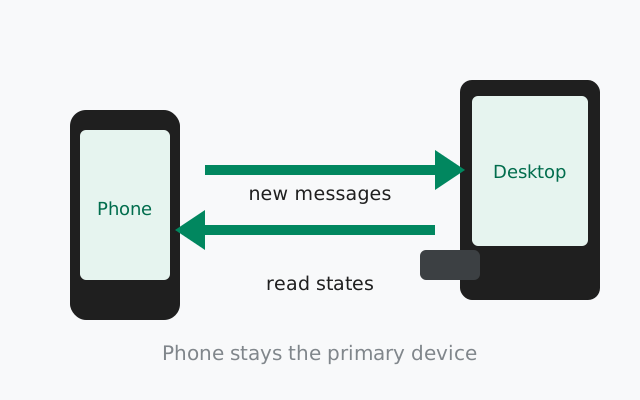
Once linked, your phone and Signal Desktop exchange new messages, read states, and contact info automatically. But your phone remains the primary device, and only messages sent after linking sync between them. At link time you get a one-time transfer of your full history plus roughly 45 days of media; after that, each device keeps its own copy of what arrives. This guide explains exactly what syncs, what does not, and the rules that govern the relationship: the 5-device limit, the 30-day rule, and the 45-day auto-unlink.
The model: phone as source of truth
Signal is built around your phone. Your phone number is your account identity, your phone creates the account, and every other device (desktop apps, tablets) exists only as a linked device attached to that phone. Nothing on desktop works without the phone having set up the account first.
- Each device gets its own encrypted copy. Signal's servers deliver every message to each of your devices separately. Desktop is not mirroring your phone's screen; it is receiving its own copy of each message, encrypted for that device.
- Desktop works with the phone off. Once linked, the desktop app sends and receives on its own. The phone does not need to be online, nearby, or even powered on. This is the independent-device model in action.
- Up to 5 linked devices. One account supports a maximum of five linked devices (desktops and tablets combined). Adding a sixth requires unlinking something first.
- The phone must stay alive. If your phone goes offline for more than 30 days, linked devices stop working. That is the 30-day primary-online rule. If a linked device stays inactive for 45 days, it is unlinked automatically. Keep the phone's Signal app working and this never comes up.
What transfers at link time
The one exception to "only new messages sync" is the moment you link. When you scan the QR code, Signal offers a one-time history transfer from your phone to the new device:
- Full message history: your conversations, transferred in full.
- Roughly 45 days of media: photos, videos, and attachments from about the last month and a half. Older media generally does not come across.
- It happens once. There is no "transfer later" button. Skip it and the computer starts with an empty conversation list; only messages sent after linking appear. Want the history after all? Unlink and link again, accepting the transfer this time.
The transfer runs over your local connection and can take a while for heavy histories. Leave both devices alone until it finishes. The step-by-step process is in our QR linking walkthrough.
What syncs between phone and desktop
After linking, this is what flows between your devices:
| Syncs | How it behaves |
|---|---|
| New messages (after linking) | Every message sent or received after the link arrives on all devices independently |
| Read states | Reading a chat on one device marks it read on the others |
| Contacts | Your contact list syncs so desktop can address messages correctly |
| Groups | Group memberships and new group messages arrive on every device |
| Profile info | Name, avatar, and about-text updates propagate |
| Disappearing-message timers | Timer settings apply across devices; expired messages vanish everywhere |
| Delete-for-everyone | Deleting a message for everyone removes it from all devices |
What does not sync
- Messages from before linking, except through the one-time link-time transfer. They never backfill afterward.
- Media older than ~45 days at link time: the transfer window cuts off around there, even if the text history is complete.
- Delete-for-me deletions. Deleting a message just for yourself removes it only on that device; your other devices keep their copies. Only "delete for everyone" reaches across.
- Some phone settings. Device-level settings like notification sounds and phone-side backup settings are per-device. Desktop has its own Preferences.
- Calls history detail. Call logs are primarily a phone-side record; do not expect a perfect mirror on desktop.
The mental model that prevents surprises: think of each device as keeping its own diary of everything that happened since the link. They agree on the present, but the past belongs to whichever devices were linked when it happened.
from Signal’s official download page — installers are hosted by Signal, not by us
Why sync sometimes lags
Sync is usually near-instant, but delays happen. The common causes, in order of likelihood:
- The app is not running on one side. Desktop only receives while it is open (or running in the background/tray). A closed app catches up on next launch. Nothing is lost.
- Network hiccups. A flaky connection on either device delays delivery to that device only; the other device is unaffected because each gets its own copy from the server.
- Phone battery optimization. Aggressive battery savers on Android can delay background delivery to the phone. Desktop, being its own device, still gets messages on time. One reason desktop is a good backup screen.
- Version mismatch after an update. Right after a major update on one device, sync can stutter until both sides are on compatible versions. Updating the lagging side fixes it.
- Server-side queueing. If a device is offline for a while, messages queue and arrive in a burst when it reconnects. This is normal, not a bug.
Persistent one-way sync failures are a different animal. See our linked-device-not-syncing guide.
Per-device message stores
Because each device keeps its own copy, your phone and desktop can legitimately disagree about history. Examples that confuse people:
- Desktop has chats the phone lacks: if you linked desktop, then deleted a chat on your phone, the desktop keeps its copy (unless it was a delete-for-everyone).
- Phone has chats the desktop lacks: normal for anything that happened before linking, or on a device linked later.
- Storage differs per device. Each device's footprint depends on its own link-time transfer and what it has received since. See our desktop storage guide for managing the computer's side.
- Unlinking is per-device. Removing desktop from your phone's Linked devices screen affects only that computer. Your phone and other linked devices are untouched.
None of this indicates broken sync. It is the design: sync covers the present; history is per-device.
The rules: 30 days, 45 days, 5 devices
Three numbers govern linked devices. Worth memorizing:
| Rule | What it means | What to do |
|---|---|---|
| 5-device limit | One account supports up to 5 linked devices total | Unlink an old device before adding a new one; see two desktops on one account |
| 30-day primary-online rule | Your phone must come online at least once every 30 days or linked devices stop working | Just use your phone normally. This only bites abandoned phones |
| 45-day auto-unlink | A linked device inactive for 45 days is unlinked automatically | Re-link with a fresh QR scan; history transfer is offered again |
Practical upshot: if you get a new phone number or factory-reset your phone, treat every linked device as needing a fresh link. The account identity lives on the phone, so a new phone means new links.
When sync breaks
- Messages arrive on phone but not desktop: is the desktop app actually running? Is it connected to the internet? If yes to both, see linked device not syncing.
- Desktop says it is linked but shows nothing new. The 30-day rule may have kicked in. Check that your phone's Signal app is working and online.
- Read states do not update across devices. Usually a transient connectivity issue on one side; they catch up when both are online.
- Old messages missing on a new computer: expected if the history transfer was skipped. Unlink and re-link, accepting the transfer, to bring history over.
- Hit the 5-device limit. Open Linked devices on your phone, remove the device you no longer use, then link the new one.
from Signal’s official site — file hosted by Signal, not by us
Frequently asked questions
Does Signal Desktop sync old messages from before linking?
No, except through the one-time history transfer offered when you link. That transfer brings your full message history plus roughly 45 days of media. Messages from before the link never backfill afterward.
Does Signal Desktop work if my phone is off?
Yes. Once linked, the desktop app is an independent device that sends and receives on its own. The phone does not need to be online or nearby.
How many devices can I link to one Signal account?
Up to 5 linked devices (desktops and tablets combined), plus the primary phone. To add more, unlink one first from your phone's Linked devices screen.
What is the 30-day rule for linked devices?
Your phone must come online at least once every 30 days, or linked devices stop working. A linked device idle for 45 days is unlinked automatically and must be re-linked.
Why do my phone and desktop show different chat histories?
Each device keeps its own copy of everything since it was linked. Deletions on one device (except delete-for-everyone) do not remove messages from the other, and pre-link history only exists where the transfer ran.
Keep reading
- our QR linking walkthrough: every step of connecting your phone
- Desktop without your phone nearby: independent linked-device operation
- two desktops on one account: multiple linked computers
- the not-syncing troubleshooter: when messages stop arriving
- the desktop guides hub: all 24 desktop guides in one place