
Restored Signal but your photos are gone? The 45-day rule explained
Published: October 7, 2026
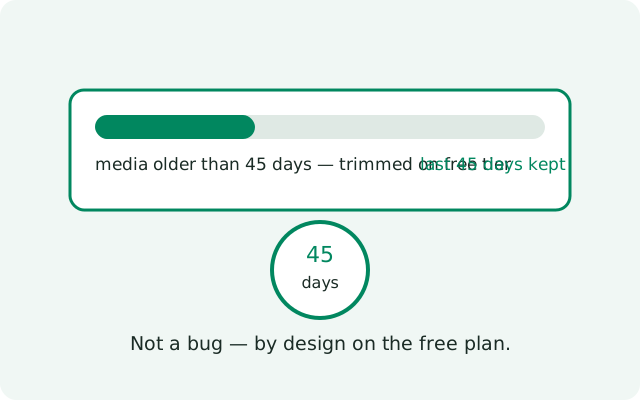
If your photos and videos are missing after a Signal restore, it is probably not a failure. It is the 45-day rule. The free backup tier keeps your full text history but only 45 days of media, by design. Older photos and videos were trimmed from the backup long before you restored, so there was nothing to bring back. This guide explains exactly what the rule keeps and drops, what a text-only restore looks like, how to recover media that matters, and how to prevent it next time.
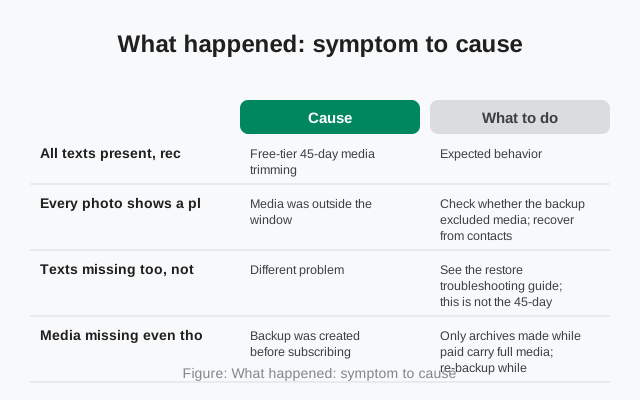
What happened: symptom to cause
Match what you see after the restore:
| What you see | Cause | What to do |
|---|---|---|
| All texts present, recent photos present, old photos gone | Free-tier 45-day media trimming | Expected behavior. See recovery options below |
| Every photo shows a placeholder, no media at all | Media was outside the window, or messages-only backup | Check whether the backup excluded media; recover from contacts |
| Texts missing too, not just media | Different problem: wrong number, wrong account, or failed restore | See the restore troubleshooting guide; this is not the 45-day rule |
| Media missing even though you paid for the tier | Backup was created before subscribing, or subscription lapsed | Only archives made while paid carry full media; re-backup while subscribed |
| Disappearing-message chats have gaps | Messages with timers of 24h or less are never backed up | By design. Nothing was lost in the restore. It was never archived. |
The 45-day rule, precisely
The free tier backs up your texts plus 45 days of media within a 100 MiB message archive. In plain terms:
- Your text history is complete. Every message, from every conversation, is in the backup. The rule never touches text.
- Media from the last 45 days is kept. Photos, videos, and voice notes received recently ride along in the backup.
- Media older than 45 days is trimmed. It is dropped from the archive on purpose. This is the documented behavior of the free tier, not a bug and not a failed backup.
- The paid tier removes the rule. At $1.99 per month, your full media history is backed up, up to 100 GB, with no 45-day cutoff.
One timing detail that trips people up: the 45 days are counted at backup time, not restore time. A backup taken today keeps media from the last 45 days; if you restore it three months from now, you still get those same 45 days of media. The window does not keep sliding after the backup is made.
What a restore without media looks like
When media was trimmed, or when the backup was taken messages-only, the restore still brings back the complete conversation record. What you will notice:
- Placeholders where photos were. The message entries remain, but the attachments show as missing or undownloadable. The chat reads normally; the pictures are simply not there.
- Voice notes that will not play. Same story: the message exists, but the audio file does not.
- Recent media intact. Anything inside the 45-day window restores exactly as it was, thumbnails and all.
This looks alarming the first time, but it is the documented shape of a free-tier restore. Nothing went wrong in the transfer. The media was never in the archive.
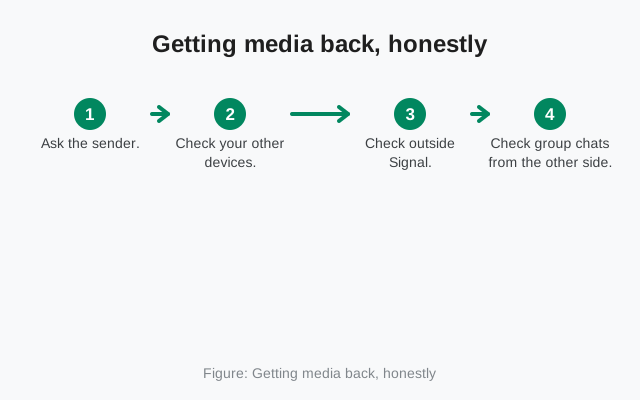
Getting media back, honestly
The trimmed media is not hiding somewhere recoverable. It was never archived. But "not in the backup" is not the same as "gone from the world." Try these, in order of likelihood:
- Ask the sender. The person who sent the photo still has it on their phone. For the photos that actually matter, a re-send is the fastest recovery there is.
- Check your other devices. If you were logged into Signal on another phone or a linked device, its local copy may still hold the media.
- Check outside Signal. Your phone's gallery, a PC you copied files to, or any cloud storage you use may hold copies you saved yourself. Many phones auto-save received photos to the gallery.
- Check group chats from the other side. In a group, several members received the same photo. Ask in the group and someone will usually have it.
What will not work: re-running the restore, contacting Signal support for the media, or any "recovery tool" that claims to pull trimmed media from the backup. The data is not in the archive, so no tool can extract it.
Prevention going forward
- Keep the paid tier active if full history matters. $1.99 per month, up to 100 GB, no 45-day cutoff. Note the generic rule: if the subscription lapses, subsequent archives revert to free-tier limits, so keep it active continuously.
- Save important media outside Signal. Your gallery, a PC, your own storage: a photo saved elsewhere does not care about any backup tier's rules.
- Do it regularly, not once. Media ages out on a rolling 45-day window. A yearly save-everything session still loses 10 months of the year; make it a monthly habit.
- Confirm the tier before a big restore. If you are about to move phones and your history matters, verify the backup completed while the paid tier was active. A backup made during a lapsed month trims like a free one.
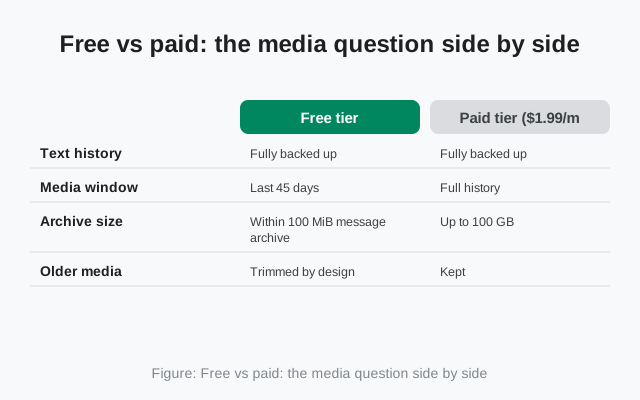
Free vs paid: the media question side by side
| Free tier | Paid tier ($1.99/month) | |
|---|---|---|
| Text history | Fully backed up | Fully backed up |
| Media window | Last 45 days | Full history |
| Archive size | Within 100 MiB message archive | Up to 100 GB |
| Older media | Trimmed by design | Kept |
| After a restore | Old photos show placeholders | Old photos restore fully |
This table is the whole decision. If your reaction to "old photos show placeholders" is "I can live with that," the free tier is fine and this page's recovery steps cover the rest. If your reaction is "absolutely not," the paid tier is the answer. No shrinking trick changes the free tier's trimming.
A note on disappearing messages
Disappearing messages with timers of 24 hours or less are never backed up at all, on either tier. If a conversation used short timers, its gaps after a restore are not the 45-day rule and not a failure; that content was never archived in the first place. Longer-timer disappearing messages are backed up normally and follow the same media rules as everything else. When auditing "what is missing," separate the never-archived (short timers) from the trimmed-by-tier (old media). They have different explanations, and only the second has a paid-tier fix.
The bottom line
Missing media after a restore feels like something broke, but on the free tier it is the documented behavior: full text, 45 days of media, everything older trimmed. Run the symptom table at the top to confirm that is your case (texts present, recent photos present, old photos gone), and then decide whether the recovery options above are enough or whether the paid tier's full history is what you actually wanted. Either way, make the decision before your next phone move, not during it: a backup made today is the one your next restore will use, and a media habit started today is what protects the photos you take tomorrow.
Frequently asked questions
Why are my old photos missing after restoring Signal?
The free backup tier keeps 45 days of media by design. Anything older is trimmed from the backup, not lost by accident. Your text history restores fully; only older photos, videos, and voice notes are affected.
Can I get the missing media back?
Sometimes. Ask the contacts who sent the photos to re-send the important ones. Their phones still have them. Check any other device where you were logged into Signal, and check your phone's gallery or PC for copies you saved outside Signal.
Does the paid tier keep all my media?
Yes. The $1.99/month paid tier covers your full media history up to 100 GB, with no 45-day trimming. If your backup was created while the subscription was active, a restore brings back the full history.
My texts restored but every photo shows a placeholder. Is that normal?
On the free tier, yes. The message record restores completely, but media outside the 45-day window was never in the backup. The placeholders mark where media lived, not a failed download.
How do I stop this happening next time?
Either keep the paid tier active so the full media history is backed up, or regularly save important photos and videos outside Signal (your gallery, a PC, or your own storage) before they age past the 45-day window.
Related: how Secure Backups and the recovery key work, restoring a backup step by step, shrinking a backup that is too large, the master backup troubleshooting hub, moving your chats to a new phone, attachments not downloading.
from Signal's official site — file hosted by Signal, not by us