
VPN Breaks Signal? Fixes That Work
Published: October 7, 2026
Signal worked fine. Then you turned on a VPN and messages stopped sending, calls dropped, or notifications arrived late. This is one of the most common Signal problems, and it is almost never Signal's fault. A VPN changes how your traffic reaches the internet, and that change breaks things Signal depends on. Here is why it happens and the exact order to fix it, with no brand names and no guesswork.
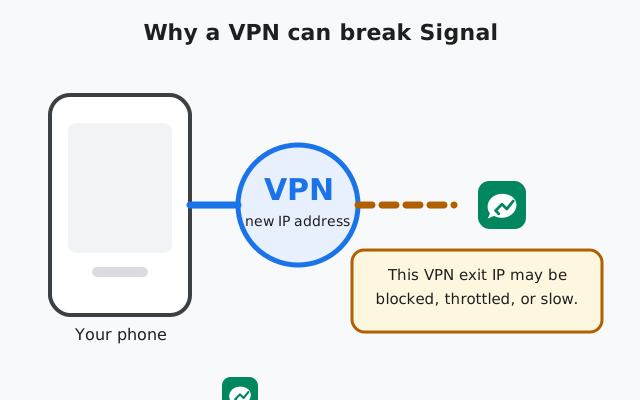
Why VPNs break Signal
A VPN routes all your traffic through one of its servers before it reaches the internet. That is the whole point. But it changes three things Signal relies on:
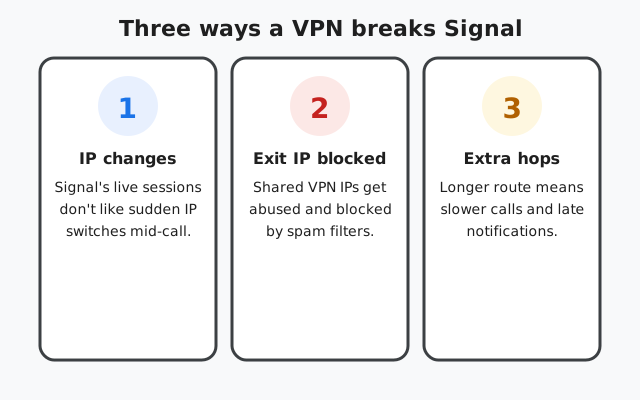
1. Your IP address changes mid-session
Signal keeps live, long-running connections to its servers for messages and calls. When you connect a VPN, or when the VPN switches servers on its own, your visible IP address changes suddenly. Some of Signal's connections do not survive that switch cleanly, so messages hang and calls drop until the app re-establishes everything.
2. The VPN's exit IP may be blocked or throttled
VPN servers share one IP address among thousands of users. If some of those users abuse it (spam, scraping, attacks), other services start blocking or throttling that IP. Signal's infrastructure can end up refusing or degrading connections from a "dirty" VPN exit IP. There is nothing wrong with your account; it is the shared address that has a bad reputation.
3. The route gets longer and slower
Your traffic now travels phone → VPN server → Signal's servers instead of phone → Signal's servers. Extra hops add delay, and delay is what kills call quality and makes notifications arrive late. A VPN server on another continent can easily add enough lag to make calls unusable.
The honest summary: a VPN is not "incompatible" with Signal, but it adds failure points. Most VPN-plus-Signal problems come from one of the three causes above.
The fix order that actually works
Do these in order. Most people never get past step two.
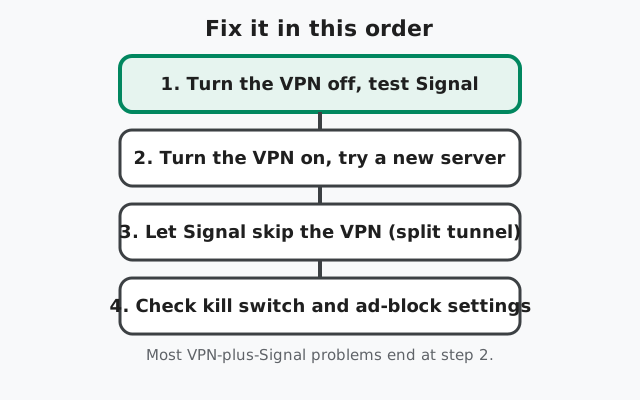
Step 1: Turn the VPN off and test
Disconnect the VPN completely, then send a test message in Signal. If everything works with the VPN off, you have confirmed the VPN is the cause: not Signal, not your phone, not your account. This two-minute test saves you from "fixing" the wrong thing.
Step 2: Reconnect and try a different server
Turn the VPN back on but pick a different server, ideally one geographically close to you. A fresh server means a fresh exit IP (which may not be blocked) and a shorter route (which means less delay). If Signal works on server B but not server A, the problem was that specific exit IP, and you are done.
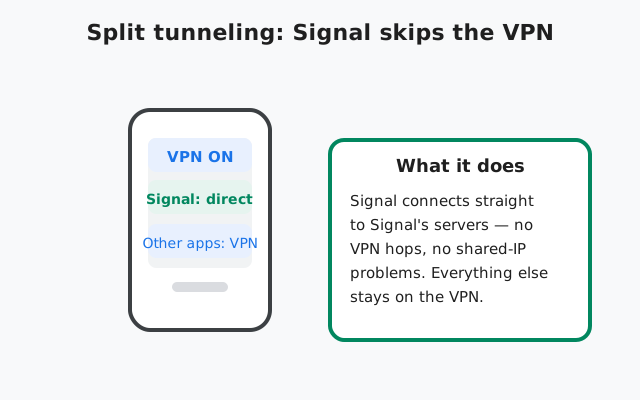
Step 3: Let Signal skip the VPN (split tunneling)
Many VPN apps offer split tunneling: you choose which apps go through the VPN and which connect directly. Add Signal to the "bypass" or "direct connection" list. Signal's messages are end-to-end encrypted anyway, so it does not need the VPN's protection. Connecting directly removes all three failure points at once.
Step 4: Check the VPN's own settings
Two settings commonly cause trouble:
- A kill switch that blocks all traffic when the VPN drops (it can leave Signal stranded with no connection at all).
- Aggressive ad or tracker blocking built into some VPN apps (it can interfere with the domains Signal uses).
Try disabling each temporarily to see if Signal recovers.
Circumvention toggle vs. VPN: different tools
Signal's built-in censorship circumvention toggle (Settings → Privacy → Advanced) and a VPN solve different problems. The toggle changes how Signal disguises its own traffic to slip past network-level censorship. It is for genuinely blocked regions. A VPN encrypts and reroutes all your traffic for privacy. If your VPN is the thing breaking Signal, the toggle will not fix a bad VPN exit IP. Fix or bypass the VPN first. The two can also conflict: running both at once sometimes makes things worse, so test with one at a time.
| Symptom | Likely cause | Try first |
|---|---|---|
| Messages hang only when VPN is on | Blocked or throttled exit IP | Switch VPN server (step 2) |
| Calls connect then drop | IP switch mid-call | Connect VPN before opening Signal; avoid server-hopping |
| Calls are choppy or robotic | Long route / high delay | Pick a nearby server; or split-tunnel Signal |
| Notifications arrive late | Background connection killed through VPN | Split-tunnel Signal; check battery optimization |
| Nothing works even with VPN off | Kill switch left blocking traffic | Disable the kill switch, or fully quit the VPN app |
| Signal fine, but VPN slows everything | Overloaded server | Different server; this is a VPN problem, not Signal |
What about VPNs on school or work Wi-Fi?
Some readers will ask: if my school blocks Signal, why not just run a VPN over the school Wi-Fi? Technically that can work, but it brings you right back to the problem this page solves. It can also break your network's acceptable-use rules. Many schools and employers prohibit VPN use on their networks outright, and managed devices often block VPN apps from installing at all. If you are on someone else's network, ask permission first. The VPN fixes above are for your own connection, not for sidestepping an institution's policy.
When nothing above works
- Restart the phone with the VPN off, then test Signal before reconnecting the VPN. Stale network state is a real (if boring) cause.
- Update both apps. Old VPN clients and old Signal builds (current website build is v8.29.3) contain bugs you do not want to debug yourself.
- Test on a different network (mobile data vs. Wi-Fi) with the VPN on. If it works on one network but not the other, the problem is the combination of that network and the VPN: often the network blocking VPN traffic itself.
- Accept an honest limit: some VPN exit IPs are simply blocked, and no setting on your phone changes that. Switching servers or split-tunneling Signal are the real answers, not a seventh settings toggle.
And a note on honesty: we do not endorse VPN brands here. Any provider's servers can have blocked exit IPs on a bad day. The fix is the same regardless of whose logo is on the app.
Frequently asked questions
Why does Signal stop working when I turn on my VPN?
A VPN changes your IP address and routes traffic through its servers. Signal's live connections can break on the IP switch, the VPN's shared exit IP may be blocked, or the longer route adds enough delay to break calls.
Should I use a VPN with Signal?
You do not need one for message privacy. Signal is end-to-end encrypted already. A VPN adds privacy for your other traffic, but it also adds failure points for Signal. If you use one, split-tunnel Signal so it connects directly.
What is split tunneling and why does it help?
Split tunneling lets chosen apps bypass the VPN and connect directly. Putting Signal on the direct path removes the VPN's IP changes, blocked exit IPs, and extra hops from Signal's connection entirely.
Does Signal's censorship circumvention replace a VPN?
No. They solve different problems. The toggle (Settings → Privacy → Advanced) helps Signal connect in censored regions. A VPN protects all your traffic's privacy. If the VPN itself is breaking Signal, fix the VPN first.
Can a VPN get my Signal account banned?
No. Signal does not ban accounts for using VPNs. At worst, a blocked VPN exit IP makes your connection fail. Switching servers or disconnecting fixes it.
Why do my Signal calls drop but messages work on VPN?
Calls need a stable, low-delay live connection and are the first thing to break when your IP switches or the route gets long. Messages are more tolerant. They just wait and retry.
Get the verified Signal APK
Running an old or modified build can cause odd connection problems. If your copy of Signal is outdated, grab the current website build (v8.29.3) from Signal's own download page.
from Signal's official site — file hosted by Signal, not by us