
Get your Signal verification code by phone call
Published: October 7, 2026 Updated: October 8, 2026
If the SMS code never arrives, you don't have to keep resending texts. Signal offers a voice-call fallback. Once the SMS countdown finishes, a "call me instead" option appears, and an automated call reads your verification code aloud. It works on mobile and landline numbers, and because it's a voice call, it sails straight past every SMS spam filter your carrier can throw at it.
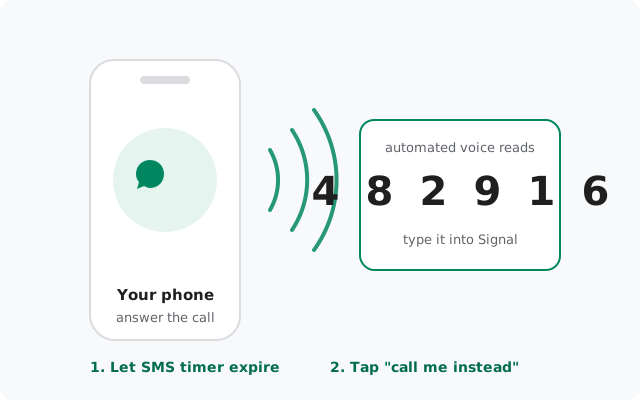
When the call option appears
The voice option doesn't show up immediately. That's deliberate. Signal first tries SMS, shows you a countdown, and only when that timer fully expires does the call option unlock. The wording varies slightly between app versions ("Call me instead", "Verify by phone call", or similar), but the position is consistent: right under the code entry, where the resend button was.
Two mistakes people make here:
- Tapping resend instead of waiting. Every resend restarts the timer and counts as another registration attempt. If you want the call, let the timer run out untouched.
- Looking for it in the wrong place. It's part of the registration flow on the code-entry screen, not in Settings, not in a menu. If the timer hasn't finished, the option simply isn't there yet.
If your app is old enough that the flow looks different, update first. The current build is 8.29.3, available from signal.org/android/apk.
How it works, step by step
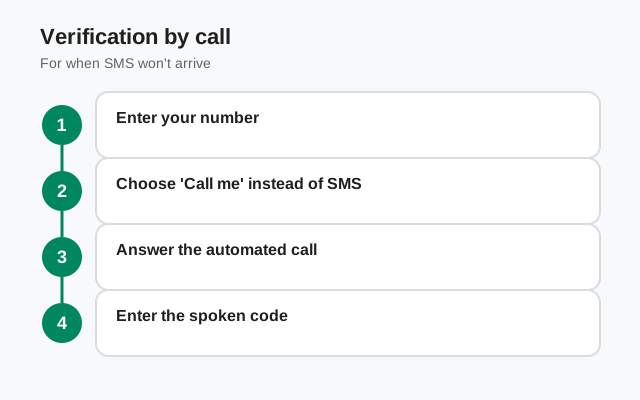
Request the SMS code normally
Enter your number with the correct country code and let Signal send the text. The call option is a fallback, not the first step.
Wait for the timer to fully expire
Don't touch resend. Put the phone down and let the countdown finish completely.
Tap the call option
It appears where the resend button was. Tap it once. One deliberate tap, not five hopeful ones.
Answer the automated call
Your phone rings within a short while. Answer it. A recorded voice reads your verification code aloud. Have a pen ready, or put it on speaker and type the code straight into Signal.
Enter the code promptly
Type it into the registration screen. If you missed the digits, you can request the call again. Wait properly between attempts instead of hammering it.
The whole thing takes about a minute when it works. When it doesn't, the cause is almost always on the checklist below, not in Signal.
What you need: the checklist
| Requirement | Why it matters |
|---|---|
| A number that can receive voice calls | Mobile or landline. A number that can't take calls can't take this call. Obvious, but it's the number-one gotcha with virtual numbers. |
| Be near the phone when you tap | The call comes soon after you request it. Requesting it from the couch and sprinting to the bedroom phone is how codes get missed. |
| Do Not Disturb off | DND silences the incoming call. Turn it off for the two minutes registration takes. |
| "Silence unknown callers" off | The verification call comes from an automated number your phone doesn't recognize. iOS and Android both have settings that send unknown callers straight to voicemail. Disable them during registration. |
| Call blockers paused | Third-party spam filters love eating automated calls. Pause them or whitelist during registration. |
| Pen and paper, or speakerphone | The code is read once or twice and the call ends. Write it down as you hear it, or keep Signal open on speaker and type directly. |
Landlines: the call is your only option
Landlines can't receive SMS at all, so for a landline number the voice call isn't a fallback. It's the entire verification path. The flow is the same: enter the landline number, wait out the SMS timer (no text will ever come, and that's fine), then take the automated call and write down the code.
- Be the person who answers. The code goes to whoever picks up that phone. If your office line routes through a receptionist or an extension menu, the code may never reach you. Use a direct line you answer yourself.
- Cordless phones and speakerphones are fine. Anything that lets you hear the digits and write them down works.
- After registration, everything is normal. Signal doesn't need the landline again until the next fresh registration. Day-to-day messaging works over the internet like always.
More on number options in the guide to using Signal without a mobile number.
When the call never comes
You tapped the option, and the phone never rang. Run these before assuming it's broken:
- You tapped too early. If the SMS timer hadn't fully expired, the tap may not have registered as a call request. Wait for a proper expiry, then tap once.
- Unknown-caller silencing ate it. The most common cause, by far. Check DND, "silence unknown callers," and any spam-filter app. The call looks exactly like the robocalls those features exist to block.
- Carrier-level blocking. Some carriers block automated or international calls by default. If everything on the phone is clean, this is the next suspect. Trying again later sometimes works, since these filters are inconsistent.
- Wrong number entered. The call went to the number you typed, not the number you meant. One wrong digit and a stranger just got a mysterious automated call. Check the digits and the country code.
- Dual-SIM routing. The call arrives on whichever SIM holds the registered number. Make sure that SIM is active and has signal.
- You're rate-limited and don't know it. Too many code requests pause everything, calls included. If Signal shows any "too many attempts" message, stop and read the rate limit guide.
What the call is NOT
Call vs SMS: when to choose which
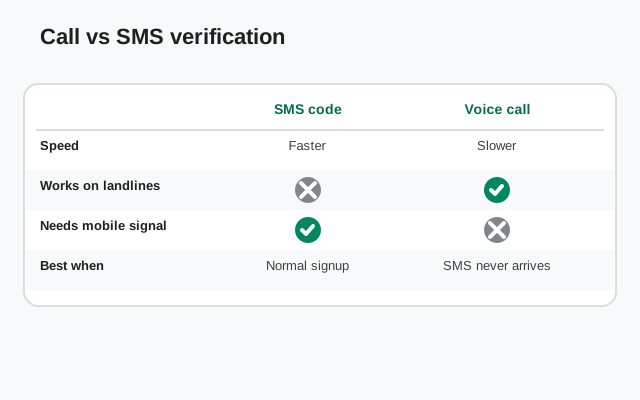
Neither option is "better" in general. They're tools for different situations:
| Situation | Use this |
|---|---|
| SMS arrives fine | SMS. Faster, and auto-fill types it for you |
| Carrier filters automated texts | Voice call. A different channel, no SMS filtering |
| Roaming with flaky SMS delivery | Voice call. Calls usually get through where texts stall |
| Landline number | Voice call. The only option, by design |
| You missed the call | Request the call once more, pen in hand this time |
One more practical note: the code from the call and the code from SMS are interchangeable. Whichever valid code you enter, Signal accepts it. If an SMS straggles in after you've already taken the call, either code works as long as it's the most recently issued one. And if neither channel works (no SMS, no call), the problem is rarely the channel at all: check the number for typos, confirm the SIM is active, and work through the missing-code checklist before requesting anything again.
from Signal's official site, file hosted by Signal, not by us
Frequently asked questions
Is the Signal verification call free?
It's an ordinary inbound call, so your carrier treats it like any other incoming call. Usually free on most plans, but normal incoming-call charges apply if your plan has them, especially while roaming.
Can I register Signal with a landline number?
Yes. Landlines can't receive SMS, so the voice call is the designed path: enter the number, wait out the SMS timer, answer the automated call, and enter the spoken code.
How many times can I request the verification call?
Treat each request like an SMS attempt, because Signal does. Too many in a row triggers a rate limit. Request once, answer, and only retry after a proper wait.
The call came but I missed the code. What now?
Request the call again after waiting a bit, and this time have a pen ready or use speakerphone so you can type the digits straight into Signal as you hear them.
Does voice verification work with VOIP numbers?
No. Signal blocks most VOIP and virtual numbers regardless of channel. The SMS is never sent and the call never comes. Use a real mobile number or a landline.
I never see the call option. Where is it?
It only appears on the code-entry screen after the SMS timer fully expires, not in Settings or any menu. If your app is very old, update it; the flow changed over versions.
Related: the missing-SMS checklist, fixing failed registrations, waiting out a rate limit, options without a mobile number, and the troubleshooting hub.