
Is Sideloading APKs Safe? The Honest Answer
Published: October 7, 2026 · Updated: October 8, 2026
Sideloading has a scary reputation it only half deserves. The scary half is real: sideloading bypasses the Play Store's malware review, so a bad file faces no screening between the download and your phone. The undeserved half is the idea that the method is the danger. It is not. An APK is just a package format. The Play Store downloads and installs APKs constantly. The danger was never the file format; it is who handed you the file.
This guide explains what sideloading actually risks, when it is genuinely safe, when it is not, and the simple rule that keeps Signal users safe. No fear-mongering, no false reassurance. Just the mechanics.
from Signal's official site — file hosted by Signal, not by us
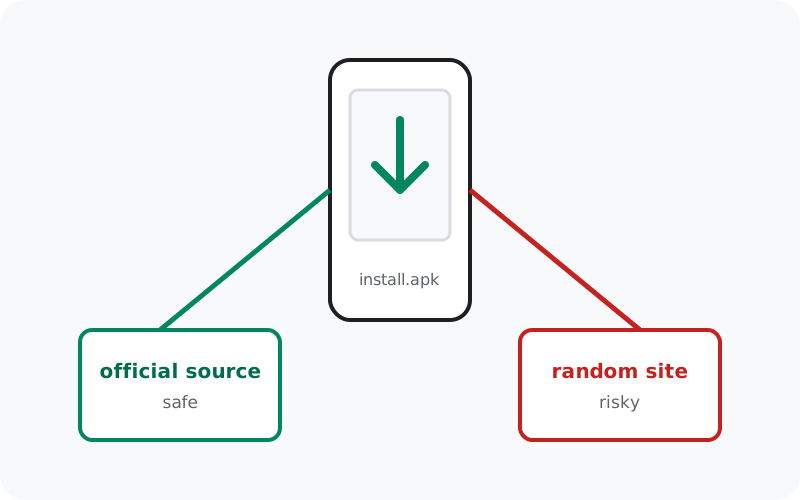
What sideloading actually is
"Sideloading" just means installing an app from a file instead of from an app store. You download an .apk file, Android asks you to allow installs from that source ("Install unknown apps"), and the app installs. That is the entire technical difference.
People are often surprised to learn that the Play Store does exactly the same thing under the hood: it downloads an APK (or app bundle) and installs it. The difference is not the mechanism; it is everything around the mechanism: who vetted the file, who serves it, and who updates it. When you sideload, you take over those jobs yourself. Whether that is fine depends entirely on whether you are equipped to do them, which, for a file from the developer's own site, you are.
What you give up when you sideload
Being clear-eyed about the trade-offs is what separates safe sideloading from careless sideloading. Here is what the Play Store normally does for you:
| Play Store protection | What it means when you sideload |
|---|---|
| Malware review before publishing | Nobody screens the file before you install it. A malicious APK faces zero automated checks, which is why the source matters so much. |
| Developer identity verification | The store ties listings to verified developer accounts. With a raw file, you must confirm who made it via the signature check. |
| Automatic updates | The store updates apps silently. A sideloaded app only updates if it has its own updater (Signal's website build does) or if you manually download new versions. |
| Remote malware removal | Google can pull malicious apps from devices via Play Protect. A sideloaded app can only be removed by you. |
| Review and rating signals | Store reviews sometimes warn about bad apps. Sideloaded files have no public comment section. Another reason to verify rather than trust. |
This list looks alarming until you notice something: every row is about untrusted sources. When the source is the developer's own official site and the file is signature-verified, you have replaced each of those protections with something as good or better. The store's review is replaced by the developer's own distribution; automatic updates are replaced by the app's signed self-updater. What you cannot replace is diligence: sideloading safely is an active process, not a passive one.
When sideloading is safe
Sideloading is safe when all of these are true:
- The file comes from the developer's own official site. Not a mirror, not a "download portal," not a forum attachment: the domain the developer itself operates. For Signal, that is signal.org.
- You verified the file's signature. The developer publishes a fingerprint or signing certificate; you check the file against it. This is the step that turns "probably fine" into "proven genuine."
- There is a legitimate reason to sideload. No Play Store on the device (Huawei, de-Googled phones, Fire devices), regional blocks, or the developer officially offers a direct download, as Signal does.
- Updates have a trusted path. Either the app updates itself through a signed channel (Signal's website build does this) or you are committed to re-downloading from the official source.
Meet all four and sideloading is not the risky option. It is simply the direct option. Millions of people sideload under exactly these conditions every day without incident.
When sideloading is not safe
Flip any of those conditions and the risk climbs fast:
- The file comes from a mirror or aggregator site. You are trusting a stranger's file handling with no way to audit it. This is the single most common source of Android malware.
- It is a "mod," "pro," or "unlocked" edition. Modified apps are repackaged by third parties: the signature is broken by definition, and the modifications routinely include spyware or adware.
- It arrived via forward, message, or email attachment. Forwarded APKs are a classic malware vector. The sender often does not know the file is tampered with.
- The site told you to disable Play Protect. Legitimate software never asks this. It is the clearest possible signal that the file will not survive a scan.
- You cannot verify the signature. If the developer publishes no fingerprint and offers no verification method, you are installing on blind trust. For a messaging app, that is not good enough.
The official-source rule for Signal
For Signal users the whole discussion compresses into one rule:
Why this rule is enough: Signal is unusual among apps in that the developer itself operates a first-class direct-download channel. Many apps have no official APK download at all, which pushes users toward mirrors. Signal does. So there is never a legitimate reason to get its APK anywhere else. Anyone offering you a Signal APK from another source is either uninformed or malicious, and the safe response is the same either way: decline, and get it from Signal.
The rule also covers updates. The website build (currently 8.29.3) updates itself through Signal's own signed updater. You do not need to hunt for new APKs on the web, and you should be suspicious of anyone telling you to. If an update ever needs manual downloading, it comes from the same official page, verified the same way.
Sideloading vs Play Store: the Signal-specific comparison
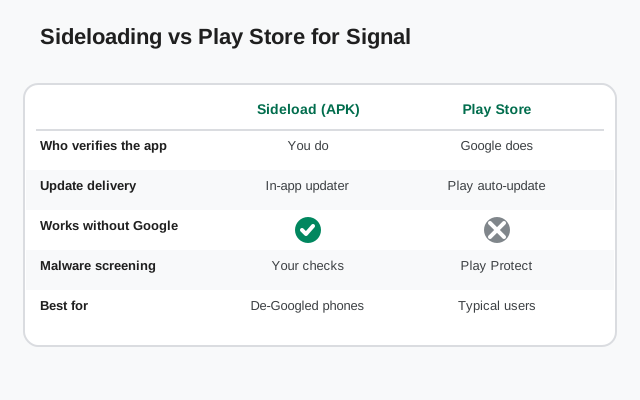
If your phone has a working Play Store, should you still sideload Signal's APK? Honest answer: for most people, the Play Store build is the simpler choice. You get automatic updates, Google's review layer, and no signature checks to perform. The website APK exists for people who cannot or prefer not to use the Play Store.
| Play Store build | |
| Source | Google Play, listing by Signal Foundation |
| Signing key | Play build key (different from the website build's key) |
| Updates | Automatic through the Play Store |
| Verification needed by you | Check the developer name and listing; Google handles the rest |
| Best for | Phones with a working Play Store where simplicity matters |
| Website APK build (sideloaded) | |
| Source | signal.org/android/apk, file from updates.signal.org |
| Signing key | Website build key (different from the Play build's key; the two cannot install over each other) |
| Updates | Self-updates through Signal's signed updater |
| Verification needed by you | Download from the official page; verify the SHA-256 fingerprint once |
| Best for | Huawei / de-Googled / Fire devices, blocked regions, anyone avoiding Google services |
One practical warning: because the two builds use different signing keys, you cannot install one over the other. Android will refuse. Switching builds means backing up your chats, uninstalling, and reinstalling. Our full build comparison walks through that process.
Seven habits for safe sideloading
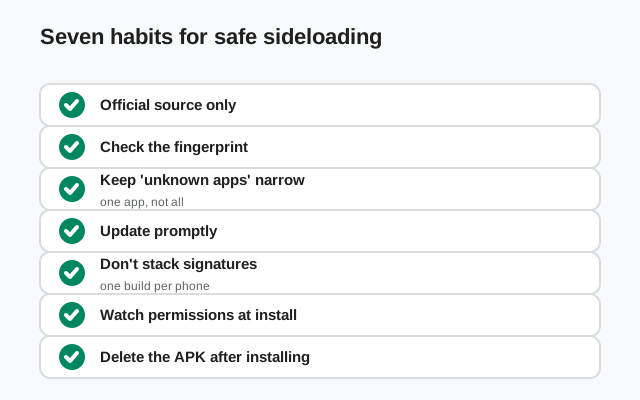
Bookmark the official page; never search for downloads
Search results for APK downloads are heavily gamed by scam sites. A bookmark to signal.org/android/apk bypasses the minefield permanently.
Verify the signature on first install
Run the fingerprint check once per fresh download. It takes five minutes and it is the strongest proof available: how to verify the SHA-256 fingerprint.
Grant "Install unknown apps" narrowly
Android lets you allow installs per-app (e.g., only your browser or file manager), not globally. Allow the minimum source you need, and revoke it after installing.
Read permissions before tapping through
A messenger needs contacts, mic, camera, and notifications. Accessibility services, device admin, or overlay requests from a messenger are hostile until proven otherwise.
Never disable Play Protect for an install
Any site or app that asks you to turn off malware scanning is telling you the file will not pass a scan. Walk away.
Keep sideloaded apps updated through trusted channels only
Signal's website build self-updates securely. For other sideloaded apps, re-download from the official source, never from "update available" popups on random sites.
Delete APK files after installing
Old APK files sitting in your Downloads folder are clutter at best and a confusion risk at worst (reinstalling an outdated, vulnerable build months later). Keep the installed app; delete the file.
Frequently asked questions
Is sideloading legal?
Yes. Sideloading is a built-in Android feature: Google includes the "Install unknown apps" permission in Android itself. It is your device; installing software from files is legitimate. What matters is the file's source, not the method.
Will sideloading void my warranty or break my phone?
No. Installing an APK does not void warranties or damage the phone. The risk is purely about what you install, not how. A malicious app from the Play Store would be just as harmful.
Will sideloading Signal break my banking apps or trip SafetyNet?
No. Installing an APK does not change your phone's integrity verdict. Banking apps and Play Integrity checks break when the bootloader is unlocked or the phone is rooted — neither of which sideloading requires or does. Sideloading Signal on a stock phone leaves all of that untouched.
Why does Android warn me when I sideload?
Because you are bypassing the store's screening, Android wants you to make a conscious decision. The warning is working as intended. Pause, confirm the source is official, then proceed.
Is sideloading Signal safer than using the Play Store?
Neither is meaningfully "safer". Both deliver genuine Signal builds. The Play build is simpler (automatic updates, Google's review); the website APK is essential for phones without Play and preferred by people avoiding Google services. Choose based on your situation.
Can I sideload on a phone with the Play Store?
Yes, nothing stops you. Some people prefer the website build's direct-from-Signal updates. Just remember the builds use different signing keys, so pick one and stick with it. Switching requires a backup, uninstall, and reinstall.
What is the single most important sideloading safety rule?
Official source plus signature verification. Get the file from the developer's own site and check its signature. Everything else, permissions hygiene, narrow install permissions, keeping updated, is valuable reinforcement around that core.
Related guides
- Signal APK safety hub: all verification and scam guides in one place
- Is the Signal APK safe?: the honest full safety assessment
- Verify the SHA-256 fingerprint: prove your sideloaded file is genuine
- Real vs fake Signal APK: the checks that catch fake files
- Website APK vs Play Store build: which genuine build fits you