
Your antivirus flagged the Signal APK: here is what to do
Published: October 7, 2026 · Updated: October 8, 2026
If your antivirus flagged the Signal APK you downloaded from signal.org, it is almost certainly a false positive, and you can prove it in two minutes. Antivirus tools distrust sideloaded apps by design: a file installed outside the Play Store trips malware heuristics. The Signal APK trips those heuristics too. The SHA-256 fingerprint check against Signal's published value settles it.
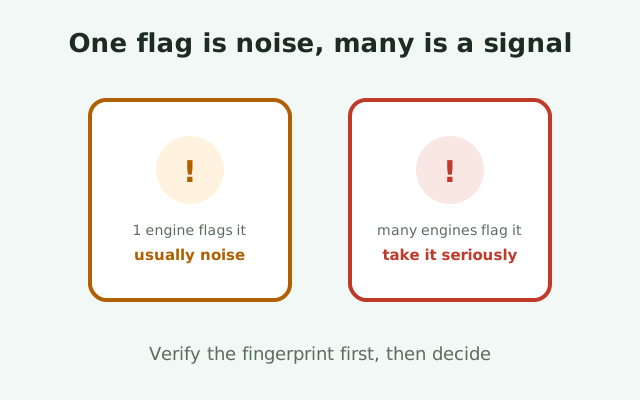
The short answer
Do not panic, and do not delete the file yet. If you downloaded it from signal.org/android/apk: Signal's own page, reached by a bookmark or typed address. The flag is then overwhelmingly likely to be a false positive. Verify the file's signing fingerprint against the value Signal publishes (quoted below, re-verified live), and if it matches, the file is Signal's own signed build, signed by the key only Signal holds. No antivirus heuristic overrides that math. Allow the exception and install with confidence.
The flag deserves a different response only in two cases: the file came from anywhere other than Signal's page, or the fingerprint does not match. Then the antivirus may have caught something real, and the steps below tell you how to confirm. The dividing line is not "which antivirus" or "how scary the warning looked." It is source plus fingerprint, every time.
This page will also explain why the flag happens, because understanding the mechanism is what stops the next flag from scaring you. Antivirus software is not claiming Signal is malware. It is saying "this file pattern resembles things I have been told to fear," and sideloaded APKs resemble those things by construction.
Why antivirus flags sideloaded APKs
Modern antivirus works on two engines: signatures (known-bad files) and heuristics with reputation (unknown files that look suspicious). The genuine Signal APK will never match a malware signature, because it is not malware. It trips the second engine, and it does so for reasons that are entirely about how it arrives on your phone rather than what it contains.
Reputation systems punish rarity and newness
First, reputation systems punish rarity and newness. Scanners maintain scores for files based on how many users have installed them and for how long. The Play Store version of Signal has enormous reputation: millions of installs through a known channel. The website-build APK, downloaded directly, is far rarer in the scanner's telemetry: fewer users, direct downloads, no store metadata attached. Low reputation does not mean bad; it means unknown. But heuristics treat "unknown app from the web" as a risk category, because statistically, that category contains most Android malware.
Sideloading itself is a heuristic trigger
Second, sideloading itself is a heuristic trigger. Installing outside the Play Store bypasses Google's app review, which scanners treat as the removal of a safety layer. The scanner cannot distinguish "user deliberately bypassed the store for a legitimate independent build" from "malware tricked the user into bypassing the store," so it flags the behavior. Some scanners are more aggressive about this than others, which is why one antivirus flags the file while another stays silent. The file is identical; the policies differ.
Packaging and update patterns look odd to heuristics
Third, packaging and update patterns look odd to heuristics. The website build updates itself outside the store, downloads executable code over HTTPS on its own schedule, and requests the permissions a messenger needs (contacts, microphone, camera, storage). Each of those is also something malware does. Heuristics are pattern-matchers, not judges; they count suspicious-looking traits, and a self-updating sideloaded messenger accumulates several. A single trait means nothing. The scanner flags the pile.
None of this is the scanner malfunctioning. It is doing exactly what it was designed to do: treat unknown sideloaded software as guilty until proven innocent. Your job is the "proven innocent" part, which is what verification is for.
False positive vs real detection
This is the skill this page exists to teach: telling the two apart. It rests on three independent checks, and they agree with each other when the file is genuine.
Check 1: the signing fingerprint
Check 1: the signing fingerprint. This is decisive. Signal publishes the SHA-256 fingerprint of its 4096-bit signing certificate on its download page, and we re-verified it live on October 7, 2026 while writing this guide:
4B:E4:F6:CD:5B:E8:44:08:3E:90:02:79:DC:82:2A:F6
5A:54:7F:EC:C2:6A:BA:7F:F1:F5:20:3A:45:51:8C:D8
Run apksigner verify --print-certs on your APK file (our apksigner guide walks through it) and compare the fingerprint character by character against the published value. If it matches, the file was signed by Signal's key. Malware cannot fake this: it cannot sign with a key it does not have, and re-signing with its own key produces a different fingerprint. A matching fingerprint ends the debate regardless of what any scanner says.
Check 2: the multi-engine consensus
Check 2: the multi-engine consensus. Upload the file to VirusTotal, a free service that scans a file with dozens of antivirus engines at once and shows each verdict. Read the result like a statistician: one or two obscure engines flagging it while the majors stay silent is the classic false-positive shape: heuristics disagreeing at the margins. Ten or more engines flagging it, especially including the major vendors, is a genuinely bad sign. A single scanner's verdict is an anecdote; seventy scanners' verdicts are data.
Check 3: the source
Check 3: the source. Where did the file come from? Downloaded from signal.org via your own bookmark: consistent with false positive. Downloaded from a third-party APK site, a forwarded link, or a QR code of unknown origin: consistent with real detection. Be honest with yourself here; "I think it was the real site" is not the same as "I typed it myself." If the source is uncertain, treat the flag as guilty until the fingerprint proves otherwise. If the fingerprint does not match, the file is not Signal's, whatever the scanner says.
When all three checks point the same way, trust them. Fingerprint matches plus clean multi-engine consensus plus signal.org source: false positive, allow it. Fingerprint mismatch, or many engines flagging, or shady source: real problem, delete it. Mixed signals are covered in the worry table below.
What to do, step by step
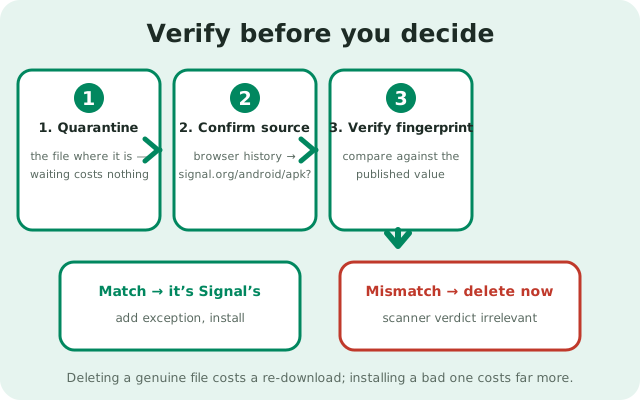
Follow these in order. Stop when a step gives you a definitive answer.
- Do not install yet, but do not delete yet either. Quarantine the file where it is. Deleting a genuine file just means re-downloading it; installing a bad file means incident response. Waiting costs nothing.
- Confirm the source. Open your browser history and check that the download came from signal.org/android/apk. If you cannot confirm this, skip straight to re-downloading from a typed address: a fresh known-good file is faster than forensics on a dubious one.
- Verify the fingerprint. Compare the APK's signing certificate fingerprint against the published value quoted above (also shown live on Signal's page). Match: the file is Signal's. Mismatch: delete it immediately and jump to the cleanup step.
- Run the multi-engine check. Upload the file's hash (or the file) to VirusTotal. One or two marginal flags with a matching fingerprint: textbook false positive. Broad consensus of flags: treat as real even if you thought the source was fine.
- If clean, add the exception. Tell your antivirus to allow this file (usually under "add exception," "allow," or "restore and exclude," depending on the product), then install normally. You are not "disabling protection"; you are correcting a misclassification with evidence.
- If dirty, clean up properly. Delete the file, do not install it. If you already installed it before the flag appeared, uninstall it, change important passwords from another device, and check for unexpected charges. Then get the genuine file from Signal's page and verify it before installing. Our malware cleanup guide covers the full process.
The whole sequence takes under ten minutes, and most of that is the VirusTotal scan running. Ten minutes to replace anxiety with certainty is a good trade.
When to actually worry
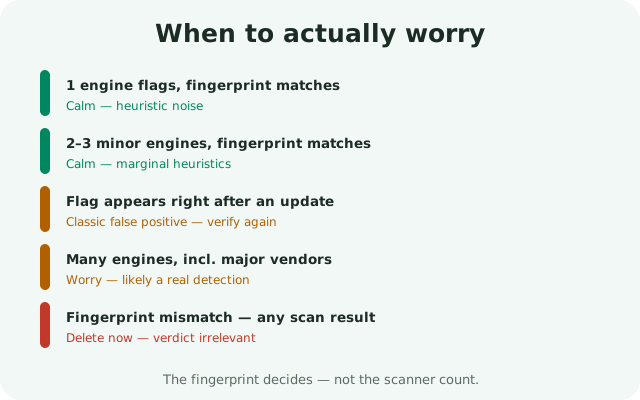
The information-gain element for this page: the worry table. Find your situation, read the verdict.
| What you see | What it usually means | Do this |
|---|---|---|
| One engine flags it, fingerprint matches, from signal.org | False positive: heuristic noise | Add an exception, install, move on |
| Two or three minor engines flag it, fingerprint matches | False positive: marginal heuristics disagreeing | Same as above; optionally re-check after the next Signal release |
| Many engines flag it including major vendors | Real detection: the file is likely bad | Delete it, do not install; re-download from signal.org and verify |
| Fingerprint does not match, regardless of scan results | Not Signal's file: tampered or wrong file | Delete immediately; the scanner verdict is irrelevant now |
| Flag appears only after an update, fingerprint matches | New build, zero reputation: classic false-positive timing | Verify the fingerprint (it may have rotated with the release), then allow |
| Source uncertain, can't confirm signal.org | Unknown provenance | Do not verify a dubious file. Delete it and download fresh from a typed address |
| Flag names a specific malware family confidently | Heuristic label, not a diagnosis; take it seriously | Run the full three checks; a specific name plus a fingerprint mismatch means delete |
The pattern across every row: the fingerprint is the anchor, the scanner consensus is the corroboration, and the source is the context. No single row is decided by how alarming the warning popup looked. Popups are designed to alarm; evidence is designed to inform. Follow the evidence.
Why 'just delete it' is bad advice
The most common advice for a flagged file is "when in doubt, throw it out," and it sounds like prudence. For the Signal APK from Signal's page, it is actually counterproductive, for three reasons.
It teaches the wrong lesson
First, it teaches the wrong lesson. Deleting a genuine file because a heuristic complained trains you to distrust verification and trust fear. The next flagged file might be genuinely malicious, and "I always just delete" gives you no tools to tell the difference. Without those tools you will delete good files and, eventually, trust a bad one that no scanner happened to flag. The verification habit is the durable skill; deletion is a one-time dodge.
It does not make you safer in any lasting way
Second, it does not make you safer in any lasting way. The scanner will flag the next Signal update too, because the heuristic trigger is structural: the file is sideloaded, self-updating, and has low reputation. If your policy is "delete on flag," you will be re-downloading and re-deleting every release cycle, or you will eventually get tired and disable the scanner entirely, which is worse. The stable fix is one verified exception, made once with evidence.
It wastes the strongest evidence you have
Third, it wastes the strongest evidence you have. The fingerprint check is close to mathematical certainty about the file's origin, and it takes two minutes. Throwing away the file instead of checking it is like throwing away a letter instead of checking the signature. That signature was the whole point. Verify first, then decide. The order matters.
None of this means ignoring antivirus warnings generally. It means answering them with evidence instead of reflex. A warning plus a matching fingerprint plus a clean multi-engine scan is a false positive you can allow with confidence. A warning plus a mismatched fingerprint is a real threat you delete without hesitation. Both outcomes come from the same process, which is why the process, not the reflex, is the advice.
from Signal's official site — file hosted by Signal, not by us
Frequently asked questions
Why does my antivirus say the Signal APK is dangerous?
It's a false positive in almost all cases. Antivirus heuristics flag sideloaded apps because they're rare in the scanner's telemetry, installed outside the Play Store, and self-update, all of which resemble malware patterns. The file's content isn't the problem; its arrival method is.
How can I be sure it's a false positive?
Verify the APK's signing fingerprint against the value published on signal.org/android/apk (quoted on this page, re-verified live). If it matches, the file is Signal's own signed build, and no heuristic overrides that. A VirusTotal multi-engine scan as corroboration completes the picture.
Should I add an exception for the Signal APK?
Yes, once you've verified the fingerprint and the file came from signal.org. You're correcting a misclassification with evidence, not disabling protection. The scanner will likely flag future updates too, since the trigger is structural.
One antivirus flags it but another doesn't. Which is right?
Both are behaving normally; their heuristic policies differ. That's exactly why a single scanner's verdict is an anecdote. Check the fingerprint (decisive) and a multi-engine scan like VirusTotal (consensus) instead of picking a favorite scanner.
What if many antivirus engines flag the file?
Take it seriously. Broad multi-engine consensus, especially including major vendors, points to a real problem. Delete the file, don't install it, and re-download fresh from signal.org/android/apk, verifying the fingerprint before installing.
Keep reading
- verifying the APK's SHA-256 fingerprint: the full fingerprint-check walkthrough
- the apksigner verification guide: the exact command, explained
- Signal APK malware guide: cleanup when a file really is bad